ZBrushCentral

trim curve corners

Hello fine folks. Mr Drust has compelled me to learn hard surface techniques. But I am having difficulty with the curve brushes. I would like to Trim a nice beveled edge type shape. But am having difficulty figuring out the bezier. I am finding it difficult to get the exact cut I need. I resort to building the shape out of primitives then boolean the shapes to get my cut. Maybe I am trying to be to precise? Can someone tell me if it is possible to use the curve brushes to layout a relatively precise edge like in the attached image?

Attachments

trim_corner.jpg

Join the club. I’ve asked this specific question a few time s and no one has ever answered me :slight_smile: it doesn’t work like any busier curve I’m used to. Anyway, have the reason for my post is to subscribe to the thread in case you get an answer.
OT

You don’t have to post in a thread to subscribe to it. Top right corner.

new-2.JPG

Got excited there as I thought it was an answer :slight_smile:

But thanks for the subscribing tip :slight_smile:

Profile is about what you want except the upper right corner? Why not pull those few vert’s into the correct location?

Your right, its close to what I want. I am trying to accomplish a straight edge along the bottom. A 90 degree turn +Y. Finally a straight edge up. You can see that the bottom edge bows -Y once I try to make my turn. and the turn is close, but not very controllable once I make the final edge up. (which bows out as well)

I understand that I can push and pull once the cut is made. And I am fine with that. The curve brushes get me 90 percent of the way there. And, a boolean gets me 100 percent. I just figured there would be a level of control when defining the curve. As with any bezier example. And if it is not bezier, then I at least hoped to find what type of function the curve brushes use so I can understand how to use them properly, and possibly result in some control when defining the curve shape.

Looking at this closer. I guess there is no way to get the shape I need in ANY application, without having control over the point tangents, after the curve is created. I guess this is what tripped me up.

You could just trim away the excess then smooth the corner, maybe?

The question is a good one though, for more functions than this. Masking using curve for example. How do we find out, or from whom, how this curve is meant to work? It seems quite hard to control accurately.

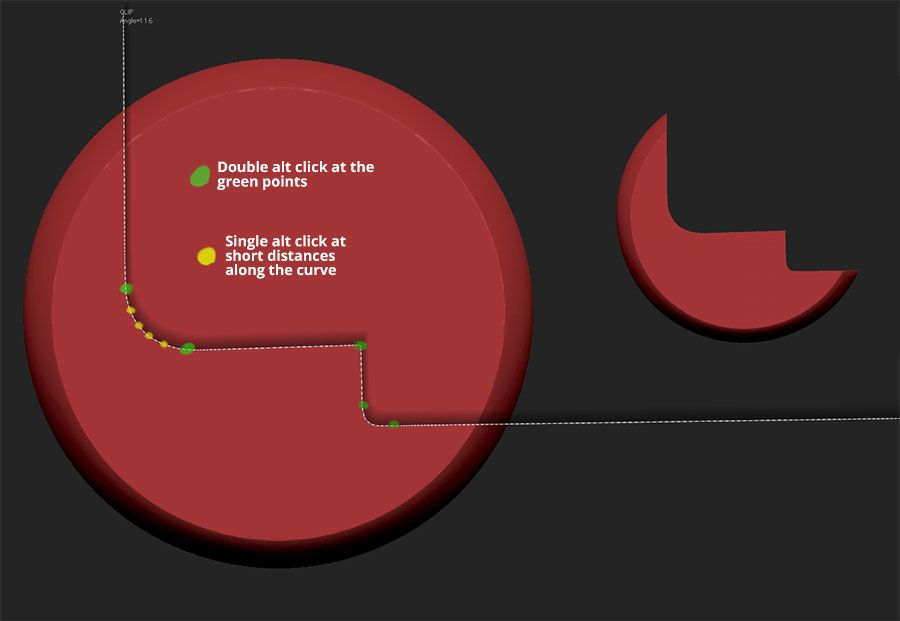
This is what works for me. Once you start the curve you can take your fingers off the control and shift buttons, double alt click at the points shown in green and single alt click at short distances to follow your curve. Hope this is of some help and that my attachment works.

Attachments

ClipCurve.jpg

Thank you ! That works well.

Yeh cheers. Will give that a go. On the smaller rounded corner, are you saying double alt click Is all you’ve used on that one? I though double alt click created a hard angle, like it has at the 90h degree corner. Why hasn’t it done so the smaller rounded corner?

Hi Gordon,
My explanation is not very clear. The smaller curve is the same as the larger curve with multiple single alt along the curved surface. It was too tiny for me to mark. Also, it’s not an alt double click, but a double or single tap of the alt button as you move along the curve.