I’m trying to use the transpose master, & for the most part, it’s working…but when I try & move the hips of my female, no matter if I use move or rotate (I prefer rotate) or move the zspheres or the lines in between, her face skews. I can’t figure out why it’s doing this. Any help would be muchly appreciated. Thanks.
Better explanation would help as would a couple of screen grabs. You must have multiple subtools?
yeah…multiple subtools. I’d do screen grabs, but I’m still crazy new to zbrush & want to be better before I post ANYTHING…people on here are too good…
I’m incredibly new to 3d modeling…it’s been about a month or two & I’m getting more serious about it…I did go to art school for illustration & design, though.
My only subtools are hair (I can’t use fibermesh cuz it’s acting weird…I made a post a few days ago about it & never got a reply…it either makes my model disappear completely, or the fibers won’t show–& I used it before a few weeks ago on another project) & I have eyes.
You masked too make fibers?; Did you clear the mask? Masked areas dont move or take paint etc.
I know masked areas don’t move or take paint…but I was taught, and did before, that when using fiber mesh, you mask the areas you want to have fibers (eyebrows, head hair etc) hit “preview” and the fibers appear. They did so before, and now it says it creates fibers, but they aren’t there, or else my model (tool) will disappear from view. I’m doing everything exactly like how I did it before…it just isn’t working right now. And as for the face on my model moving in transpose master when I’m trying to move the hips…I just don’t get it.
I just created a simple pose for my model and I’m working on fixing some problem areas. (Though it’d be nice to know how to fix it so it doesn’t happen later) But right now she has “clay” hair and I’d love for her to have fibermesh and for her eyebrows to look real instead of painted on…
It’s difficult to give you clear instructions without being able to see exactly what the problem is - that’s why it’s always good to post a screenshot if you can. ZSphere rigging can be quite difficult in some circumstances as you can get the type of behaviour you describe, with parts moving when you don’t want them to.
Adding more ZSpheres to the rig can help control areas, though this will mean you lose the pose as you will need to unbind the rig in order to add to it. The image shows the type of thing. Also it is generally a good idea to have the ‘root’ ZSphere - the one you start making the rig with - at the hip position or thereabouts.
Attachments
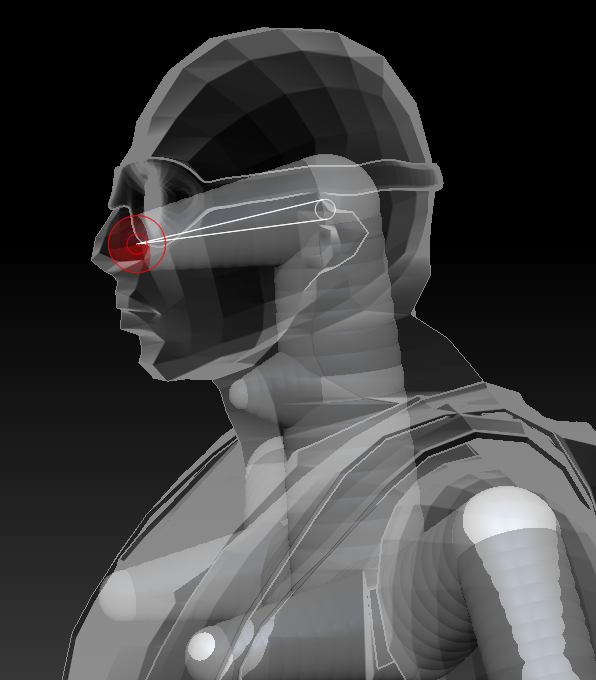
Marcus, you have one sticking out in the throat…does that help with random facial movements? I already posed my character…it’s not the best pose…but for my first real time, it’ll work.
And yeah…I’ll pose screen shots any other time i have questions…I usually won’t post until I do a google search first.
I was just demonstrating how you might add some zspheres to control the way the mesh moves. Whether such an arrangement works will depend on the mesh but the influence of the zspheres depends on their position rather than their size, so placing zspheres like that can stop unintended movement.