ZBrushCentral

Transpose Master + CTRL = Crash

Hi!
Right on!

Every time I use Transpose Master with the CTRL command (and rotate) it crashes. I choose rotate. Holding CTRL to drag the mask boom it crashes!

Any tip!?!

Info:
Just reinstalled the system.
ZBrush 3.1
WinXP x64 PRO
8 Gb Ram
Quad 2.8 Intel
MSI Radeon 4870 x2
(shouldn’t be a problem in the system?!)

(:white_small_square:Tried to reinstall ZBrush on former system, same problem)
(:white_small_square:I have tried the “Data Execution Prevention” thing also)

Best.

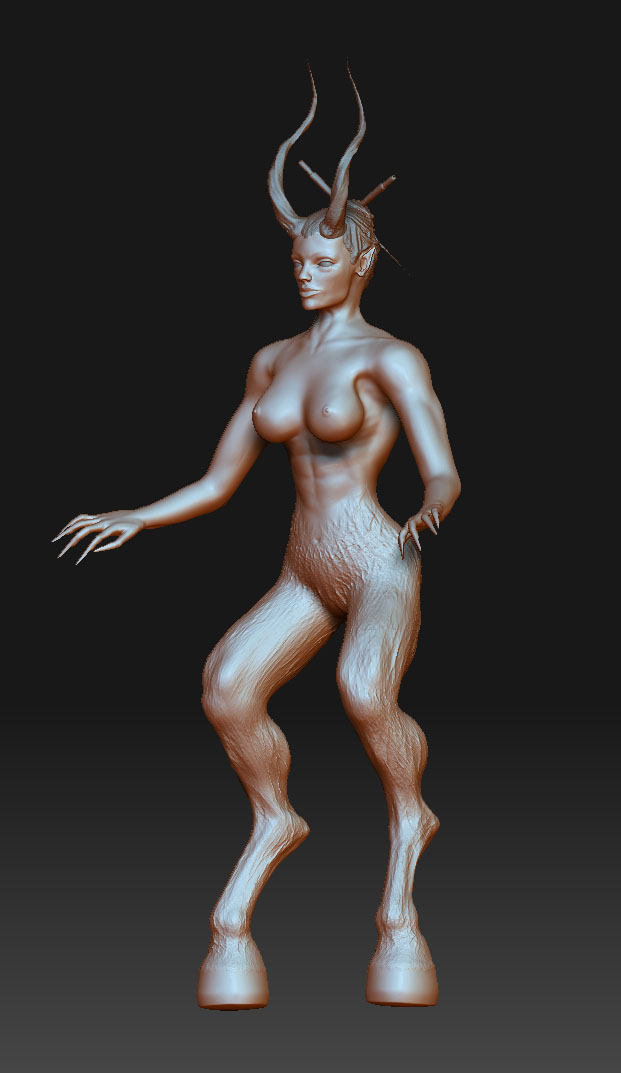
By the way here is my first model in ZBrush! :wink:

Attachments

SheSatirWIP001.jpg

I cannot duplicate this. Off hand, I would guess that another plugin is conflicting with TransPose Master. Do you have other plugins installed?

If so, try this:


  1. Double-click to launch ZBrush, and immediately hold down the Shift key while ZBrush finishes launching. This tells ZBrush not to load any plugins.
  2. Check to make sure that no plugins have loaded.
  3. Press ZScript>Load and manually load TransPose Master.
Now do some tests to see if the problem persists. If it has gone away, then you know one of your other plugins is creating the problem.

Hi!
Yes I have downloaded a few from ZScript section. Thanks for the info, I’ll try it immediately.
I’’ come back and brief about the result.

Best.:slight_smile:

Result:
Still crashes. Seems to be the Transpose Master within maybe?
I’ll try to reinstall it and try again.

Ok. I tried this with the “Demosoldier” also and it seemed to work so the conclusion could be my model.(?):idea:

Modelinfo at this stage:
Subdiv levels 3 (total)
Sbdiv level 1 aprox 415500 polys (Total polys 2021200)
No materials/textures applied only sculpted.
5 subtools, Hair, horns, eyes, 2 “sticks”

Preferences:
Compact mem: 4096 (have 8 Gb)
Doc undo: 20
Tool undo: 20
Maxpoly: 12
HD Preview: 8

Best.

20? Your undo settings are at 20? Are you nuts? :stuck_out_tongue:

Seriously, you are crippling ZBrush with such high undo settings. I doubt that’s the cause of this problem, but it is going to be an issue with other stuff. Yeah, your computer has a lot of RAM and your settings let ZBrush use as much of it as possible. But your Undo settings are so high that pretty much all of your RAM is going to remembering Undo states and nothing of what it really should be used for.

I strongly recommend backing those undo settings down to 4. ZBrush will try to remember more than that. It only starts cutting down on the number available (but never dropping below the set value) if it needs to for performance purposes. If you’re unsure about something that you’re about to do, simply save a backup copy of your model. Or you should also get used to using the Tool>Layer menu. Not only does this provide a way to immediately undo your work, but it gives you a lot of cool options as well.

I’ve seen this issue with some imported meshes (not necessarily to do with Transpose Master) when they are discontinuous, perhaps with unwelded duplicate vertices.

Hi!
yeah I “read around” about the undos. Have decreased it Can’t understand the option to have so many in ZBrush then.:qu:

Well anyway, run trough a few tutorials and have seen the one about the layers. Seems to be a better option I agree.

Thanks for all the help.:cool::wink:

Ok, but this character is modelled with ZSpheres and the entirely in Zbrush…

Also, get in the habit of storing a morph target of your ZTool at the beginning of each work session, before you begin working on it. If you do, you can use the morph brush to “paint back” to the target you stored. It’s nice because you can do this in select areas of your model and get some cool effects. This technique combined with the one aurick already mentioned will have you saying adieu to ctrl+z in no time.

-Dustin

i’ve had this problem too on zbrush made models, but only when part of the mesh is hidden and i’m using the t-masking really fast.

Thanks m8:s!
This was really helpful, I’ll look into the Morphtarget and so on.

Thanks.

Okey just as you know I have tested a few options and its confirmed, its the Transform Master that is the problem for me.:frowning:
I tried to pose the model “manually” and it worked fine, as soon as I used the Transform Master it crashes when CTRL clicking.
I’ll do some more tests and see if there is anyway to “control” this bug or get around it

Best.

Oki. Problem solved.

The problem seemed to be a combination of system instability and an “imported OBJ file”
It was solved with a reinstallaion of the system and ZBrush, took a while that’s why I’m posting now. :sunglasses:

Just for knowledge:
:small_orange_diamond:The model was tested on a 32 bit system also. Didn’t work to my satisfaction. The 32 bit system only supports 3 Gb Ram. ZBrush couldn’t load the highpoly model. (NVidia GFX Card)
The Transpose Master worked fine on other models thou.

:small_orange_diamond:The error occurred when I had modelled the horns in C4D and imported them in ZBrush. I actually don’t know the reason why the horns as subtool didn’t work with the model. Anyway when these was gone it worked.

Thanks everyone for all the help,
Thanks to Pixologic support and Aurick.
Thanks for the replies.

interesting, although for me all the models were made within zbrush, but as i said it only happens when i have part of the mesh hidden. glad you got it sorted.