ZBrushCentral

Transparency Issue

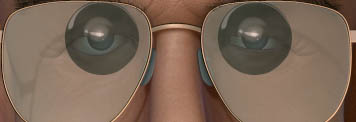
Hi there, I was wondering if anyone could help me out with a problem I’m having. I have a character wearing glasses and has an outer transparent eyeball. When I activate BPR transparency and render I get this result:

Any Idea on how to solve it?

Thanks in advance!

Attachments
glasses.jpg

You’ve tinkered with all the settings? There are a bunch, material and render. http://docs.pixologic.com/reference-guide/render/bpr-transparency/

Select a different subtool like the eyeglasses and render again.

Transparency only works with BPR.

deleted by me

I think this might be an object sorting problem. If so there might be no solution unfortunately.

Cute character BTW.

new-1.JPG

new-2.JPG

Thanks for taking the time to make that, Zber2. I tried it but nothing changed.

What effect are you after, skin tone not changing or?

I was looking for this, very nice. I was about to make a new threat, awesome to find this, very helpful.