ZBrushCentral

transparency in projection master

Hey guys. I’m absolutely stumped on this one…

I’m trying to use projection master to rip a texture to a head by using a poly plane for placement. But in order to do that I need to be able to see the mesh under it but when I turn the transparency down by using the “model transparency” slider on the polyplane, but all it does is flatten out the mesh bellow to just a sihloette.

Attatching an image to show you what I mean:

Anyone know if there’s a way to get this to work? Any help would be GREATLY appreciated.

-Adam

Attachments
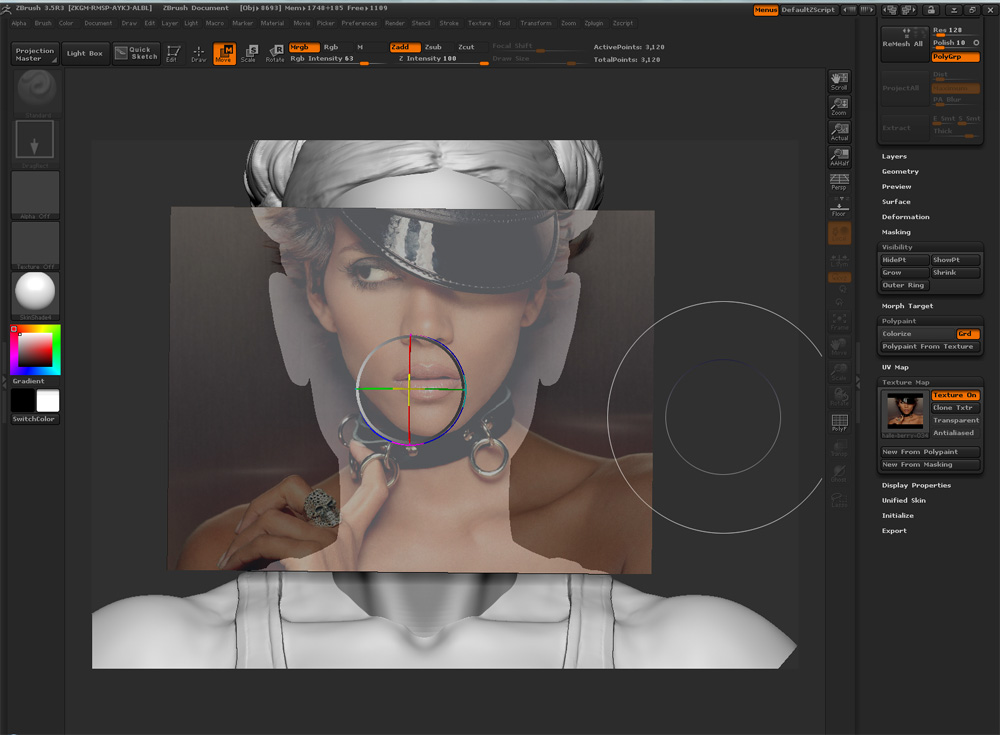
problemTexturing.jpg

Read the instructions here for using Image Plane with Projection Master:
http://www.pixologic.com/docs/index.php/Image_Plane
Although you’ve not said you are using the plugin the method still applies.

Ha ha. That’s what I used to get to this point. With some help though I was able to figure out that it’s because the Zadd button has to be clicked off first. Then you can turn it back on though and it starts working. Fun little bug :stuck_out_tongue:

Nevermind, even that is buggy. It’ll work then not work. It’s fun though. kinda like winning the lottery when it does work :stuck_out_tongue:

Hope pixologic’s working on this though. Amazingly powerful way to texture when it works properly.