ZBrushCentral

Transform Gizmo?

transform_gizmo.jpeg

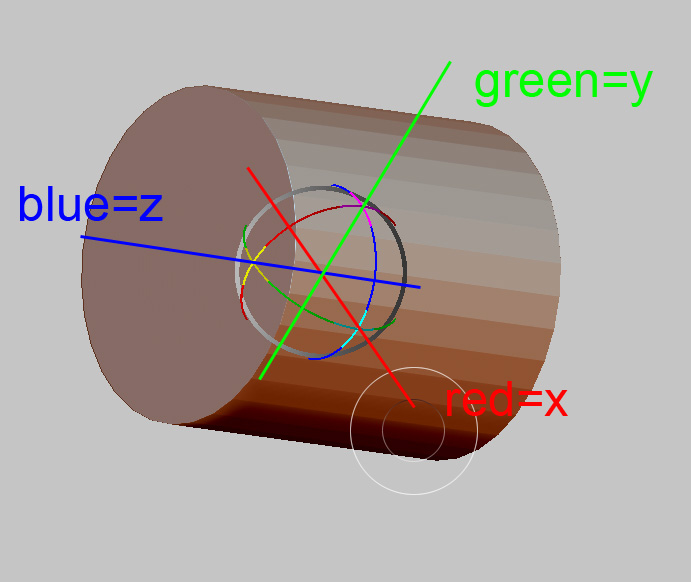
Hi, is there any way to know which axis the model is on in ZBrush. For example I created a cylinder and needed to stretch it for a long pipe but it took a lot of trial and error to know which axis (X, Y, Z) to resize (Every app is different).

Is there no X,Y,Z Gizmo in ZBrush? This is a no brainer and should really be a default part of the workspace window. There must be a preference I can set to make it visible?

You can always live temporarily the edit mode and activate the zbrush gizmo, by pressing w, e or e on your keyboard. Then you’ll see the axes of your object.

When I press “w” or “e” it gives me the move or scale tool but there’s still no way to tell which axis is X, Y. or Z unless I’m missing something. :cry:

you can get an idea if you check the tool : preview window, also you can make a small tool with the correct axis and always append it to your current tool set.
here is one that i made awhile ago:

Hey man.

Every 3d app follows the same convention, red correspond to x, green to y, and blue to Z. Look at the zbrush gizmo. It has color circles, indicating which axis they determine. I’m showing this at the image below. Hope you got it this time :slight_smile:

[[attach=158414]gizmo.jpg[/attach]](javascript:zb_insimg(‘158414’,‘gizmo.jpg’,1,0))

Attachments

gizmo.jpg