ZBrushCentral

Transfering Polypaint to a lowpoly model (Texture distortions)

I am working on a very simple geometry, properly uvd.

Imported to zbrush save a morph target and got to work on it. I also did my polypaint and my model is ready to come back out. As I subdivide my mesh my uvs stayed the same as expected but the underlying geometry changes. This is not a problem with generating displacement or normal maps since I would drop back down to level 1 and reimport my original base geometry, but how do I capture my level 8 polypainting correctly? if I drop to level 1 and reimport when I go back up levels my model starts getting distorted, which I imagine is fixed by the Rstrd button. Can someone provide some guidance please?

i would use a raytraced baking solution if I were you.

So this is not a bug and theres no way of doing it out of the box?

i agree with beta_channel that a tool like xnormal will propably help your workflow; in my view it´s the best way to transfer zbrush-polypaint to a lowres
http://eat3d.com/free/xnormal_overview

one question:
why do you reimport your lowest subd after polypainting, as the UV´s of the lowest level haven´t changed during the process of polypainting? you also have a morph target in store to get the shape of the lowest level right.

as long as the suv-button isn´t active, zbrush will subdivide the UV´s in a linear way, thus keeping the lowest and highest subd-level consistent in terms of UV´s.

it is important to also export the other maps (i.e. normal map) with suv off, to match the polypaint

zbrush and suv has been a topic for quite some time; i haven´t used in a texturing pipeline recently, but i had thought this has been improved with the latest releases.

If you used the SmoothUV option for displacement/normal map generation then you will need it for converting polypaint to a texture, in which case:

  1. Go to the highest subdivision level.
  2. Make sure the Tool>Geometry>SUV button is ON.
  3. Press the Tool>Geometry>ReUV button.
  4. Create your texture map from polypaint.

If you didin’t use SmoothUV with the displacement/normal map generation then repeat the above steps but at step (2) make sure Tool>Geometry>SUV is turned OFF before (3) pressing Tool>Geometry>ReUV.

I believe my UVS do stay constant and dont change. The change seems to be based on the fact that the original geometry gets distorted as you subdivide. I am importing my original because of the same fact since the distortion I am getting is not based on the uvs themselves but on the geometry being already uvd and getting stretched.

I will provide my base obj and a quick walthrough later today so you see the problem a little closer Marcus. I dont think the problem is related to smoothuv, right now I am not using smoothuv on my subd or my uvs.

This has a lot to do with multilevel subdivision since, when my I edit my upper levels my lower levels get changed and when I reimport level 1, my upper levels will be distorted. The soultion would be just along the lines of capturing a displacement at level 1 I would reimport y base mesh, and would be able to capture the polypaint from level 8 without upping levels.

The texture map needs to correspond to the displacement map at the highest subdivision level. That’s why it is important to use the ReUV button whether you used SmoothUV or not (so that the two maps match either way). Your texture map will only look correct when it is rendered with the displacement map.

If you are using subdivisions, the only way of avoiding distortion is to switch off Smoothing (the Tool>Geometry>Smt button) before subdividing, but that will maintain the polygon edges from the low res model.

Ah ok then maybe my problem is I was not applying a displacement map to it at this time. I will try it with displacement and texture see if that works. Marcus can you clarify the smoothuv part.

I read somewhere if the model will be used on a specific engine that needs to have smoothed uv`s you use it. Else you really not need to worry about smoothuvs option. There is no way to attach an obj to this post is there?

I guess my question in the end would still be what would be the best way to work on polypainting a low poly model would I still want to project the texture using a raytracer?

So in thinking about my problem, would it be possible to append the polypainted mesh that consist of 3.2 mill polygons and project directly to a texture map on my low poly model?

What engine are you using? If you’re aiming to have normal maps as well, then you’re probably better off just using xnormal and having it bake your polypaint at the same time.

No engine in particular just figuring out how to work on low poly meshes as far as texturing goes.

Alright to make it easier to understand I upped my ztool file to dropbox, it has 8 levels of subdivisions since I needed to have enough polys to be able to maintain a decent quality texture. level 1 has a morph target with the original polygons and layout.
My plan was to use this model in maya but I only wanted to subdivide 3 times. In case you guys dont have time im also uploading an image of the problem to try to describe it better. Any idea why the red boxes are getting streaks like that??

Including my obj as well since it is smaller.

to give you a good Idea of what I mean if you grab the obj apply a checkered pattern, you will see the uvs look good, as you apply subdivisions the texture starts getting distorted regardless of if you have smoothuv or not.

https://dl.dropbox.com/u/10426587/Shared/Book_BookCover.OBJ
https://dl.dropbox.com/u/10426587/Shared/OldBook.ZTL

Xnormal did the trick, I exported level 8 painted with smoothuvs on. If it is off I get those nasty streaks you saw on my previous image.
I exported level 1 and was able to transfer the polypaint to my base mesh and it looks good. I am wondering if this is the best workflow, or if theres any way of doing it all from within zbrush.
Is there a way to transfer my polypaint on my high res to my low res base mesh but directly to a texture map?

Looks like another decent workaround would be to grab my model and divide only 3 times, which is my intended output and then start doing hd geometry until I have enough polys to capture polypaint.

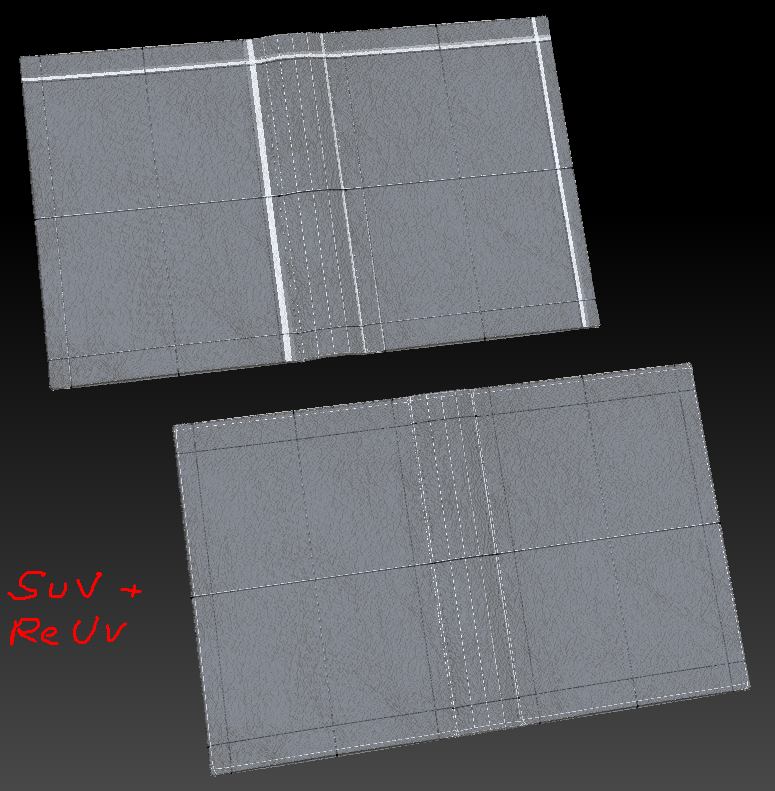
Did you try SUV at ReUV in ZBrush? This is the result I got after:

  1. At lowest subdivision level create a 'New from UV Check texture map with polyframes on (top pic).
  2. Go to highest subdivision level, turn on Tool>Geometry>SUV and press ReUV (bottom pic).

Creating a texture from polypaint then showed no distortion.

Attachments

ReUV.jpg

Yes I did it with smoothuv also note this might be a bug, but 2 things to point out reuv is not working as a toggle but as an additive option.
With smoothuv turned one the more times you hit reuv the more it applies a smoothuv function, which contrasts the docs. Finally one other quarky thing I could is the following,

-Go to the highest level click the reuv with smooth on
-create your texture
-go up and down your subdivision levels, even without modifying anything they start getting stretched as if the uvs are actually chaging every time you jump from one to the other.

Thank you much for your time Marcus, I know youre super busy and working on all of this is not very clear anywhere in all the docs I have read.

I agree that this should be better documented and will look into it. What docs have you been referring to (so that I can make sure information is consistent)?

Thanks,

I have been reading many of Pixo`s documents, I cannot remember the one that it was but it was the one introducing the REUV option. Also the bigger problem is the lack of material on the smoothuv. I actually enjoy reading both online docs and the pdf docs included in the install as well as the getting started guide. I will try to find the reference again and let you know.

If nothing else thanks as always you have been helpful.

somehow i do not get the point…

edit: i thought you meant suv… sorry for the cunfusion…