ZBrushCentral

Transfering from Zbrush 4 R2 to Zbrush 4 R3

I’m trying to make a transfer to the new zbrush here at work and I need a few things to get up and running.

  1. The bracket keys “[” and “]” No longer change the size of the brush. How can I get those to change the size of the brush again? Do I need to make my own script an assign them? Can they be assigned to things?

  2. The “P” key is “assigned to an interface item”. I need this key. I need to be able to assign this common key to a common function that I use all the time. In this case its Pinch. I need to be able to assing P to Pinch. I tend to flutter back and forth between common tools such as Standard, Pinch, Move, Infate, and Trim Dynamic.

Thanks
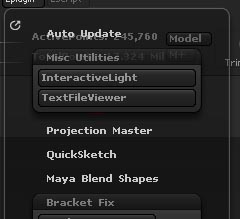
In the Plugin > Misc Utilities are the ‘<<Brush’ and ‘Brush>>’ buttons. Assign the Bracket keys as hotkeys to those two buttons. If you don’t have those two buttons then you can get a plugin here which also has an increment slider for the buttons.

thanks

Anybody know how I could assign P to Pinch?

thanks

also. (see attached)

Attachments

zbpmisc.jpg

Did you see the link in post #2 to get the plugin?

regarding the ‘P’ key, that is perspective button. Did you try to assign different key to perspective so P is not being used. Then you can assign P to the pinch brush. I havn’t hotkeyed any brushes so I can’t be sure it will work. All you can do is try it.

Yes I tried that and in the end what seems to have happened is that pressing P does nothing but assigning P still does not work… Returns the same text as I said above.

I just tried it and I didn’t have any problem assigning K key to perspective then assigning P key to Pinch brush. I don’t know why you are getting taht message.

Do what I did above in post #7 but on a fresh restart of ZBrush. For example, Re-start ZBrush , Draw a Sphere3D, Edit mode on, make PM3D but do not sculpt on it. Then assign your hotkeys. Then store the hotkey file.

Bracket part is solved. thanks!

Randomly looks like P started working. So if anybody hits this thread woindering the same thing… Perhaps you have to restart zbrush? Cause I swear it said “cannot…” after i tied a different key to Perspective. And the P key wasn’t doing anything.

But i’ve been working adn doing things as usual and randomly noticed that P is going to Pinch!!! So it started working.

thanks

Ah I didn’t see this - this is probably what happened, more or less.

thanks man