ZBrushCentral

Transfering details from old to new mesh

Hello guys!

I got a problem and really don´t know how to fix it:(

I exportet my basemesh from maya and sculpted everything.
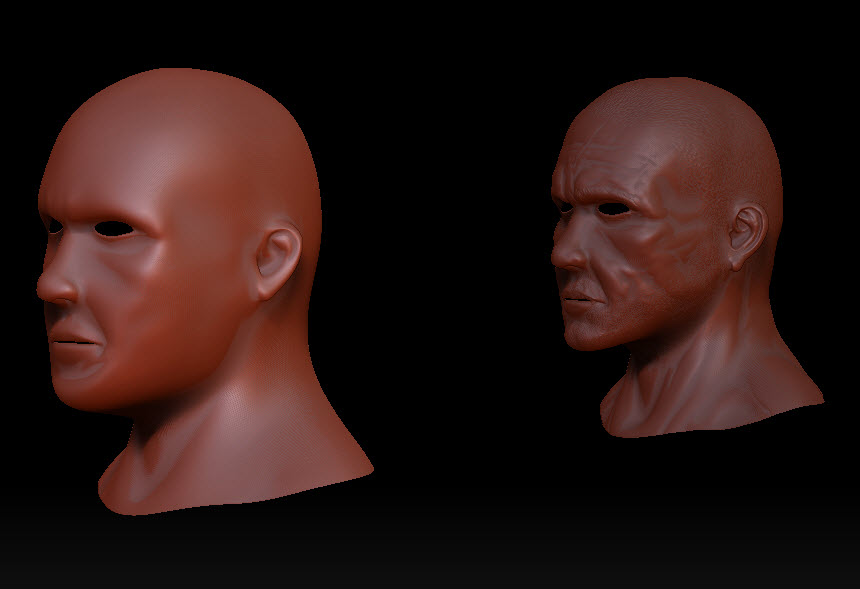
Looks like this:

Then in texturing stage i decided to make some major changes and also updated some uv’s.

I exportet my new mesh and hope to reproject all the fine details from the subdiv layers to my new updatet geometrie.

My destroyed mesh looks now like this:

Any Option to fix that problem or start from ground again?

There is no major change the meshes got the same vertcount etc pp only the position of the vertices/uv coords are different.
Maybe there thousend of these posts but i don´t find one because i don´t know how to fix it :rolleyes:

I hope you can help out.

I wish a nize weekend!

Cheers Cody
my guess is your vertex order is different.

And are you projecting the mesh? or simply importing at SubD 1?

just import your new mesh, add it to your old one as a subtool… subdivide it enough so that it can support the details of your old mesh, then hit “project all” under the subtool menu.

you’ll probably have to clean up a few spots, but for the most part it’ll be good to go.

Hey guys,

hope you had a nize weekend!

Basically it didn’t work, i checked your two methods.
@project all.nothing happens to my updatet mesh.

cheers Cody

Project All should work very well. Please detail your steps so that we can hopefully spot where the problem is.

Hey Aurick,

here is step by step walktrough. 1. Sculpted on my old mesh 2. changed to SubdivL1 exportet it 3. Make some changes in Vertexplacement and uv updates 4. reimport the Mesh 5. Added the reimpotet Mesh to a Subtool on the old ztool 6. subdivided to the same level as my original 7. "reproject all" --> nothing happend I tried different things but nothing worked The really deleted no vertex , so they stay at the same vertcount The Only difference are there worldspacecoords i reimportet the Oldmesh back to Maya: Here are world space places: [![screen1.jpg|881x526](upload://1kj5AitgS6dpaEhBF0UJabRr6P6.jpeg)]![maya_exportSettings.jpg|505x130](upload://micMV5HImJZf4pFcXDNlRJUCUaF.jpeg)

thanks for any help

Cody

Attachments

nothing_happend.jpg

I think that the reason nothing happened is because you changed those coordinates. ProjectAll only works if the points being projected are very close together. In other words, the two versions of the mesh need to overlap as closely as possible.

the key isn’t in the obj export.
but more importantly the import

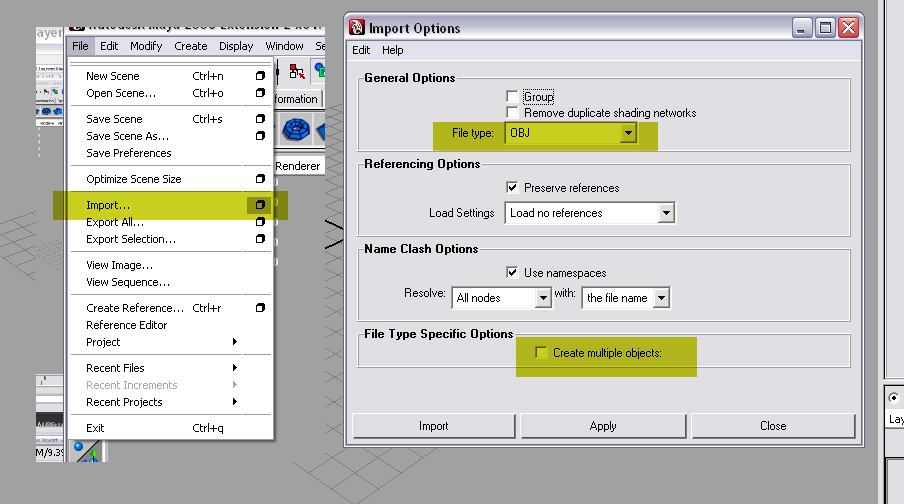
you have to click the diag box on the import tab and insure that it says

File type : OBJ

then scroll to the bottom and insure that Create Multiple objects is turned off

every time you import and object use the diag box so that you can bring up OBJ import settings

otherwise Maya will do a guess

cheers

Aaron Wehrmeister

Attachments

importOBJ.jpg