ZBrushCentral

Topology question

I just went through a 10 video tutorial on using Booleans to create an object. The Author said that this isn’t the best topology, but you can retopologiz it or make a low poly version and bake it in to clean it up. I have no idea what he is talking about.

Is there a quick and easy way (or even a hard way) to clean this up because when I took it into another 3D program to colorize it, it had faint distortions on its surface.
Pict.jpg

Polycount doesn’t matter for you? Are those surface distortions something that can be solved with smoothing faces with normals? If it is yes for both then you need to use a external program as MAX, Maya, Blender etc to correct the normals problems.

Here is an example of what’s happening. Notice the stretch marks around the knobs. Also, notice that even though the Boolean edges are nice and sharp in ZBrush, they are a mess when imported into another 3D program (DAZ Studio) as an obj.
Edges.jpg example.jpg

I don’t care about poly count right now, I just want it to look right. FYI: I don’t have Max or Maya. I do have Blender, but I don’t really know how to use it. I was hoping there was some way to fix it in ZBrush.

BTW: I tried ZRemesher (following a tutorial) and it came out a bumpy mess.

Can you send a problematic fragment to check if it can be solved with normals?

I was hoping there was some way to fix it in ZBrush.

Zbrush doesn’t use smooth surface shading the same way other 3d programs do (probably since its not an actual 3d environment with the lights and materials to match). Instead it treats every polygon as if it were its own smoothing group which is why a low poly sphere might look facted inside zbrush.

Sicne you have Blender, here’s a video showing how to control the smoothing based on angles and manually defined hard edges:

//youtu.be/sTJ-pryZFQk

As for retopology, an object like this is something you’d ultimately want to do manually rather than use an automatic solution like zremesher (which has a different purpose). You’d especially want to do it manually incase this were meant to be a game object, since you might not want every detail on the highpoly object to exist on the final model when it could be baked to a map instead.

As commented the problem probably are the normals and the solution of Blender from Cryrid should work (or Max, Maya etc)
Redo topology is something that is not needed in your workflow, but for games. And even in that case the high res version should be OK and without artefacts.

In some cases people redo topology to convert a draft irregular geometry in a clean one, but it doesn’t seem the case here. Rebuild that same exact detail with retopology would be as time consuming as doing it from scratch.

Zbrush is not an autonomous program that can do everything and you will be forced to learn the basics of a generalist 3d program (Maya or Max etc) unless you only do concepts or 3d printing. Learning that kind of programs, even the basics, is a big investment of time, choose well.

Cryrid & Altena - Thanks for the help. I am going to check out that video as soon as possible.

Altea - I am not sure what a fragment is? Are you saying to upload one of the subtools? Will this forum let me?

I will be checking out the video first. If I can’t get it to work in Blender, I will try upload a fragment (??), if you still want to check it out.

Thanks again both of you.

Anyway I don’t think now the fragment is necessary. Editing normals should solve the problem.

Well I followed through the video but I couldn’t make any changes to my object to fix my problems.

Thanks for trying Cryrid and Altea.

If you send a subtool I take a look. You can attach files with the clipper icon or if it is bigger that size limit use a link to dropbox, google drive or similar.

Altea

I sent you a direct message with a Dropbox URL. I am not sure how to get ZBrush forum messages, so please let me know (here) if it didn’t arrive.

Thanks
LD

As predicted it is a question of smooth normals. You need to smooth normals, something quite basic, and smooth them with a threshold around 30.
You also have a handful of artefacts that need to be edited manually but it can done quickly as they are not many. Basically you need to weld manually some vertices but using the method of weld target to avoid moving the correct vertex, no general welding.
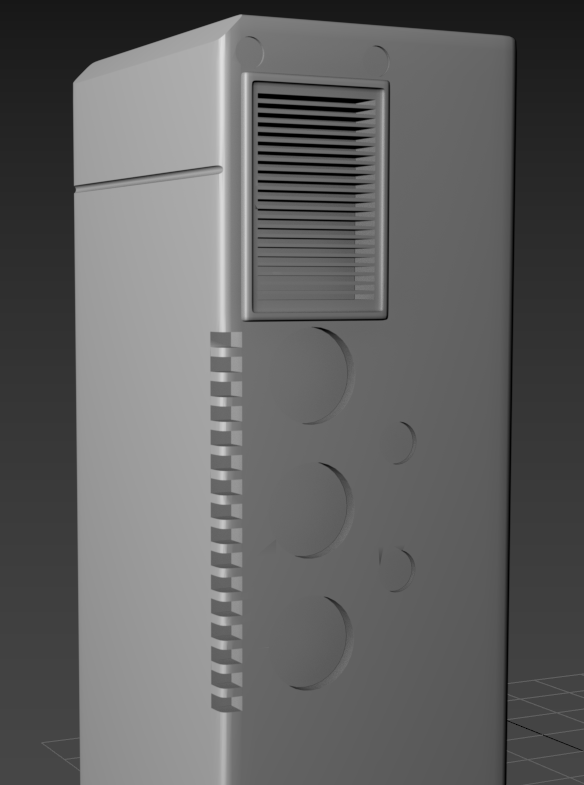
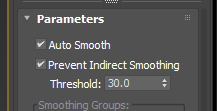
Image 118.pngImage 119.png
I have used Max for this and 30 is related to Max. But Zbrush has the ability also to smooth faces if you use the FBX exporter instead the OBJ. That slider that says 100 smoothed etc set it to 50 or 60 and the button SNormals active:
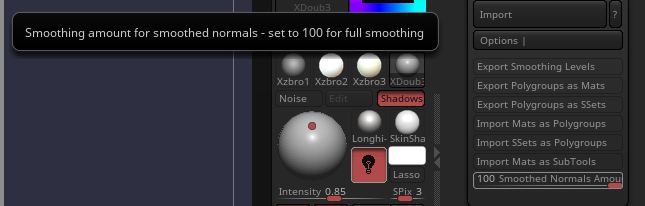
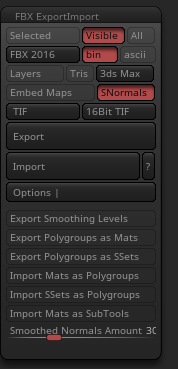
Image 120.pngImage 121.png
Be sure that the program where you are importing it has the option import smooth groups ON.
Using this Zbrush exporter mostly will solve your problem but you wont be able to remove a few faces artefacts with that system with Zbrush as they are invisible in Zbrush and need a external editor as Max, Maya, Blender etc.

With the current scale in FBX the object need to be imported in meters units or will be tiny. I suppose it depends also the program you use

Altea

Thank you very much! The exporting as FBX did clean up a lot of the distortions. Now I have to look for tutorials telling me how to clean up the remaining artifacts since I have no idea how to do welding targets. But even if I can’t figure it out - I am a lot happier with how it looks now.

Thanks again

You are welcome.
The artefacts are easy to remove. If you have the correct amount of smoothing normals you will need to correct less. Basically you need to indicate a vertex that is going to be welded with other by moving to that vertex to the target instead the medium point between both (that would be collapsing). You then weld the vertex that is creating problems to a healthier one.