ZBrushCentral

topology poles and weird spiking artifacts

Anybody know why this is happening to me lately? I haven’t noticed it before, but it seems like anywhere I’ve got a topology pole (5 edges sharing a vertex) zbrush is leaving little pinprick artifacts whenever I use the smooth brush. Sculpting using the clay brush or whatever other additive brush doesn’t leave the same artifact, and in most cases even makes it go away until I need to smooth that area again. I’ve tried playing with the brush settings such as the brushmod and whatnot, but it isn’t going away.

Any ideas on what I need to do to fix this?

I’m attaching a screenshot and using a bronze matcap to make it more visible, but it’s also visible with any other material.

[artifacts.jpg]
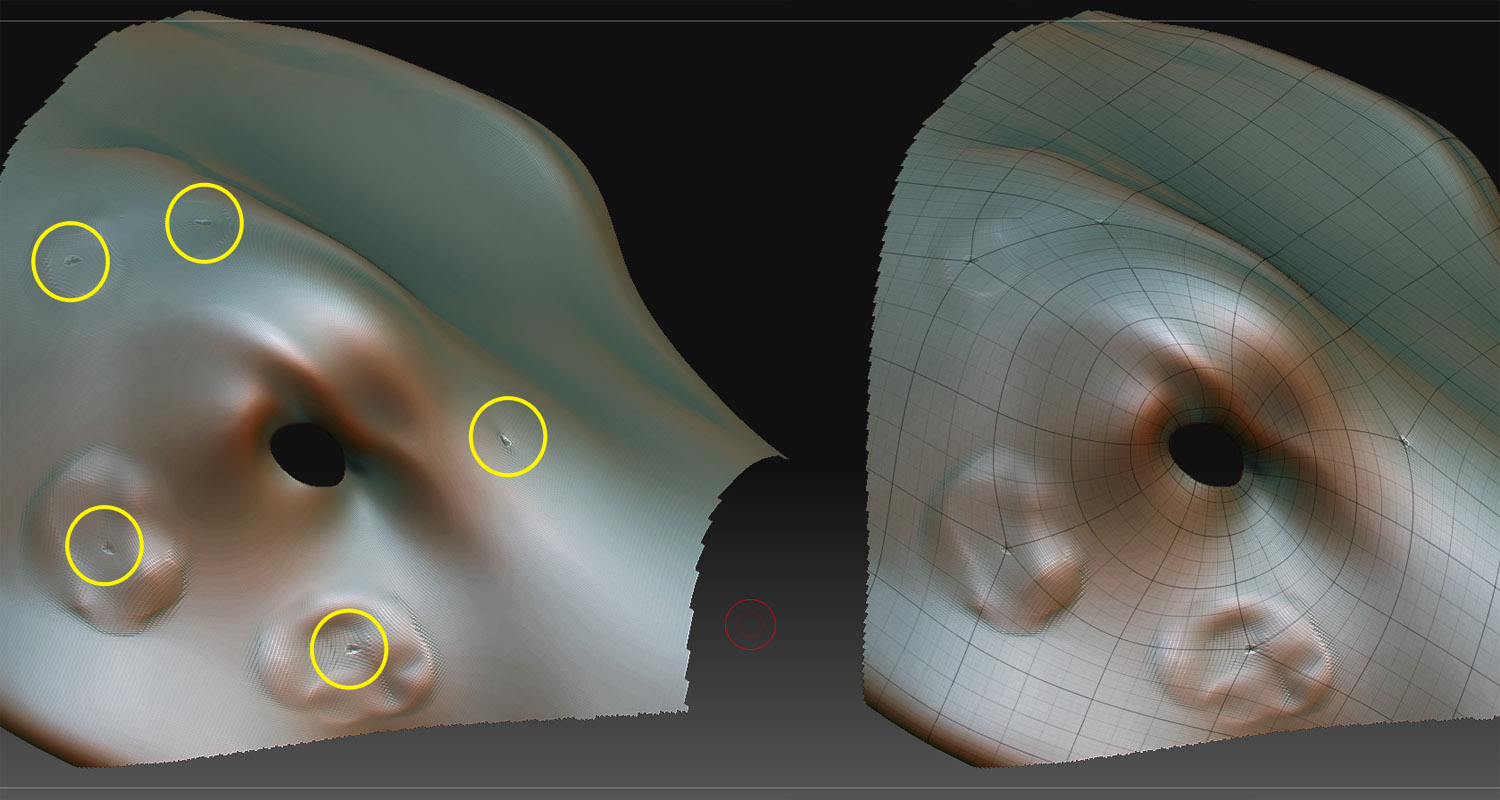
there isn’t a fix…well, not until you’re done sculpting. If you can just ignore those areas until you are 'done" then hit them with the clay brush, or standard brush a bit at the end.

If there is a fix, then no one knows it, at least that I know of.

Use the flattern brush. You can see this movie I did a while back that shows you. Here is the thread. http://209.132.96.165/zbc/showthread.php?t=60393

Here is the video link.

http://uk.youtube.com/watch?v=qfnmattorZk&feature=channel_page

I too have noticed this annoying behavior when ZBrush encounters poles.
Thank you for the tip tez! :slight_smile:

bump. not that it helps to solve the issue at all. but another thread on the topic : http://www.zbrushcentral.com/zbc/showthread.php?t=58994

this sorely needs to be addressed in the next release

I’m having the same problem… I posted a thread about this here
http://www.zbrushcentral.com/zbc/showthread.php?t=65831

I realize that i can get these to smooth out using some of the techniques
discussed here but the thing that is killing me is Normal Maps.
My Normal Maps work great until i start to notice these artifacts.
Then my Normal Map starts to look a little offset showing seams.
I would love for this issue to be resolved.I have tried to smooth out
these with the techniques and regenerate the Normal Map but is still screwy.

thanks for the links and workarounds guys, I’ll add it to my ‘workaround workflow’ :laughing:

Also, I saw this in one of those threads:

The only real solution is to avoid such topology. If that’s not possible, then put the stars in places where it won’t matter.
I would shake the hand of the man or woman who can model an animation ready human face without putting a pole in a place that ‘matters’ :slight_smile:

Intersecting isolations will always create poles, and since a properly topologized animation-ready human face has isolations for the eyes and the mouth, you will always get poles around the cheeks and nasio-labial area.

But yeah, I think i’ll just use the flatten brush idea for now till 3.5 or v4 or whatever comes out :+1:

cheers guys!