ZBrushCentral

Topology Pinching

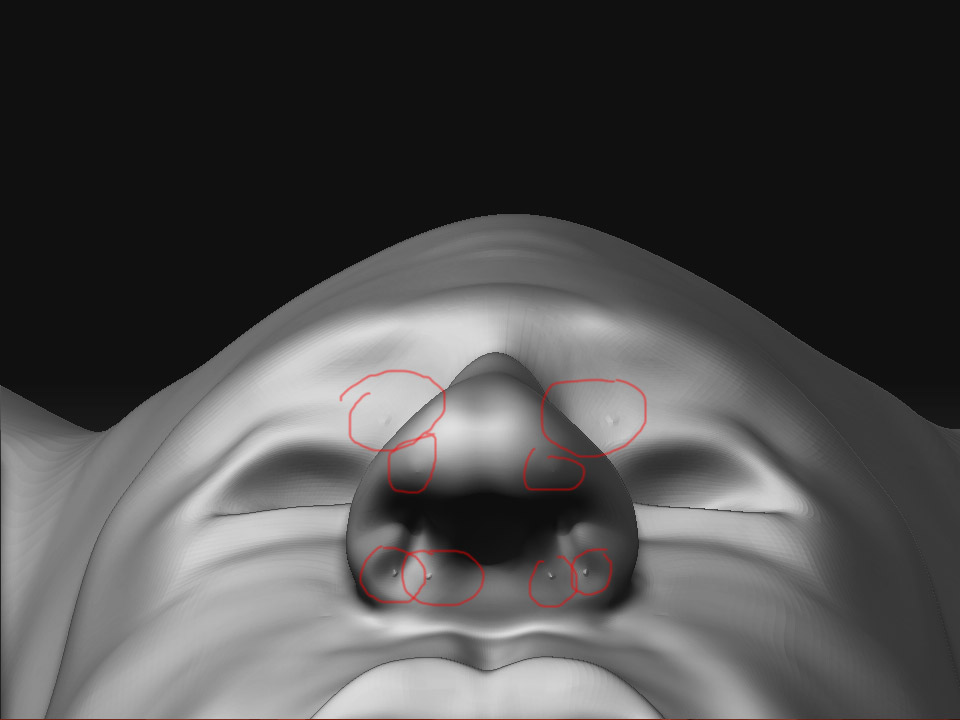
I have two issues. The first is the pinching of my mesh, im at subd 5. The geometry is clean at 1 so I dont see why I’m getting these bumps. I tried smooth, and makes it worse. I’m thinking it needs to be re edited in those areas, and here comes my next problem…

I am studying on how to export mesh from zbrush and into maya to edit and back into zbrush using the rigging and toplogy menus to make a new skin. Sure enough I run into a problem there where the edited low poly mesh moves on the x axis slightly which screws up the entire mesh when I make a new skin. I rig the original mesh which is the ztool at high res, and i edit topo with the low res mesh but the low res is not aligned anymore.

I know theres a key im missing, please lead me in the right direction. Thanks.

Jon

Attachments
1.jpg

2.jpg

I have had similar problem i think it must be some kind of bug i just played around i fixed mine with the rake tool then smoothed it. Im also trying to work out workflows between maya and zbrush but havent come across that problem yet so i cant help you with that sry. Hope that helps

In chapter 7 of Zbrush: Character Creation it says this…

Importing Topology Topology does not have to be built in ZBrush. You can import a low-polygon mesh generated in another application and use ZBrush’s project feature to re-create your ZTool with the new topology. The typical workflow is to export the highest resolution of the ZTool that your modeling application can open. Using the high-res as a template on a layer, build a lowresolution envelope mesh on top (Figure 7.36). This is an ordered mesh where each point sits just outside the surface of the high-res.

This might be of some help to you Sebastian or not depending on what you currently know.

The first issue with the bumps for some reason when those particular regions are divided (around the eyes, nostril) the pixols flare out more but the morph tool takes care of that or just moving the verts out.

The workflow to retop your geometry from Maya instead of Zbrush (for 09)

  1. Check your settings and make sure your uvs are auto mapped first to not cause explosive mesh

  2. Check deformation and unity on xy and z to ensure the ztool set in world space correctly.

Export the subd1 mesh to obj and import to maya and edit normally but dont tamper with the uvs in this process. Stay away from mirroring and auto uv setting in maya, just edit what you need and import back into zbrush.

Follow the normal setup to retop in zbrush and thats it.

  1. Make sure projection is set as well.

I’ve been studying zbrush for a while off the radar and finally have a better understanding of how it works. I’m currently on a side study learning to rig in maya and making a model that is detailed to give the animation some flavor. Heres the model in it’s rough stages. Hope this info helped someone!

beelzebub.jpg

Thanks Jsells20 I worked with mine by building zspheres then building a base mesh in zbrush then imported sub div1 to maya to fix the topology. Then brought it back to zbrush to build up the model again however has changed so much now i need to figure out how to do the UV’s Im using headus Uv layout hopefully it doesnt renumber the vertices. I found this tutorial on the forums maybe it will help

http://www.zbrushcentral.com/zbc/showthread.php?t=58292

I know you said your model is in its early stages but have a few suggestions for when you continue. Around the neck area add the clavical and neck muscles. some more defintiion in the tricep and bicep in the upper arm. I think the thigh area could be a little shorter and make the calf a bit longer. I would also suggest bulking the foot up a bit so it look strong enough to support the body.

Hello again. I am well aware of anatomy and what needs to be worked on. What you just said is monotonous. It is obviously being worked on but these issues needed to be resolved first. This is a 3 day sketch, still roughing out the shape. Stay focused on your “female anatomy” :stuck_out_tongue_winking_eye:

If you plan on using zspheres as a base, it’s a good idea to figure out the workflow to edit the geometry in maya and retop in zbrush. Saves headaches.