ZBrushCentral

Topology brush crash

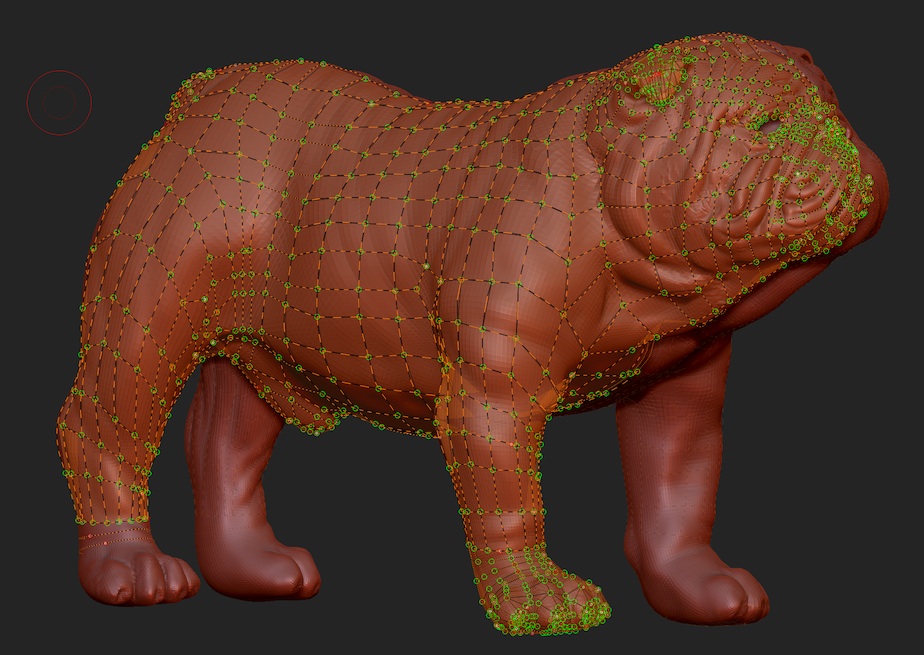
I’m having a problem with Zbrush’s stability when using the topology brush. I’m using v4R4 on MacOS10.6.8 with 12GB of ram. Everything worked fine until this point when apparently the topology brush mesh reached a certain size, now it crashes after adding a few curves with the topology brush.
The mesh itself is not very large and symmetry is turned on. I’m trying to finish the dog’s rear foot and it will take forever with the constant crashing. Any ideas what could be causing this sudden instability (and how to fix it)?

Attachments
zbrush_cap_crop.jpg

I have run into a similar issue, were you able to fix the problem or find a work around?

The problem I am having is that I have gotten to a point where I am about 70% done drawing the new topology and now every time I try to undo a bad curve zbrush crashes on me. I am able to continue drawing and working as normal but as soon as I need to undo something it crashes.

Unfortunately, no. I just grit my teeth and saved after every successful line. As you could see from the screenshot, I was very nearly done when the problem arose. When I finally got the mesh finished and the holes closed up, I took it into Maya for any cleanup and fine tuning.

I hope they get this fixed. for the ime being, I’ve gone back to Topogun for my retopology needs.

Check for update. You should be using 4R4 P2.

Just got into this crash today using 4R5. The workaround, if you want to use the Topology brush is to work on your model in sections. I was trying to do a character and got the crash when I was around 70% done. So I duplicated the subtool and erased all topo lines except for the head and just finished the head, then used another copy of the original to work on the torso and so on. It seems that there is a limit to what the topology brush will handle.

I for one love the workflow so much with this that I intend to still use it as is. It’s much easier to just draw lines on the model and then merge the pieces together in another app if necessary than to do it all in another app (I use C4D, I don’t have topogun).

Actually even after breaking up my model it crashed when I was finishing the topology on just the head. So I created a new Layer for topology line paint, used the existing topology lines as curves to just click on and draw a line directly onto the model. Then I added a ZSphere and used the painted lines as a guide to very quickly create the topology.

I’ll wait for the next update to use Topology Brush for anything more than small accessories like they show in the tutorials.

One more suggestion as I work through this. I’ve finally mastered cloning meshes, merging them and bringing them into a ZSphere to edit the topology. I’ve found this works very well. So for example, I finished creating a head topology with a ZSphere but then when I got to the limbs I really wanted to create the loops with the Topology Brush and draw them out quickly. So I did. Just the arms, then I:

created a mesh with no thickness from the Topology Brush
Used Split Parts to split it into it’s own subtool,
Merged it with my existing low poly mesh created from previous iterations
Cloned the merged mesh
Went to my ZSphere subtool, cleared the topology and selected the topology from the previously cloned mesh.
Click Edit Topology and then use ZSpheres to bridge the mesh from the Topology Brush with mesh created from ZSphere’s/Adaptive Skin.

I now can do the split/merge/clone/export in about 30 sec so I now use this method to use the Topology Brush for small areas at a time and then merge the results into a working low-poly cage mesh.