ZBrushCentral

Tool insertion and its "pivot point"

Hi,

One of my work routines is to start from a mesh in 3dsMax or Maya that is placed in 0,0,0 position, with the objects pivot on the floor level. That means that it starts from the floor and up.

When I insert a tool that previously was an OBJ, it feels like it places the object above where I press-dragged to put the tool on the canvas. Does it make sense?

I understand that the behaviour is different from eg placing a sphere, because the pivot point is in the middle of the sphere. But in my case, its not around eg. the characters feet, but quite a bit underneath it.

Also, inside Tool > Preview, the tool is not even visible.

Am I doing something wrong or is there another routine you could suggest me?

Do you have a screenshot or video explaining what your problem is? I’m not sure I understand. Also the 0,0,0 in Max is not the same as Zbrush’s. The grid in Zbrush can actually change based on settings or the models used.

You can change the grid location under the Draw menu. I believe the default is set to -1, which puts the grid at the bottom of your model.

Hi, and thanks for replying

Okay, I understand that values in eg 3dsMax/Maya are not the same as in Zbrush (although units stay the same after exported - when you have a 1x1x1 m box imported into ZB and then exported to OBJ, it is still 1x1x1 m and located in the same location in world space).

But isn’t there anything one shoudl take into consideration, for a “proper import/export routine”?
There should be a documentation of conventions or rules for import and export. So one knows them and whats possible, and so one knows what to avoid etc.
As an example; if I have a merged/collapsed subtool set which I export to OBJ. Can I import the OBJ into 3dsMax, modify one single subtool and then export to OBJ and import to ZB? I could do the test myself, but there are so many scenarios and I wouldnt remember them all, and second, there might be scenarios I havent thought about.

When you say that the grid is set to -1, does it mean that ZB works in 1 as unit for the model size no matter how big it is?

And what about the Tool Preview? Should I merge the visibile Sub Tools and press Unify?

Here is a screen shot that hopefully explains what I mean
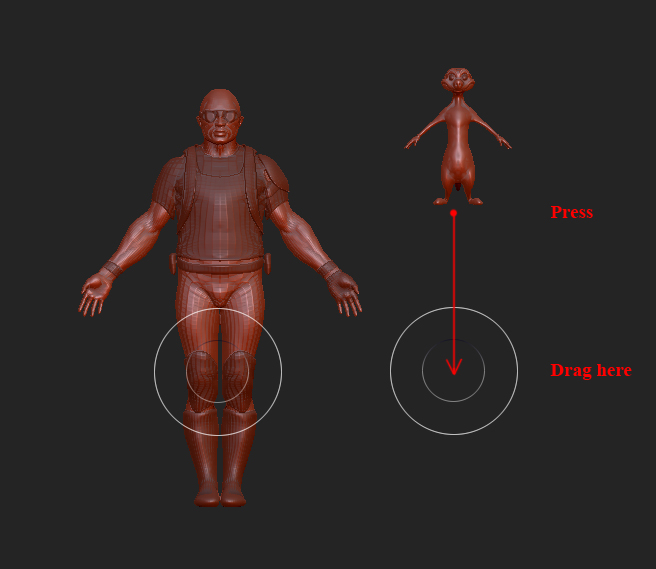
Zbrush Drag Example.jpg

First shot is the demo soldier
I press in the middle and drag down. You create the character from its mid point as starting point. However, you end up having the floor underneath the object anyway.
Exporting the tool to OBJ for examination in 3dsMax confirms that its built with 0,0,0 in its middle. Also, the mesh is 0,08m high in 3dsMax.
Could this value be checked inside ZB and even changed? Would save me alot of time do do it in ZB instead of exporting, scaling, importing, reconstructing mesh etc.

Second shot is a model done externally, exported to OBJ and imported to ZB.
Its 0,48m high in 3ds, placed on top of the ground.
As you can see, its created a bit away from the mouse pointer while creating the object.
I made another test meanwhile; I exported the tool to OBJ, selected a random tool (the star), imported the mesh and this time it was created closer to the mouse pointer.

My conclusion is that there are some placements/alignment inside Zbrush that I dont know about. The questions are; which alignments are there? I mentioned previously the Unify button. Are there more? Are they important?
And one more thing.

If I have a bunch of open tools, and I juggle from one to another, I see that some fill up the screen (in a certain zoom) and some appear to be tiny (in the same zoom), while once exported, they might have quite similar sizes in 3ds.

What I want to understand is how to have a clean work routine so that things appear in a manner and sizes that are “correct” (if there is such thing).

There are some scaling and offsetting issues and settings that a user may not realize. It’s a little bit weird and can cause some issues when transferring models to other 3d software. I do have a default tool (model) I load and then append my working tools (models) into it. This maintains a consistent scaling and offset values for all my work. I can try and upload it later tonight.

I did post a thread that kind of goes into some of the explanation of what’s going on behind the curtains and where to find it. The information posted in that thread is from a previous version, so it’s not 4R42b, but I’m not certain as to which version I was using at the time. It was at least version 4.

http://www.zbrushcentral.com/showthread.php?168239-Scaling-Issues-(GoZ-Blender-Max-etc-)-Solution-and-explanation

I like the idea of a default tool that one can use to import the OBJ on.
As for scaling and offsetting issues - I think that by now I’ve managed to avoid these kinds of situation. So I am more focused on how ZB works in the background and if we need to adapt our workflow.
I did some more tests by comparing base meshes that come with ZB and similarities/differences between them, and also compared to my objects.
It seems like the tools that came with ZB are 2x2 “grid squares” (no idea if there us a unit for that) big, approximately. While my objects differ from one and another. I had some sample OBJs that came with TopoGun, and same here, the imported OBJs looked different.

The post you are linking to seems very promising. Will read it now.
But is it “official”? Are there any official guidelines? I am not questioning or doubting the information in your post, but rather wondering of Pixologic has covered this issue.

I had a hard time “converting” my old meshes from the time I studied 3D to proper units (some were 10x10x10 cm, when they should be 2x2x2 m for example). I don’t want to discover that I am still doing things wrong. Or at least, if I am, then I can start doing things right :slight_smile: