ZBrushCentral

Timeline camera problem?

Hello,

I am trying to follow along with this video explaining how to use the timeline.

http://youtu.be/pUVuYE5I3xY

In the video he sets one keyframe on the lips then the next on the eyes. When he scrubs through the timeline the camera interpolates between the lips to the eyes smoothly keeping the model in view.

However when I copy the video and set my key frames between the lips and the eyes, my camera makes huge rotating moves out of view, then when I hit the key frame the model shows up in view.

Has anyone else experienced this? Or know how to fix this problem?

Thank you for all your help
Yes, I get that behaviour. However, it only seems to affect the 64bit ZBrush version. You can save your timeline and load it into the 32bit version and it will be OK.

Could you post your system specs (cpu type etc.)? That will help the developers with this issue.

Thanks,

Hello Marcus, thank you so much for your help. I was working in 64 bit! When I tested it out in 32 bit, it worked just fine. I was also testing out some things in the 64 bit version. I did get it to work a couple times, but it’s not consistent. I did it by going under layers and adjusting displacement in H V Z.

The specs of my computer are .

Processor i7 950 @ 3.07GHz
RAM 12.0GB
GPU Quadro 2000

I do have a another question…

I recently downloaded turntable export, which I love! Is there a way to save out a timeline recording as tiff files, along with shaded, depth, shadow etc…

Thank you again for all your help.

Many thanks for your specs - a great help!

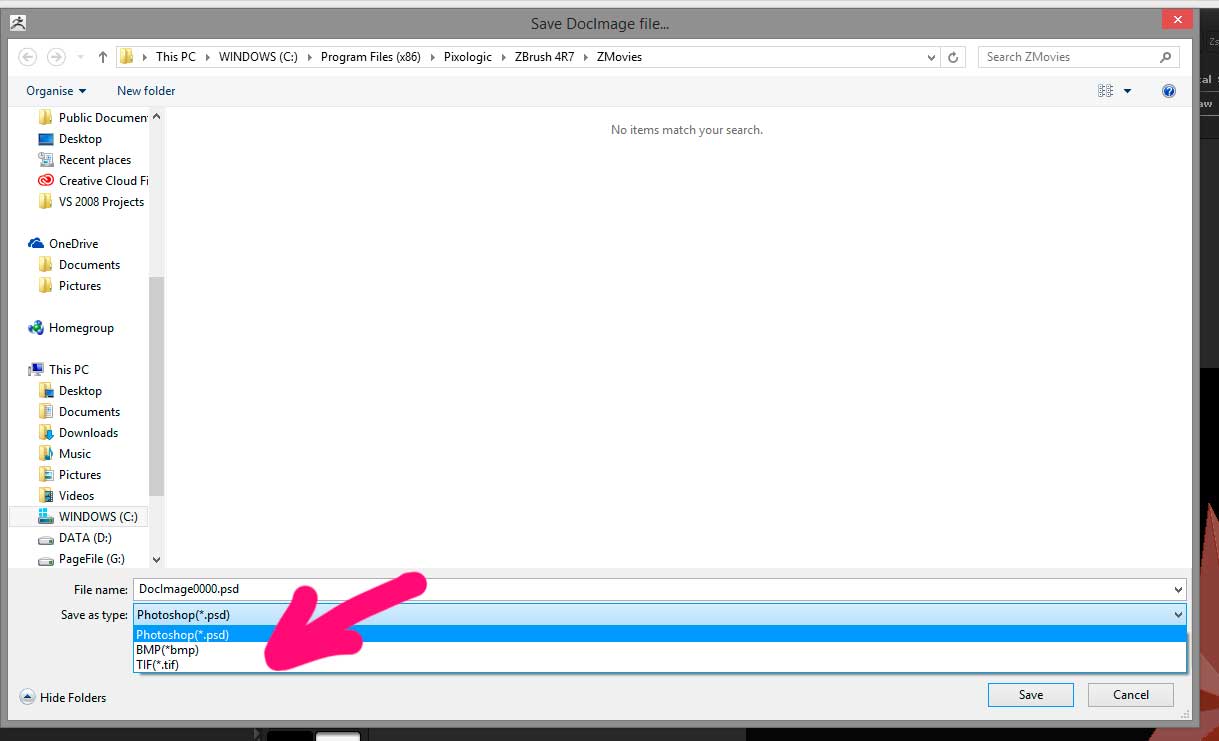
For Turntable Export, you can change the file format in the Save As dialog that you get for each render pass. Just select TIF in the dropdown list.

Attachments

Movie_tif.jpg

Again, thank you for all your help.

What I was wondering, or trying to achieve is. Is it possible to set up the timeline, let’s say with a zoom motion and blend shapes applied, then export the timeline animation as tiff files, allowing me to save out all the passes.

If it’s not possible to save out the timeline as tiff files with passes, is it possible to record the passes in each separate video. For example, for creating the alpha pass, I’m thinking I can use a flat white material with a black background, then render out the video, later to be used for composite in after effects… Would there be a way to capture the shadow and depth passes so they can also be used for composite?

Thanks.

I’m actually working on a plugin to export passes for the TimeLine. It’s very similar to the turntable one (which will be part of the plugin). Here’s a version for you to try. I think it’s fairly obvious how to use it. If you turn off all the options then you don’t get any images exported but a ZBrush movie is recorded instead.

It’s not finished, so any feedback gratefully received. :wink:

To install:

  1. Download and unzip to your Desktop.
  2. Open any folder created by the unzipping and locate the TimeLineExport_4R7.zsc file.
  3. Copy the TimeLineExport_4R7.zsc file to the ZBrush 4R7\ZStartup\ZPlugs folder. This installs the plugin for 32bit ZBrush.
  4. If you want to try in the 64bit version then also copy the TimeLineExport_4R7.zsc file to the ZBrush 4R7\ZStartup\ZPlugs64 folder but as you know 64bit TimeLine can be wonky.

Restart ZBrush and you should have a new sub-palette in the Movie palette called TimeLine Export.

HTH,

You’re amazing, I can’t thank you enough for all your help! I’m excited to jump right into it and test it out, and I will definitely keep a lookout for the official release. Many many thanks!