ZBrushCentral

Texture Resolution Issues

Hi!

I’m not a frequent poster, but I do come in and out to look at everyone’s work! I finally got around to using ZBrush for texturing and the results were awesome, but I’ve seemed to mess up somewhere along the way. I’ve gotten the texture onto my model in Lightwave, but the resolution is God-awful. The image on the left is what it looks like in Lightwave, and the image on the right is what it’s suppose to look like in ZBrush. When I looked at the resolution it was set to 1024 x 1024, and I cranked it up to 2048 x 2048 when I went to export. Is it too late to fix this?
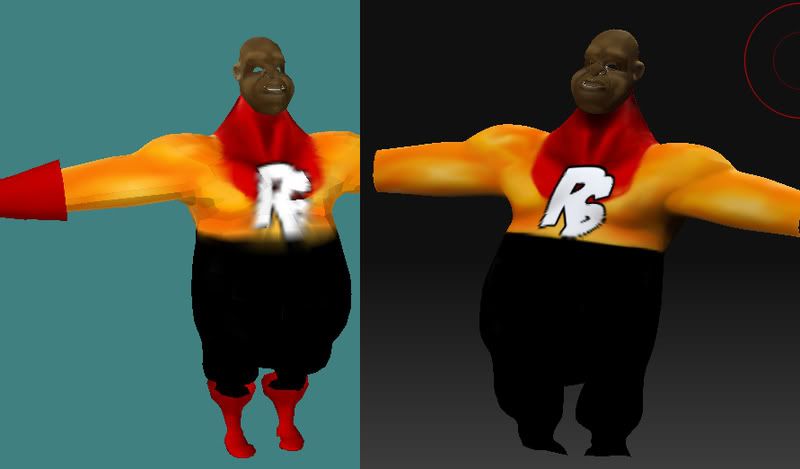
Could really use a hand here guys. Thanks. :slight_smile:

Did you polypaint your model and create a texture from that? If you did then you can create a higher resolution texture by creating a new texture first of the size you want and then pressing Col>Txr (or New from Polypaint on the Mac).

But you may also need to check your Lightwave documentation in case there is some filtering or other factor effecting the result.

I used ZApplinker. If that’s the same as Polypaint then I suppose so. :slight_smile: If not, then how would I go about increasing the resolution? Would I do so in Photoshop or could I do that in ZBrush?

Changing the resolution in Photoshop will give you a larger texture but won’t give you any more detail. It might give you a slightly better render (you might try it) but ideally you need to start in ZBrush with the texture size you want.

If you had a texture selected when you pressed the ZAppLink button then that is the size that will have been used. You need to create a new texture of the size you want first. If you had no texture selected then a dialog may have asked if you wanted to enable polygon colorize (which is polypainting). Polypainting is painting the model directly and is independent of texture resolution (though you need a high poly model for good results).

You probably need to take a look at some documentation. :slight_smile: Press the Help button under Document>ZAppLink Properties. You might also take a look at the online docs for the difference between polypainting and texture painting:

http://www.zbrush.info/docs/index.php/Texture_Painting

What does your UV map look like? The distortions that I’m seeing in the texture look suspiciously like spherical mapping with the pole being right where your major detail is. That’s a recipe for disaster, no matter what you do. If it’s what your UV mapping is like, you will want to change that mapping before you proceed.