ZBrushCentral

Texture - Polypaint - UV problem

Hi, I am very new to Zbrush yet I am in a learning phase.
I ran into a persistent issue that I cannot figure out or find an online reference to.

Platform Mac osx 10.6
Zbrush 4

In short, whenever I make “New from Polypaint” in the Texture Map window, My texture comes out strange.
As if the UVs are rotated around themselves and skewed out of place. Down under is a screenshot of an simple example.

Please bear in mind that I am new and would appreciate detailed explanation, solutions or workarounds. Thanks

Attachments
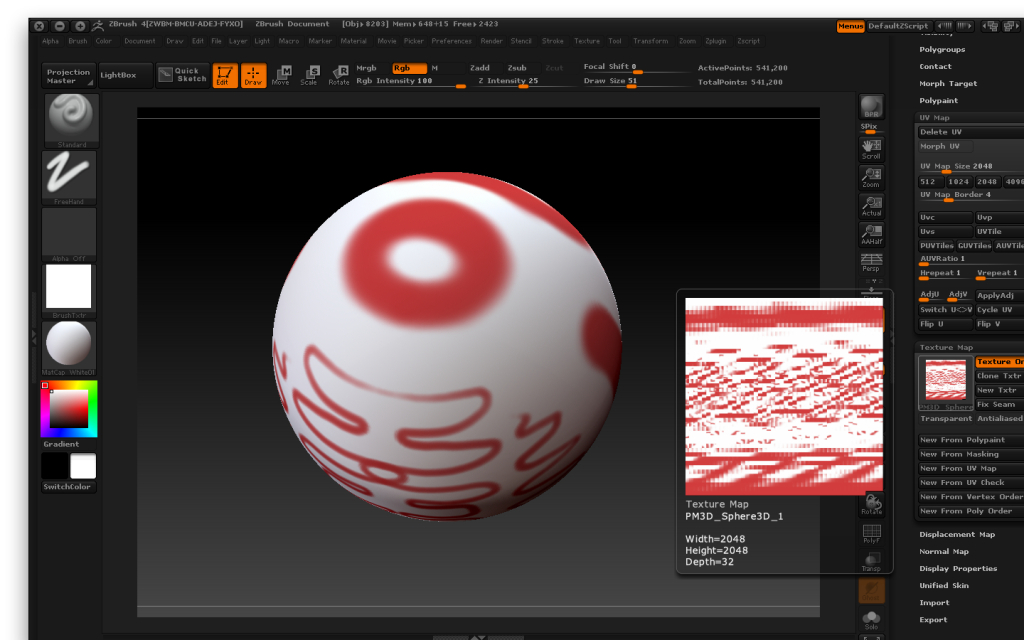
Screenshot2011-10-29at72545PM.jpg

Did you use one of the Zbrush Tiles methods (PUV, AUV, GUV?) to assign UVs? If so, then that is normal. Tile maps make efficient use of space, and are easily created, but aren’t really readable or editable in themselves.

If you want a texture map that makes more visual sense and can be edited externally, you must lay out the UVs manually with UV Master, or an external utility for doing so.

Yes, I actually pressed on AUV but that’s the only way to get the UV Maps to function on my object other wise my Polypainting does not apply to the texture at all.

If you have a reference to how to use UV master and apply Polypainting correctly on it to become a texture I would be more than grateful. The tutorials I found only explain about the UV master but no idea how to use it to create a texture from polypainting that I could use.

After you have a UV Map from UV Master, then you can go to the tools menu and use Texture Map, and click New from Polypaint. After that you can use the Clone Txtr button to copy this texture to the textures. You can then go to the Texture menu and Export this texture for use in other programs. I hope this helps.