Hey all
I’m still pretty new at this, especially the texturing aspect of things more complex than a cube or plane. So, any help with understanding in the world is going on with this thing would be most helpful.
What I have done is this:
- I assigned a MatCap that I liked
- I’ve got 3 HDSculpting Divisions (something I’ve only just started to use).
- Once I finished with the geometry I kept the HD Sculpting active on SubD 3 and began texturing. I imported the texture via the brush texture box on the left of the screen and started using the rectangle drag with RGB enabled to start putting the textures where I wanted them. I do believe this is Polypainting (i hope).
- Once I’d finished putting basic textures around in the manner mentioned above I then chose a simple brush to draw some details on such as veins and little scars etc.
- Time for bed, I saved the tool out.
- Home from work, load the tool and now it looks like this mess below

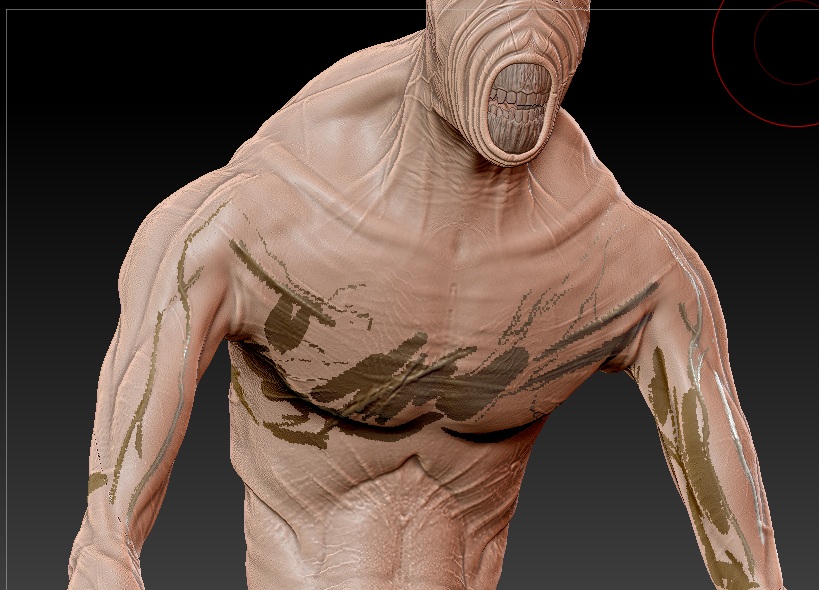

Now, I’ve tried activating the HDSculpting SubD level that i was working on again, no change. Changed the MatCap, no change. Trying to paint over it, no change. Basically I just want to remove the polypainting from the model completely but I can’t find out how. I’ve been googling all evening and over lunch at work but can’t find anything of use.
Could anyone shed some light on this for me please? I’m quite proud of the model but don’t want things turning bad because of a screwed up texture painting.
