ZBrushCentral

Texture Mapping Issue - Prism Effect

I apologize if this has be covered before. I tried doing several searches but wasn’t sure what to call the problem I’m having. Specifically, my texture and normal maps that I’ve generated in Zbrush are showing a “prism” effect…, that is the polygons in the model are showing through to the textures. Any idea why this is happening and how to fix it? I’m using Zbrush 3.5 r3. I’ll post an image of the color map below.

Thanks in advance,

John Anderson

Attachments
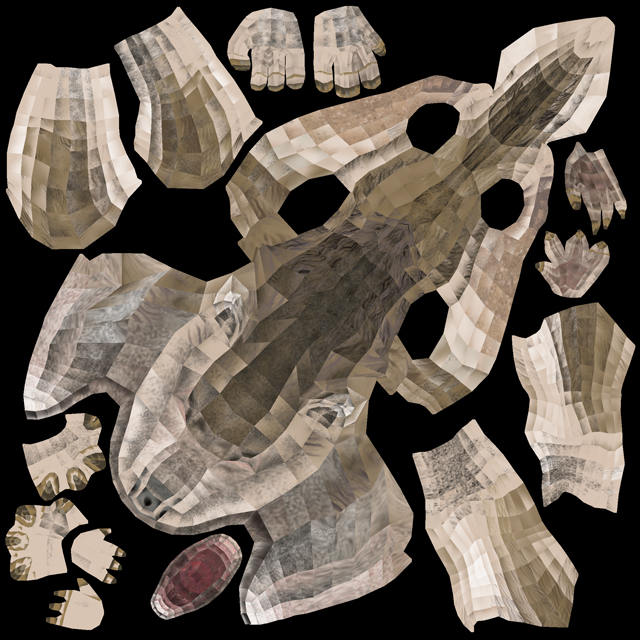
WerewolfColor_sm.jpg

Im not 100% sure… but you might wanna reconsider your unwrapping workflow. Im not sure how you unwrapped your model (In what program), but it seem that your uv’s have been screwed in the process. This is often happening due to vertex order problem zbrush seem to have with some specific applications…

I can’t give you an exact answer, but you might be able to solve the problem, by unwrapping your mesh in uvlayout, since it keeps the vertex order intact… I’ve had the same problem, when i was trying to unwrap in max… and uvlayout helped me out alot…

I hope it helped…

best of luck with the problem

Thanks for the help Vindicate. Here’s an update.

I fixed the problem. When I exported from 3DS Max, I forgot to collapse the modifier stack (Unwrap UVW). Amateur mistake, I know. I collapsed the stack, converted to editable poly and then exported as an .OBJ. I then re-imported the .OBJ at the lowest subdivision level in Zbrush and voila! All fixed… for now. I’m keeping my fingers crossed, but at least my mapping is working.

Thanks again Vindicate. I hoped this thread helps someone else in the future.

– John

Np dude, well it wasn’t really a help :D… im happy you figured it out… :slight_smile: gl with the project