ZBrushCentral

Texture CropandFill Issues [Answered]

I am having some curious issues with the Texture:CropAndfill. I was using it fine yesterday and now I am getting different results.

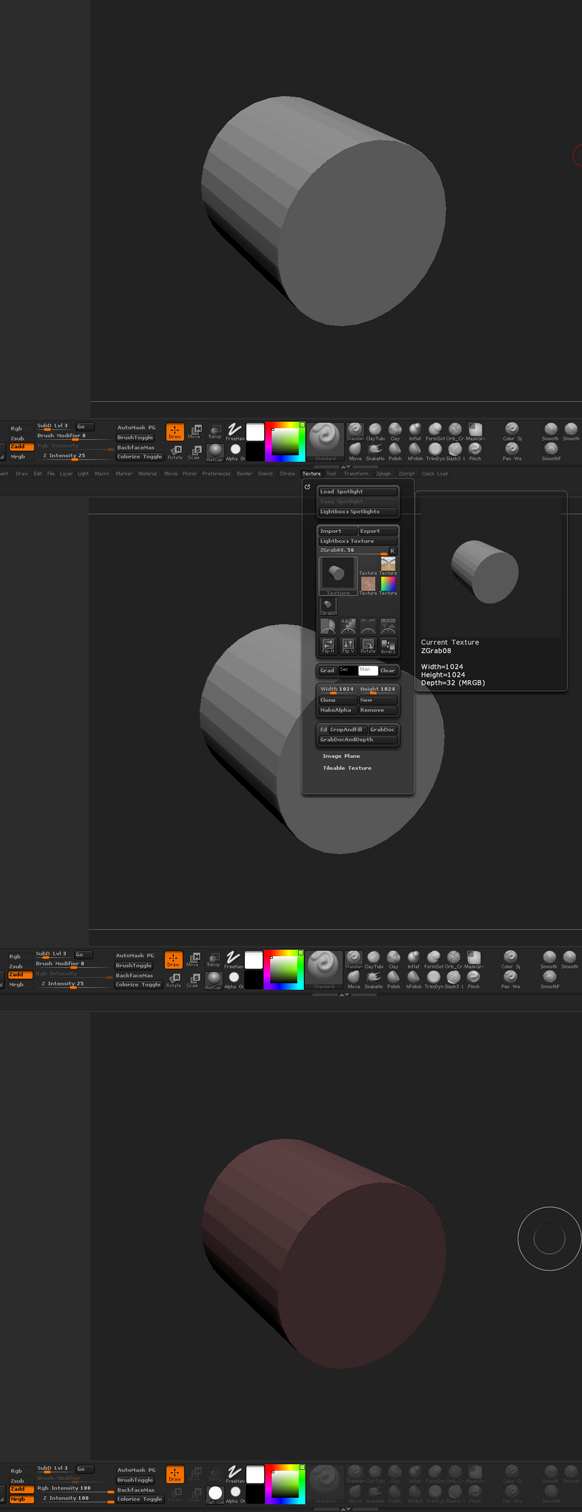
  • I am grabbing the canvas with Texture:GrabDoc. You can see in the second image that the preview looks correct.
  • I change the material to the Flat Color and then Press CropAndFill using the texture I just made with the GrabDoc.
  • The image is now red?!?! Where is that red coming from?! You’ll notice that I have the flat material and white selected.

I can’t figure it out. I checked all the usual suspects. Lights, Materials, Color. If I use the Flat Color material and use one of the stock ZB textures it looks fine. Just like the preview.

Attachments
grabdoc.jpg

I’ve no idea what’s happening here. Can you post the project?

Sure. Here is a project.

However it’s on any mesh I try not just this project. I tried initializing Zbrush too.

Thanks for any help Marcus.

So some projects do this and some don’t. I loaded up the “Default Cube” project from Lightbox and it works fine. I open one of the mannequin projects and it has this red hue. STRANGEST thing…

I thought my startup doc might be borked so I saved over it with the Default Cube one that worked correctly. Restarted ZBrush and it still produces the same red hue!

I found the problem - for some reason turning off Wax Preview in the Render Properties will mean that the next GrabDoc operation embeds the Red Wax material, turning the image red. I need to investigate further…