ZBrushCentral

Technique help: Sculpting like Chainsaw wood cut

I have a problem i need some help on. Im trying to sculpt a wood statue that has then been carved into like with a Chisel or the more extreme chainsaw version.

I have tried some of the planar brushes to get a some carved areas then tried using some stamps to get wood grain etc but to be honest its just all coming out wrong.

so im hoping that maybe someone has had some experience with trying to do the same thing and would not mind sharing.

I would post some images but i cant as the sculpt is under copyright to the company im working for.

Thanks in advance.

Some reference of what im trying to get to:

Attachments
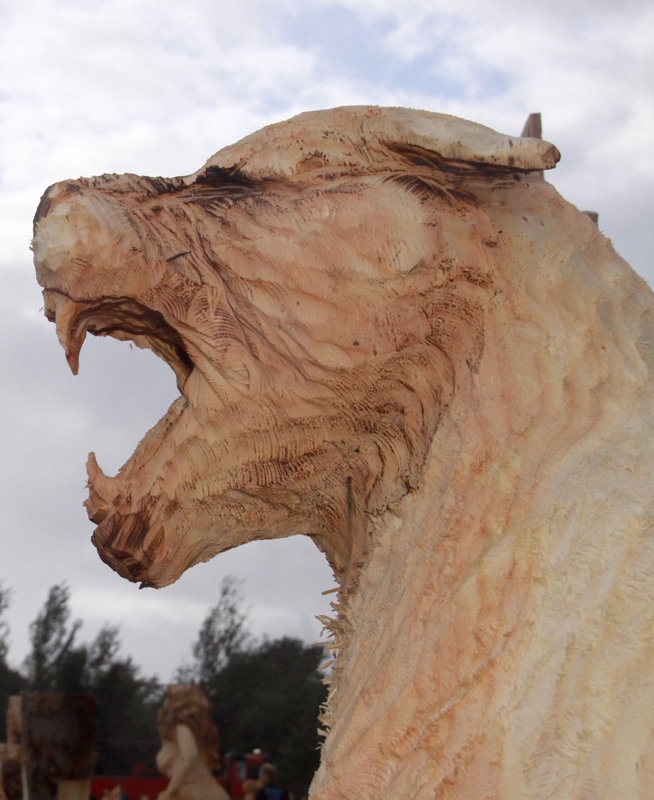
IMG_1941-2400x1600a.jpg

Other than planer brushes and polish brushes. You might try making a better custom alpha if its not working.

hmm. This is a pretty random idea but here it goes:
1)
Take your base sculpt subdiv it to level 2 and store a morph target.

Take a copy of your base mesh and subdivide it to a highres model without smoothing it.Apply a Surface Noise and step down one or two levels and delete the higher ones.

  1. Scale the object up a tiny little bit, export it and import it into your morph target ( 1) ) and extract a displacement map at level 1 or 2 with your target being your original mesh.

This will basically give you a displacement map that imitates the faceted look. Apply this displacement map to your original mesh at a higher subdiv. Smooth ones more to even out the facets a little bit and start sculpting some more. Will at least give you some faceted look without much work.

Like I said, random idea :slight_smile: