ZBrushCentral

symmetry question

Hi… I’m in a pickle here
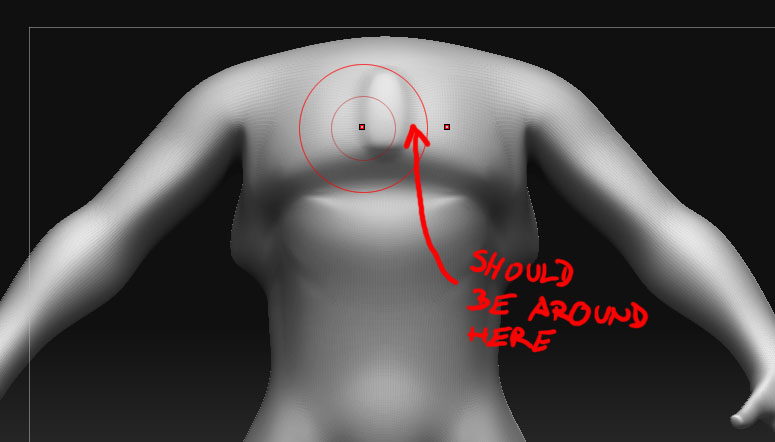
I made the low poly mesh in 3Ds max, mirrored it, mapped it and whatnot, then I changed one side of the mesh just a little. Now when I export it to ZB the symmery isn’t working as it should. Here is the example:
[01a.jpg]02.jpg
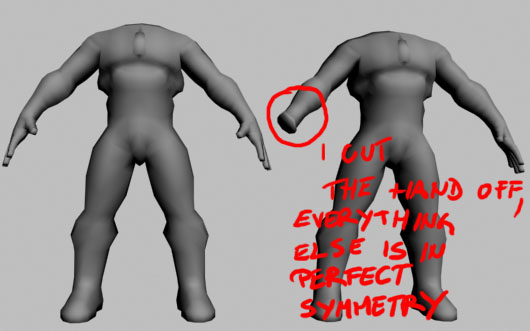
Is there a way for symmetry to work on those parts that are identical, or do I have to make this some other way I?
This is rather important so if anybody can help I’d be more than grateful.

You could try pressing Tool>Deformation>Unify.

Or Transform>S.Pivot

the issue is that when you brought it back into zbrush it tried to find the objects center, which to zbrush is not offset because you cut off the hand, not what you and i know as the center. if you look in your tool: preview window you will see it is not centered, you can either manually move it back by using the offset deformation or transpose. your other option is to try poseable symmetry which may work or not.

you could just import the complete body so the sym still works, then hide the extra hand, and hit “delete hidden geo” in the geo panel. Zbrush will keep the original center of the object, and you now only have one hand.

If it has to be capped, you can keep the extra hand on the original obj, cap the end of the arm, and then delete the extra hand the same way, but you’ll now have a cap on the arm.

I tried the offset deformation and it worked
Thank you very much guys