ZBrushCentral

Symmetry/pivot point issues

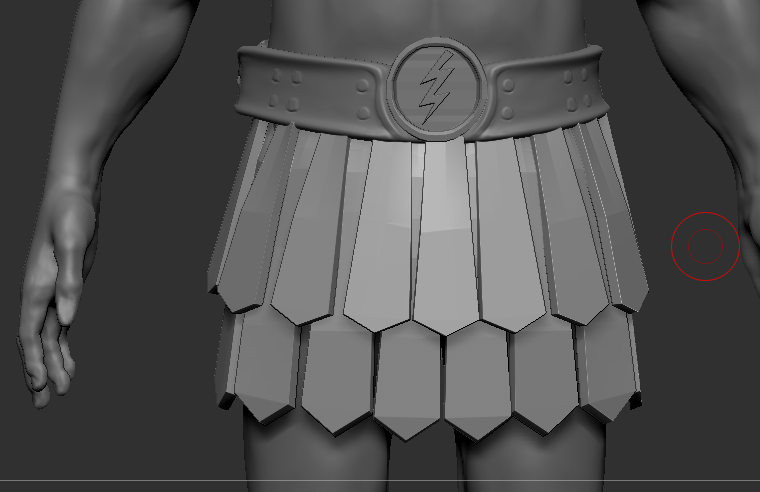
I’m making a skirt and as you can see it’s not symmetrical, the flap that is slightly to the right of the lightning bolt is suppose to be directly under the lightning bolt. All other subtools are realigned perfectly. I can’t figure out how to make this skirt perfectly symmetrical and it drives me crazy. Placing all those flaps by hand was a pain and now it doesn’t align. Any ideas on how to deal with this? :cry:

Attachments

symm.png

Well, normally you can force geometric symmetry on an object by using Tool > Geometry >Modify Geometry > Mirror and weld. However, I think in this case it would result in some unwelcome fusion along the center, but you can try it. Make sure L.Sym is off so it mirrors along the tool axis, and not the subtool’s. You will probably have to delete that center piece, and replace it after the remaining skirt is mirrored, otherwise it will be deformed by the mirror and weld.

Note: M&W only works in one direction, so if the side you want to mirror is on the wrong side, first flip the subtool using a Tool> Deformation> Mirror X operation.

You may also get unwelcome fusion on those two underlying strips, if either of them cross the tool’s center axis. You may have to replace or reposition these as well.

Life saver, thought I would have to export it and mess around with in blender, phew.