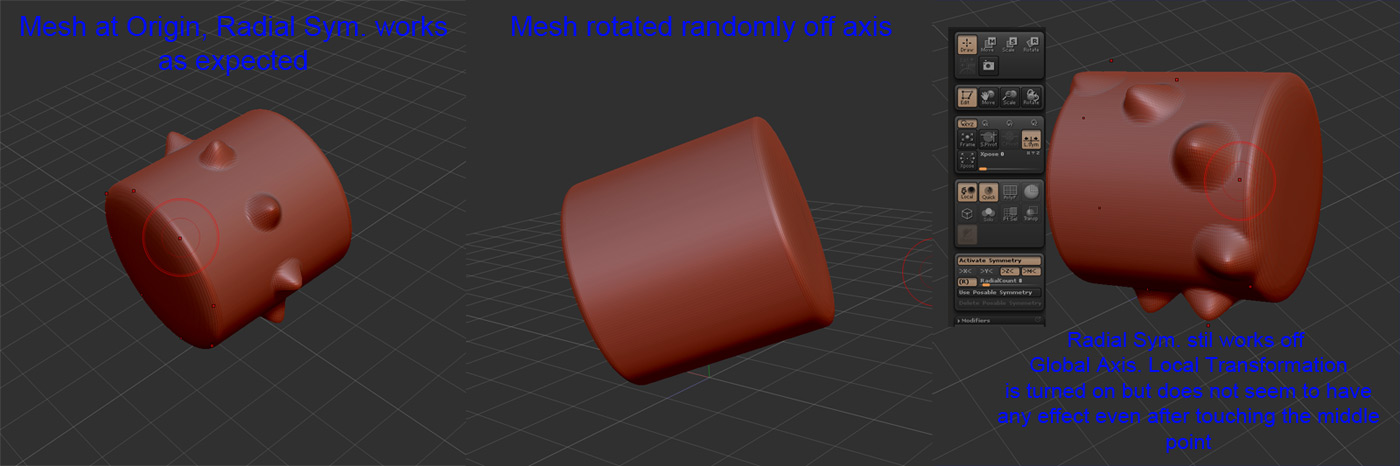
Thats not quite how local symmetry works. Dy default, symmetry is based on the center of the top most subtool. Local symmetry instead uses the center of the selected subtool, but still uses the axes of the zbrush worldspace. It’s useful for working on subtools that might be globally symmetrical in themselves, but not symmetrical in respect to your main subtool. If you rotate that object off axis in the ZB worldspace, it’s no longer symmetrical in the worldspace coordinates. Zbrush does not store a mesh’s local axes. So you can “move” a subtool anywhere you want and still work symmetrically, but need to do your editing before you “pose” the object out of symmetry by rotating off axis. As long as your rotation is constrained to one of the axes, you’ll still have symmetry along that axis.
In some specific situations, poseable symmetry can be used to work with symmetry on two sides of a an otherwise symmetrical object that has been posed out of symmetry. Not applicable in this situation, I don’t think, sadly.
[edit] I tried to keep my language as consistent as possible, because Zbrush’s internal documentaion’s use of the term “global” can be confusing, but I think you get the idea.