ZBrushCentral

Symmetry malfunction...?

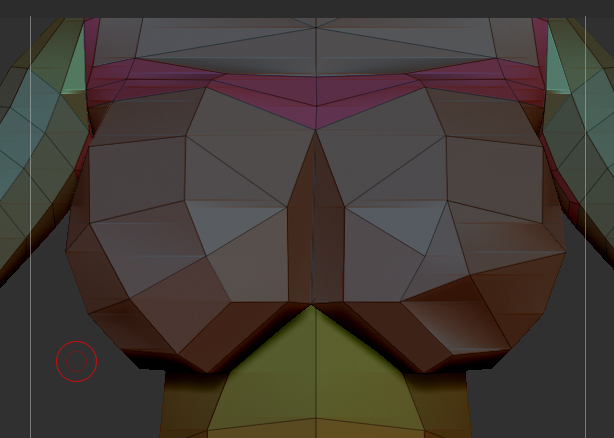
Hey all! Just started learning Zbrush and Zspheres 3 days ago, and working on my first model with it. I have run into a problem, however, and hopefully someone can point me in the right direction, because I haven’t found a similar problem like it, or at least one that couldn’t be fixed easily (and I tried what few options I know about). The image is attached…

Typical nondescript female model. The problem is with the breasts. Her right breast (the one the cursor is by) came out how i wanted, but her left has a weird twist on it. The center of the right breast almost forms a “+” shape, but the center of the left one looks like it somehow got canted sideways 45 degrees, and instead of a “+”, it looks like an “X”.
The entire time I’ve been working on this model, I’ve had symmetry turned on, and I was able to fix a few similar problems by masking off the good side and applying smart reSym (a strange twist of the left leg/foot and a misshapen buttock, also strangely on her left side).

If anyone can help me, it would be most appreciated, and I ask that very basic/beginner/nubbish moron terms be used, since like I said, I’m only 3 days into the program :smiley:

Attachments

femprob.jpg

Don’t know if you’ve figured this out or not. I’m assuming you built the model from zspheres. I don’t know why you would have a different poly layout from one side of your model to the next. Did you have symmetry on when you built the zspheres? I think 3.5 handles zspheres a little differently than older versions and actively figures out how to adjust the polys to make a clean mesh, so I can see getting a different result w/o symmetry. This error would be really easy to fix using an external 3D editor like Max or Maya. Can you provide any more information about your work flow?

Yeah, I had symmetry on the whole time, and still the left leg was rotated around about 40 degrees (making the upper leg look like a corkscrew), the left buttock had a couple extra knobs, and the thing with the breast just suddenly appeared while I was fixing the size/shape. I gave a friend an .obj of it to mess with in Max since he’s much more skilled than I at modeling. I watched him fix the aberrant vertices with my own eyes, then when I imported it back into Zbrush, all of my squares became triangles, the head was horribly deformed (looking almost Giger-ish), and the pelvic/buttock/vaginal area looked like a drunk 3-year-old played “Pin the Poly”…

I’m taking a break for a couple days (since I’ve literally spent since Thursday night on this model, having to learn Zbrush the whole way) and then taking another crack at it. Almost convinced God is trying to remind me I’m not a 3D modeler… but I’m stubborn, so I’m not giving up…

Well, you’ll have to extend your time horizon a little. If this stuff was easy everyone would do it. As a more experienced 3D modeler, I would like to make a couple of recommendations. I can understand the impulse to do an entire figure, but you are probably going to make 1000 mistakes, and each one is going to feed into the next. It will take no time for the thing to really fall apart. Rather than set yourself up for epic fail, try this: Don’t get attached to anything you do. Start off with the understanding that it isn’t going to look the way you want it to for a while, and know when to throw in the towel and start a new model. I’m speaking from experience. I have wasted months trying to solve technical issues on crappy models. I should have noted the place where I went wrong and started a new model. The other piece of advice I have is start WAY smaller. Try modeling a nose or a hand or an ear. It’s plenty challenging for a beginner. Then do it again. Keep your projects short and specific. Explore different brushes. Try to model a piece of fabric. Once you have a handful of smaller projects you can begin to tackle larger ones. Each part of a model will have unique challenges, and you should have experience with a variety of different scenarios without the baggage of a big model. The last thing I would mention is that as you have already discovered, you need to learn max or maya’s poly modeling tools (at the very least) as well. Good luck!