ZBrushCentral

Symmetry import problem

OK, I imported an obj model into Zbrush but when I activated X symmetry, all the points were offset. The thing is that the model is uneven and I am guessing that Zbrush imported the obj and centred it based on the object’s volume rather than my original pivot point.

So, I was wondering how I can import an OBJ so that it retains my original pivot point (so that X symmetry is correct because some parts of my model are still symmetrical)?

I know that I can add geometry to the original mesh to ‘balance’ it out so X symmetry is correct but I would prefer just it import the mesh ‘as is’ and have things work correctly.

Thanks.

Cheers,
Revanto :stuck_out_tongue:

This sort of question would really help if there was a picture so we could see what you’re dealing with. Here are a couple thoughts, though:

1) Try turning on Posable Symmetry in the Transform palette.
2) Alternatively, hide the parts that aren’t symmetrical and then use Transform>S.Pivot. This will set the pivot point and center of symmetry to be the center of the visible mesh.

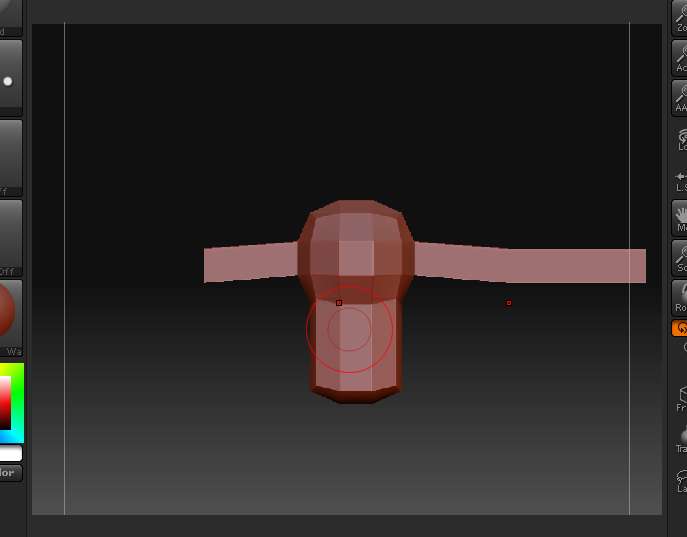
This is just a test objest I quickly made. The object exported was centred down the middle of the sphere shape but Zbrush seems to auto-centre objects to provide a new pivot point and that puts symmetry out of whack. As you can see from the highlighted points, that’s not the symmetry I was expecting.

Rev.

Attachments

symm-error.jpg

Simply Ctrl+Shift+Click on the ZSphere shape (since it’s probably a different polygroup from the rest). This will hide the rest of the model. Then click Transform>S.Pivot to set the symmetry to be the center of the visible mesh.

It’s not a Zsphere mesh, just a normal imported mesh. I only used the term ‘sphere’ to denote a visual basepoint. Sorry for the mistake in terminology.

So, if I pick a central mesh mass and isolate it them use ‘S.pivot’ then it should centre the mesh according to how I want it, correct?

All I need to do is make sure that the polygons are grouped correctly to obtain that correct symmetry.

Well, I hope it works.

Rev. :stuck_out_tongue:

Thank you, Aurick, that worked!

All I did was create a polygrouping of symmetrical mesh then I had the rest. Then I used S.Pivot from the transform palette to set the pivot exactly where I wanted it to be. I could then unhide my mesh and easily sculpt with the X symmetry on.

Cheers,
Revanto :stuck_out_tongue: