ZBrushCentral

Symmetry and Mesh Alignment

Hi, this is my first thread here on zBrush Central… I need help!

I’ve been trying to learn how to zBrush for a year now and I feel pretty confident I can pull out an interesting model… The problem is this:

http://i.imgur.com/IHpGT6i.png

Dabbling with transformations, I might have translated the base model without noticing (consequently building up the whole model wrongly). Right when I decided to Mirror and Weld a strip in the neck area (you can even see the curve of the CurveStrapSnap) I deactivated Local Symmetry and… I ended up with a seemingly distorted symmetry.
My question is, how can I align my model back on the origin (0 on X Axis)? I’ve tried Transform>Move>Info but it doesn’t seem to work.
I’m not afraid to loose my CurveStrapSnap subtools (I’ve made quite a few but they’re not so important atm, not worried about those), but I really need to put my model back in place. We all know how odd symmetry isn’t healthy!

Attachments
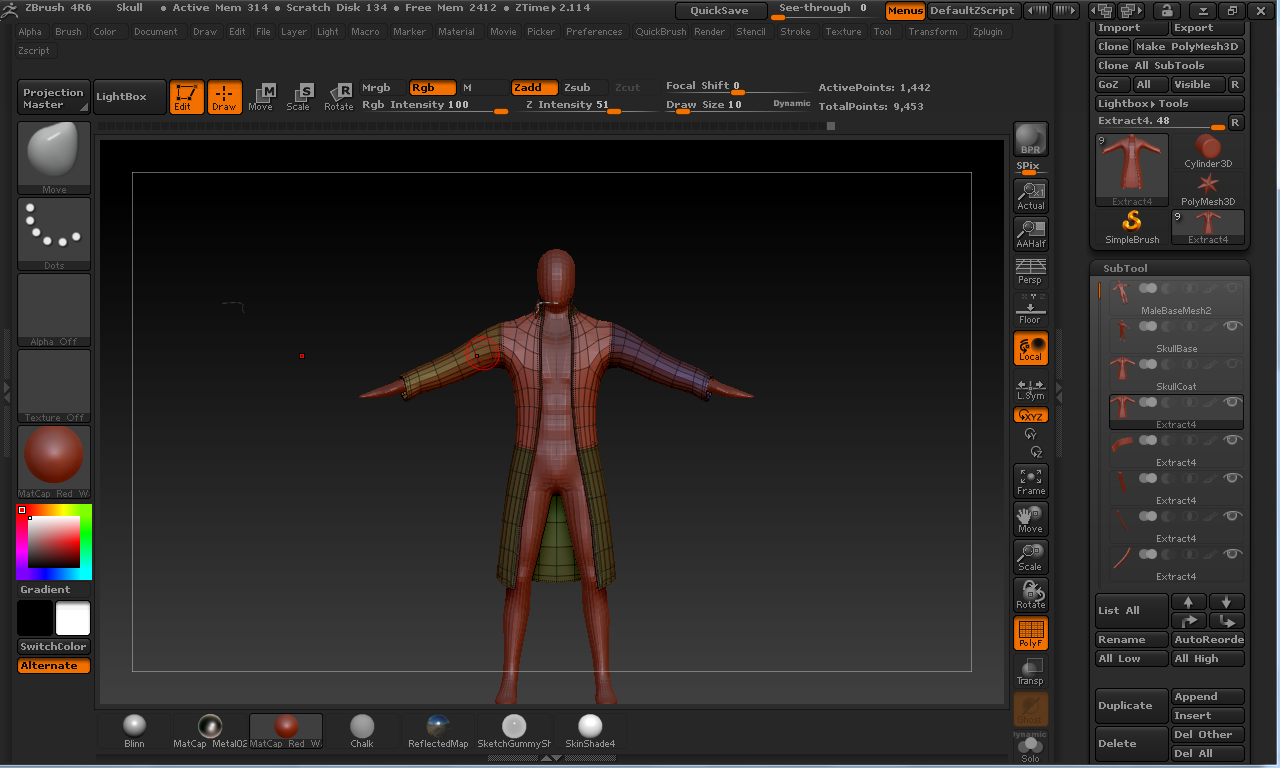
IHpGT6i.png

  1. With your top subtool selected, and everything on the lowest SDiv level, go to “Zplugin > Transpose Master” and click “TPoseMesh” button. This will temporarily join everything together.

  2. Go to “Tool > Deformation” and click “Unify” button. This will put it back on center.

  3. Go to “Zplugin > Transpose Master” and click “TPose > SubT” button. This will seperate everything again.

ps: there is an update for 4R6. Go to “Zplugin > Auto Update” and click “Check new updates” button. This is just a short update and not a complete install and will update your version to 4R6 P2.

Thanks a lot, I’ll try that out

Uhm, no, it does not work. TPoseMesh and Unify do their work, but it puts everything back in place when I click TPose > SubT. It behaves normally with all other Deformations (Size, Rotation etc…)

Oh and, thanks for pointing out the update, done in no time :smiley: