Hi guys, having one noob question, i accidantly switched on somehow the brush/panting axis, and its kind of disturbing when sculpting, can you please tell me any way to turn them off? Many thanks in advance!
Attachments
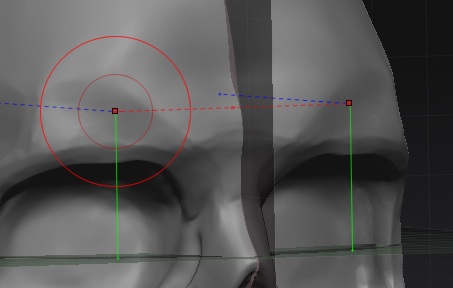
Hi guys, having one noob question, i accidantly switched on somehow the brush/panting axis, and its kind of disturbing when sculpting, can you please tell me any way to turn them off? Many thanks in advance!
You have the Floor Grids showing. If you want to turn those off, just turn off the Floor button on the right of the interface (Shift+P). If it’s just the projection lines you want to turn off then you need to turn off the PLine button in the relevant section in the Draw palette - Front-Back, Top-Bottom, Left-Right (there’s a PLine button for each).
See here for more info:
http://docs.pixologic.com/reference-guide/draw/floor-grid/
Thank you very much!