ZBrushCentral

surface noise in zbrush 3.5

hello!

first of all: i already thank you for zbrush 3.5, pixologic… its an amazing piece of software, thats for sure!

i’ve a question about the new surface noise feature in 3.5:
how is the noise projected onto the surface?
is it uv depending? would be kind of strange…
but i can’t really think of anything else.

i wondered because i saw the video about surface noise in the zclassroom, where this example is shown, where some stretching of the noise can be seen.
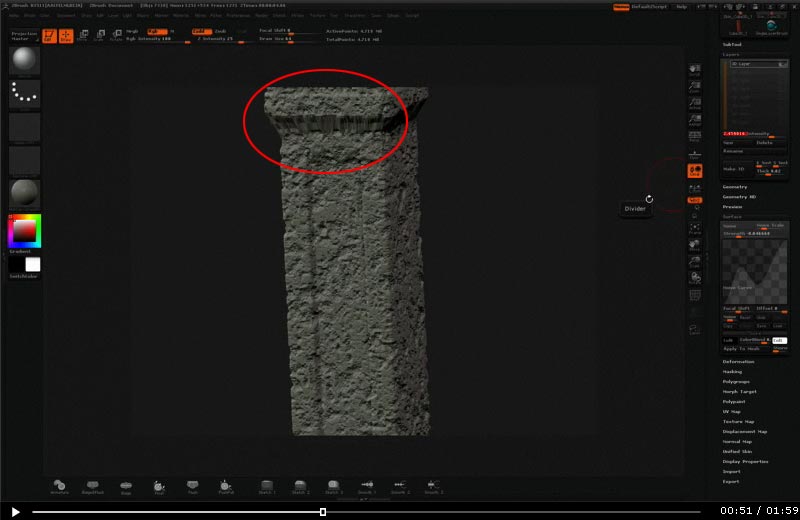
surf_noise_01.jpg

i would like to know how it comes to this :slight_smile:

thanks!
dave

Yeah, that stretching is not good. :cry: I would have thought the surface noise would have been procedural and not UV dependant as with procedural noise you don’t get stretching. Really glad you saw this?
well… i think, first, before applying its procedural, but then, with the project noise button it gets, as it says projected. but my thought would be that i would need to set some options HOW it gets projected… uvs, specical, automatic, planar…?
would not be that great if i would have to have an nice uv layout to use it nicely, because in my workflow the uvs are layed out after almost all sculpting is done.

but maybe its all totally different…? :wink:

I would not worry about it. The noise function seems to be a 3D procedural and will map perfectly to any shape, no UVs needed. The stretching you are seeing is from the noise projected to geometry and there simply was not enough polygons in that area, nothing to do with the UVs.

Ah! Yep, that Sounds reasonable… Great to Know… Thanks!

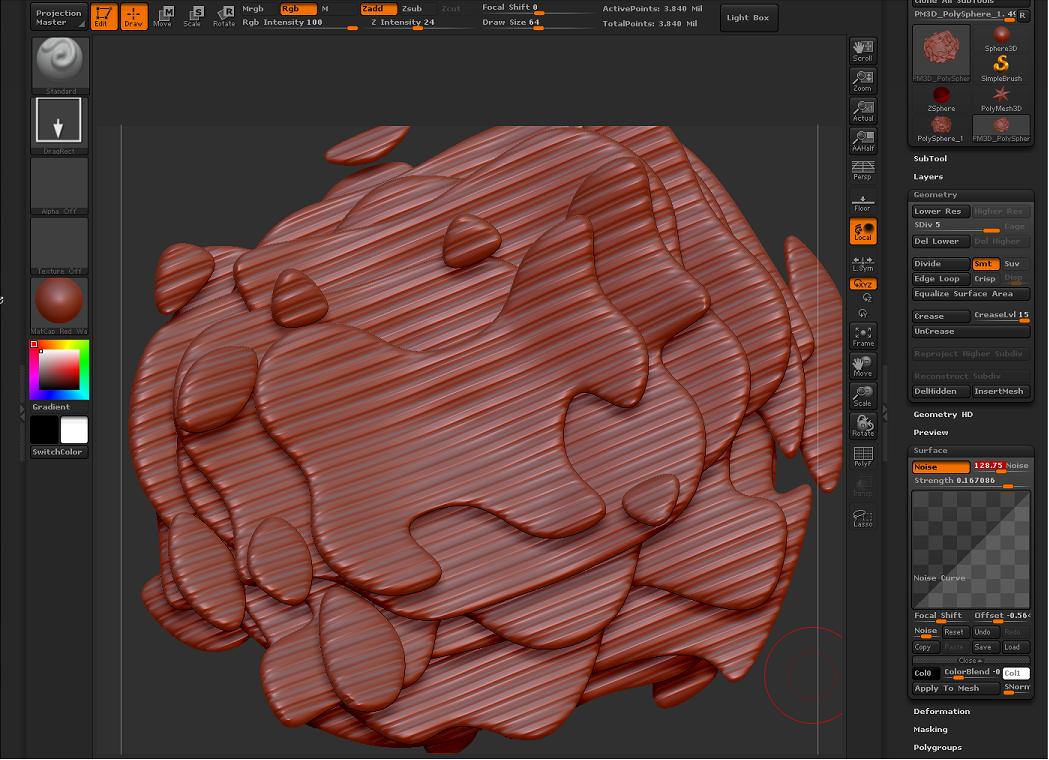
I’m having my own issue with noise today, and was wondering if anyone else had encountered this before.

Basically, settings are the same as I’ve used to generate “standard” noise on other models, but on this one, I get pinstripes.

Probably just missing something simple…brain doesn’t seem to be working too well today.

Attachments

Untitled.jpg

.

I have the same glitches like in Post#6 - stetched lines in one narrow object’s part instead of uniform noise. Can anybody explain what wrong? Why the same noise preferences works so differently for different objects?

PS. Just found that issue depends on object’s scale. But how i can use surface noise for large objects? Please help, it’s very important for my current project. thanks

Yep. It’s weird, I get this problem if my object is a little off center. If you press “unify”, it will fix this, but what’s the point when I have to totally reposition the object to get the right results.

Hello

Can you try a test for me please. Click on this subtool and go to Deformation>Unify.

How put the surface noise on. Is it good? If it is that is because the mesh you are playing with is HUGE!!! You will have to make the scale of the mesh smaller.

Paul

Totally agree, Unify works fine. But what if objects must be so huge. I made my base mesh in max. With units setup corresponding our engine (1 unit=0.01 meters). Model’s size with this setup = 5 meter. And it’s too big for zbrush. What to do? Only way i see is sculpt smaller version of the model and scale low-poly after that. But it doesn’t efficiently for adding some details to finished model. Thanks.

I found not bad solution of the noise/scale problem. Model can be scaled when exported (imported) from max using corresponding parameter (scale). I’ve never used it before, bun now it can be useful.

Yes you could do that as well but make sure to be careful with it. If you generate the maps off the small tool and then apply them to the larger tool you will have to do some setting changes in MAX but that may work as well.

I know the displacement map will need a lot of setting changes. A 32BIT will have the scale embed into the file so I would probably not use 32BIT if you are going to experiment with the map workflow.

For the export options just right down all of the original scale and offset and then yes you will be able to match it up fine.

Paul