ZBrushCentral

Subtools with Different Materials - How?

Hi, I want to create 2 ZSpheres as different subtools. One RedWax and One Semi-transparent. How do I make each Subtool have a separate material color?

I have created a ZSphere and it using the Red Wax material. Now I want to create another ZSphere that is larger and has a transparent material but when I click append and change the material they both take on the same material. How do I make each Subtool have a separate material?
turn on M or MRGB and select the material you want to fill the subtool with.

color.fill object

repeat as needed.

Thanks. Does not seem to work with ZSpheres though.

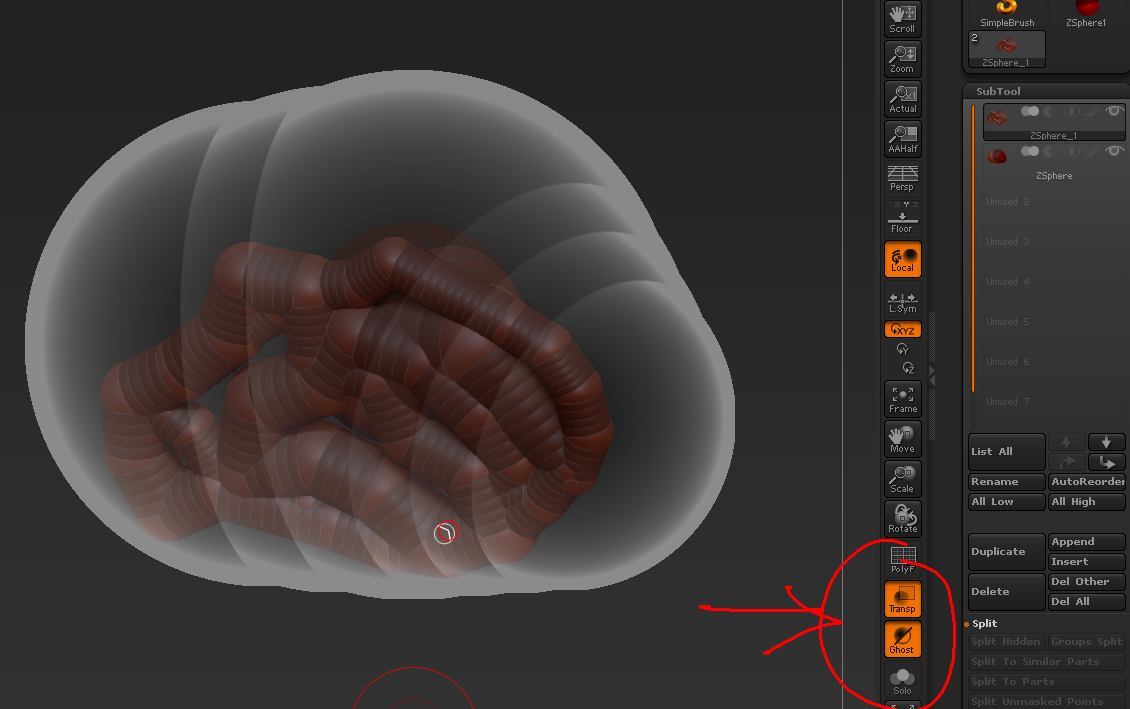
What I am trying to do is create a brain using ZSpheres and then have a larger outer shell (larger ZSphere) around it. I want to be able to sculpt the brain while still seeing the outer shell so I can know how close to sculpt to the outer shell. I hope this makes sense.

I’m sure it’s a common procedure but I have no idea how to do it. What would the best way to do this?

All you need to do is turn on Ghost Transpsarency (turn on Transp and Ghost switches in the Transform palette or bottom right of UI). Then the unselected subtools will be rendered as partially transparent.

Attachments

GhostTransp.jpg