Hya Everyone!
Hya Zber!!
Does anyone know of alternitive tutorials or anything explaining subtools and how they work and why?
I still cannot do much with them and what I can do is almost 100% unreliable.
Cheers! and THANK YOU!
Mealea
Hya Everyone!
Hya Zber!!
Does anyone know of alternitive tutorials or anything explaining subtools and how they work and why?
I still cannot do much with them and what I can do is almost 100% unreliable.
Cheers! and THANK YOU!
Mealea
Hya Mealea,
In a nutshell, the more subtools you have for a given project, the more detail you will attain on that project. Cutting it up into more pieces will allow you to have more polygons per piece.
Here are some links to get you started. I hope they will help you to understand subtools a bit more.
Subtools from the Info Wiki
Subtool palette by cannedmushrooms
Subtools by cannedmushrooms
Thanks Zber, I understand all to clearly what they are for, they just do not work correctly and I want to figure out what I am doing wrong. Part of it looks like the relationship between the tool pallet and the subtool pallet, and my figuring that when I make a new object for example that all the other ones I made are not going to vanish, get renamed, or get deleted for no apparent reason. In the second video I found my self cringing and waiting for all his work to vanish, but at the end he poped it back out of the tool pallet somehow.
I have been able to do the same thing some times but usually things are just gone, if they are not gone they have turned into something unexpected and there are more of them then I created in the first place, very odd and very confusing.
Anyhow I will keep at it, I have been losing the fight with these bloody things for months now and I am not about to give up now!
(the Wiki thing is the most confusing, I have no desire to hide things, all I want is for them to stop vanishing, then I will go from there I guess)
GRIN!
Cheers!
Mealea
Thanks Doug, I have seen that and it will be interesting if I can get these blasted things to stay put!
Thanks!
If you can give a specific example - in a step by step - of what you are doing and what goes wrong then we’ll be better able to say where you’re going wrong.
Well… ok I will do that in the most simple form
This makes me nicely insane and I begin to describe to my computer things about how deep the ocean is in various places and how much certain bits of metal like to react with salt water.
I hope this makes some sense, its hard to describe this stuff because at most steps more than one thing can happen, sometimes the fill object button does nothing, sometimes it works, and sometimes it fills things other then what I’m trying to fill for example so with that many possibility from just one button it gets tricky.
Its like that random line that appears from the upper right while sculpting, it just happens at random, but in that case far less often.
I suppose what I should also ask is why if I have a tool selected, can I not simply pick out a color, texture and or materiel and be done with it, why all the stuff with filling?
Its a seemingly extra step to me and one that seems prone to failing…
The reason I asked about alternative tutorials is that I have to be missing something, people here are working with hundreds of subtools and I cant do much more then add eyes, and god help me if I make them blue and then want brown or green. Maybe if I see enough examples something will click and I will understand what the heck is happening.
Sorry this is so long and thanks for the help, thank you very much in fact.
Cheers,
Mealea
OK Mealea, I think I know where all your frustration is coming from.
First of all, appending tools into the Subtool palette. Make sure the Tool is already a Polymesh3D before you append it into the Subtool palette. Never make anything a PM3D (like you did with the appended ZSphere) while you have other subtools. They will disappear from the Subtool palette, but…it will still be in the Tool palette and not lost (see post#12 below). As a sidenote, even though you can append a primitive to an existing PM3D and ZBrush labels the appended primitive as a PM3D, you will still have problems with it down the road. So, rule #1, Make anything you append a PM3D before you append it as a subtool. If you append a ZSphere, it should only be for the purpose of Retopologizing.
Whenever you make an Adaptive Skin or a Unified Skin, ZBrush will always label it with a “Skin” prefix. i.e “Skin_ZSphere_1” to make it easy to find in the Tool palette. EDIT: (See beta_channel’s post#10 below). Also, it probably wouldn’t hurt to rename it to something you can easily identify.
Now, “attempting to recolor subtools”, If you want individual subtools to have thier own color and/or material, you will have to “Fill” them first. For example,
Now that Material and color will stay put for that subtool and will not change when you select a different Material and/or color. It will fill the currently selected subtool only. Repeat the same thing with each subsequent subtool in the Subtool palette if you want a different material/color for each subtool. If you decide later that you don’t like the Material/color that you filled the subtool with, just refill it with a different Material/color following the same steps as above.
Practice these things for now and let me know how you get along. Remember, never click ‘Make PolyMesh3D’ button when you have more than 1 subtool in the Subtool palette if you don’t want the rest of the subtools disappearaing
Cheers Mealea.
Also, regarding filling with color/material, if you have a bunch of subtools and you want them to all have the same material/color, use the ‘Fill’ option in Subtool Master. It will fill all the visible subtools on the canvas at the same time. Just turn eye icon off for any subtools you don’t want filled.
zber2 - adaptive skins and unified skins do not need to have PM3D applied to them. This is only needed with “start-up 3D meshes”…basically anything that has the option for “initialize” That button is used simply to tell zbrush to throw out the mathematical algorithm and convert that into a sculpting mesh.
I was trying to simplify things for Mealea and get her to follow a habit so her subtools are not always dissapearing but thanks for the addendum.
Also, now that you mention it, wouldn’t it be better if Pixologic put the ‘Make PloyMesh3D’ button in the ‘Initialize’ submenu instead of the ‘Tool’ palette?
Pictorial explanation of post#8 Subtool and Tool palette’s
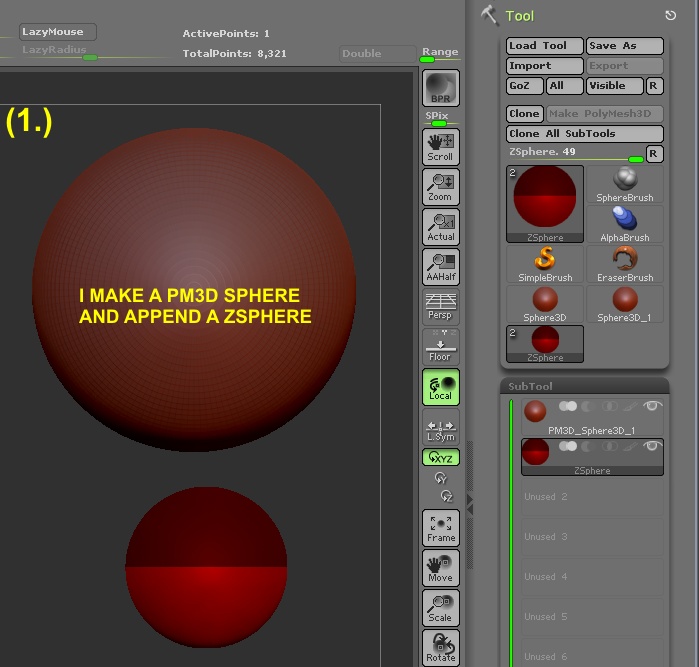
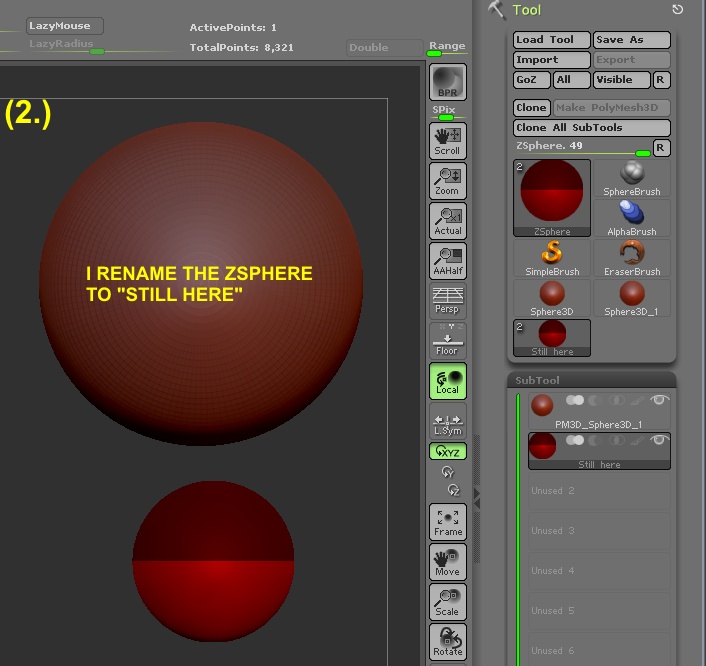
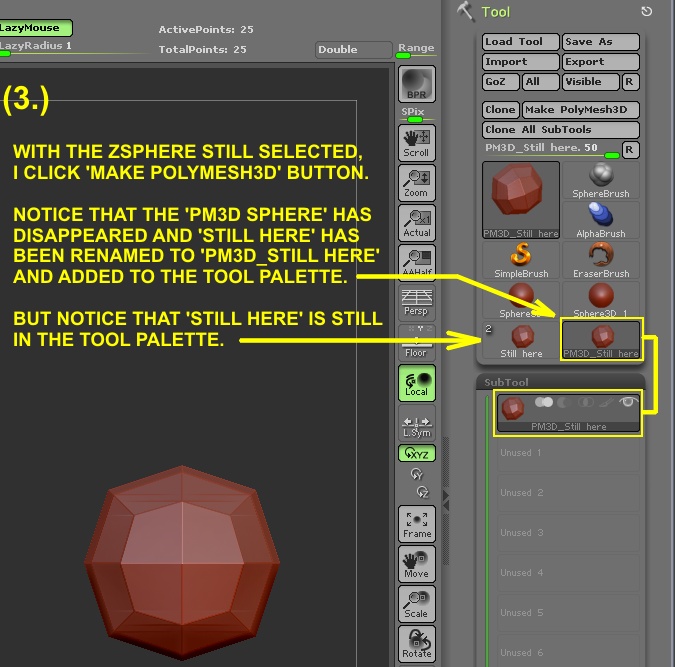
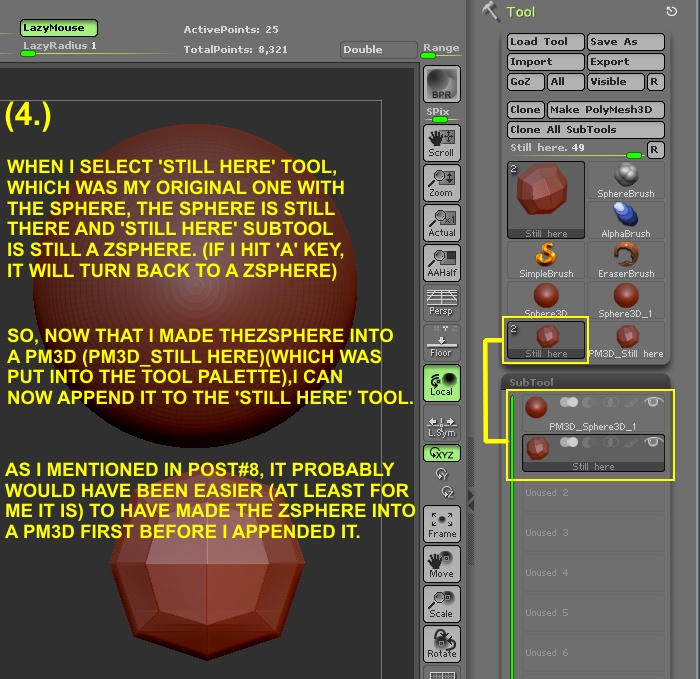
I just had a shot at this thing you made Zber and I think you have got it, but Its a horrible process just to do what should be one simple thing.
Make a head (name it HEAD).
Append a Zsphere and create and nifty hairdo (name it Hair).
Hit A.
Hit MakePolyMesh3D
Look in TOOL menu, find …
…ok its failed… A
All I have is two copies of HAIR and PM3D_HAIR, HEAD is gone…
One of the objects named HAIR have the Zsphere hair and head, but the Zsphere part is not PM3D…
EDIT ---->this is not as disjointed as it looks, this IS the work flow.
So what do I do now?
Delete it and append the PM3D_HAIR to HAIR?
Now I have a head named HAIR and a lot of crap in the tool menu and some renaming to do which does not help me keep track of names, its makes me crazy.
Ok in fact that is exactly what I had to do.
So now I have:
PM3D_HAIR in the tool menu 3 times and the all the icons look the same.
(HEAD is still (or back as) HEAD in the SUBTOOL menu but does not exist in the TOOL menu, Is Zbrush being sarcastic?)
Am I wrong here or is that just perverse?
----EDIT: I just did it again, same thing.
This stuff does not just happen with Zspheres, it happens with EVERYTHING.
This explains some of why I have been having trouble, I am also having trouble believing that what I just did is actually what happened, but as I look at your illustration I see that it is and in yours its even worse I think, yours named PM3D_Sphere3d_1 to Sphere3d or Sphere3d_1 in the tool menu.
I’mcompletely baffled.
Thanks for the help and the illustration Zber, that was very cool of you.
Yes, I know Mealea, ZBrush is very unconventional software with a lot of very unconventional methods and it also irritates me to no end at times. One thing that really bugs me about the Tool and SubTool palette is the fact that you can’t simply name the Tool whatever you want and have it stay that way. Instead, ZBrush names the Tool the same as whatever subtool happened to have been selected at the time. This is something else you have to watch out for by the way. At any rate, be as it may, it is what it is and all we can hope for is that someday, Pixologic will start to work a bit more on the “ease of use” as well as the “bells and whistles”.
So I was right?
I was NOT HALLUCINATING?!?!?!?!
YAY!!!
Wait, no that sucks… if I was hallucinating it would have stopped eventually…
CRAP!!!
hehehehe…
Ok this seriously helps a lot, thank you VERY much Zber.
Now I know it was not just me.
Also I now realize how staggering some of the things I see in ZBC are… I sort of knew but still…
holy cow.
To make a 100 subtool object I would have to go mad 200+ times. Its going to be a very long year.
Thank you again Zber, this was excellent.
Cheers,
Mealea
Your welcome Mealea, anytime.  I hope you have a slightly better understanding of the SubTool palette now and a little less frustration using it.
Cheers,
Andy
Yep… this was it, I get it now, its odd and weird but that life and I can work with it!
Thank you again, this changes things quite a bit.