ZBrushCentral

Subtools question

Hi. I’m sculpting a head—each eyeball and the head are each a different subtool. I was going along, happily refining the head, when I must have hit a button somewhere…now I can’t get both eyeballs AND the head on the screen at the same time. At the time it happened, I was trying to reposition the eyeballs, so I’d selected each eye subtool individually to move them. Now I can’t get all 3 subtools back together on the screen again.

Help please?

If you open your Transform menu, you will see a button called S.Pivot. If you click on that, it will bring your subtool back to XYZ center (floor center point). Just click on each subtool and press S.Pivot each time. That will bring everything back together. Keep in mind now that one subtool might be inside the other and not be visible. At this point, you can use the Offset slider in the Tool > Deformation submenu to move them out to where you can see them and reposition them. Also with the Deformation > Offset, if you move the slider all the way to the left or right and still don’t see your subtool, just move it again as it only moves a 100 units at a time. Keep moving it until your subtool is visible.

Thank you!
Is there something similar to the offset scale that works for positioning and object back and forth? Offset works from side to side, and none of the other keys seem to move an object back and forth. I’m not proficient yet w the transpose line to make it move in small increments, and something like the offset scale would be wonderful…

.
deformation.jpg

Wow! Thanks!

No problem Witches Bridge, glad I could help. Cheers!

FYI…there is a free plugin by Roland Kaiser called XYZ ToolPosition-AXIS that you can get here. It says ZBrush 3 but works fine in ZBrush 4.

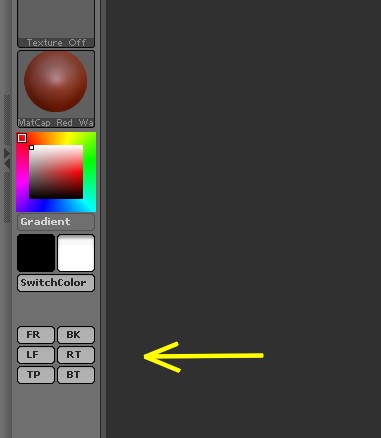
I found this great little plugin to be very handy when I’m using Deformation submenu for positioning subtools. With just 1 click, you can switch to Front, Back, Left, Right, Top and Bottom views. I used Custom UI to move them to my left side shelf where they are nice and handy.

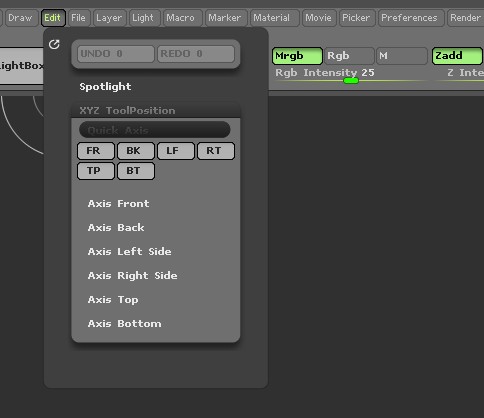
Just unzip the download into your ZStartup/ZPlugs folder. When you start ZBrush, you will find the buttons in the Edit menu under XYZ ToollPosition submenu.

xyz 1.jpg

Attachments

xyz 2.jpg