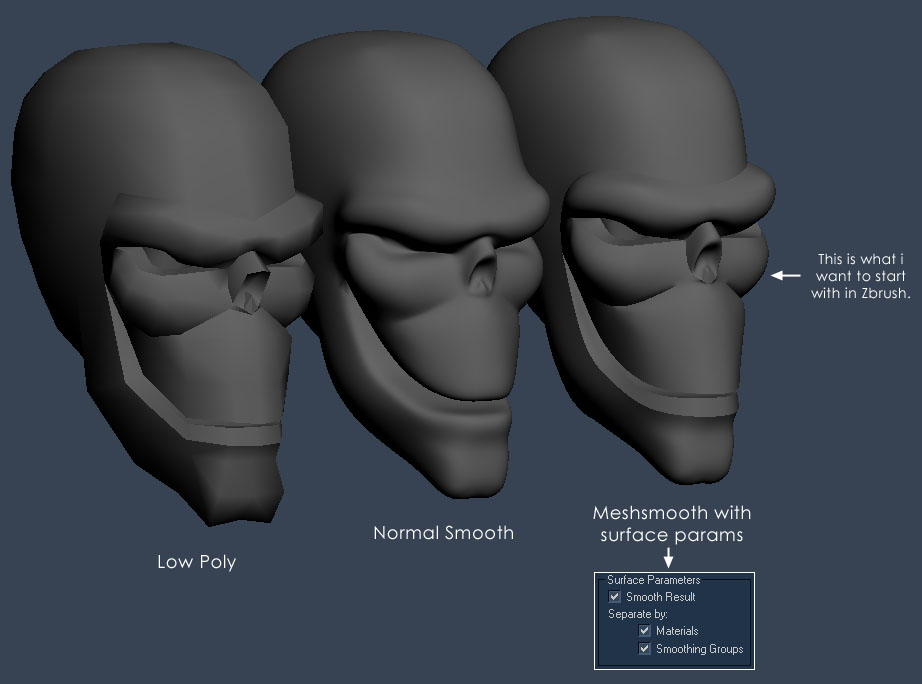
how can you subdivide an object in zbrush and maintain correct smoothing groups? i have my mesh set up in max and smoothing groups applied so that i can have some hard edges on the object but when i import the object into Zbrush it ignores that info and the subdivision just looks claylike. any info would be helpful. thanks
so after i posted this i read other posts with people asking the same question. so if Zbrush doesn’t support smoothing groups has anyone found a workaround? i detached by smoothing group and attached without welding and when i subdivided it in Zbrush i got some success but not all. some areas subdivided fine and some didn’t. here is a pic of the problem. thanks.
[attach=6376]zbrush_workaround.jpg[/attach]
Attachments
Use the crease function. I think thats what you are looking for.
hi, i’m new the zbrush so pardon my ignorance. how do i use it?  do i select faces and hit that button or what? I tried hitting that at different levels before i subdivided it but it didn’t really help. thanks in advance.
There are several ways to find out, here are two:
1: Help files:
[[attach=6389]Help.jpg[/attach]]
“Just fast forward the boring parts were I seem to lapse into spontaneous retardatuion and rotate the model for no apparent reason whatsoever”
bwaahahahahaaaaaahaha! ooh man i almost fell out of my chair reading that.
thanks for the tip on those dzammn help files, i had looked through them earlier but didn’t know i was looking for crease. and thanks for the vid, i’ll look it over now.