…hear me? 
Great work Plunq , This wall is top notch 
very interesting. this makes a great exersise/warup for pre modeling. and will help speed up the time it takes to rough out a figure.
Wow thanks for all the kind words everyone. The Siggraph poster was a surprise for me too. I had sent my studio walls to pixologic and didn’t hear or see anything the whole week of Siggraph. I had seen plenty of other posters or other great work at the pixologic booth so I just figured mine didn’t make it:)
ooOOoo and I made top row, right on!
plunq - you mean they didn’t inform you abour using your artworks for their needs?
(O)ne, no no… I knew they wanted my work, why else would I send them 3k files? 
I just thought they might have asked for a lot of different work form everyone and then chose from those (maybe the did, I don’t know). Anyway, it was a really nice surprise to see the photos back from Siggraph 
You should do a video tutorial on how you do your stuff.
Beautifully detailed and diverse pieces! Definitely top row worthy!
thnx 100 time…
I agree, i’d love to see some video of your process. this is up there with the best sculpting i’ve ever seen. beautiful
btw, the link to the forum is broken
all the best
np
Thanks for the great feedback guys.
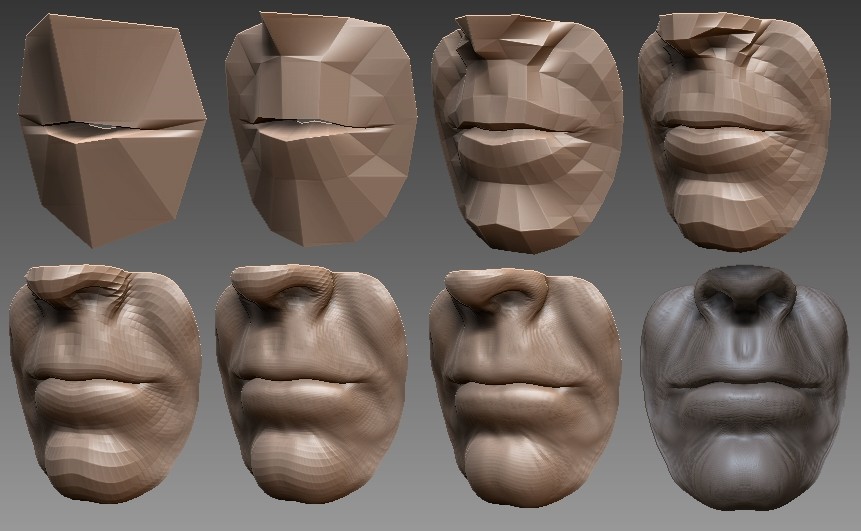
crossbones and neilpwa, I only managed to make one zbrush movie from all of my 60 sculpts. This was a movie captured from my 18th mouth, it shows you the workflow of how I do my studies.
http://www.joelmongeon.com/videos/projects/shortStudies/mouth_18.mov
Another study I just completed (95% done in zbrush) was of a skull, it’s as far as I wanted to go with it, not as detailed as it could be. Started with a sphere, sculpted the main volumes. Used topology tools to rebuild a new base, used Silo to fill in the holes and gaps. Then brought back to zbrush for final sculpt and rendering using modified skeleton matcap.

movie link is not working its still trying to load from your c drive.
hah, oops. Thanks for the heads up, should be fixed now.
Hi,
firstly let me say I am very impressed by your work, it reminds me of Renaissance sculpture. I wonder if I could ask you what sort of wacom tablet you use, or what kind you would recommend. I am COMPLETELY new to Zbrush and would like to hear it from someone whose work I admire.
I hear the Cintiq series are amazing, but they are extremely pricey. Is it possible to get amazing results with something like an Intuos 3?
Cheers
I have no words to tell how grateful I am. 
You didn´t actually TOLD us how you do it, but after watching your mouth18 movie frame by frame (thanks quicktime!), I could actually see how things were going. So I´ve tried to follow, 100% zbrush until now, starting from a cube3d, initialize settings, hiding, deleting, crease, moving a lot, etc, etc and so on…
So, with your permission, here´s my result until now:
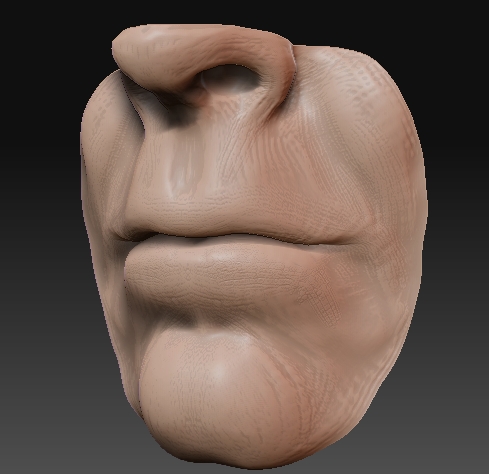
I´m just loving all this. Really man… I´m going to do more and more!
And http://philippefaraut.com sculptures are just amazing, thanks for sharing everything!
Any chance of an ear/nose/eye movie too? 
See ya! And thanks again!
Attachments
Hi Cecily, thank you, I’m glad you like my work.
As for tablets, I’d say use whatever you can afford, I’ve used graphires, Intuos 1, 2’s and 3’s at various studios I’ve worked at. I have yet to try a cintiq but would really love to try it out. At home I’m still using my trusty old Intuos 2 6X8 I bought over 4 years ago. I wouldn’t go for a graphire if I were you just because of the sensitivy, but it is still useable and is a lot cheaper than the others.
I don’t use a mouse for any of my work anymore, I made the switch to just using tablets after a bad case of carpal tunnel. So if you’re looking for another good reason to shell out for a tablet, that would be it. Gotta take care of your wrist and hands.
FabioPaiva, wow, thanks a lot! I’m glad I could help out with your own studies. Your work is looking really nice. If I can make a few suggestions, I’d say pay a little more attention to the corners of the lips. They fold in on each other at the sides of the mouth. The bottom lip could be sharpened up a little bit in the middle. I like the surface of your sculpt (as you can tell I like using rakes too )
I hope you keep doing more of these, I found that they really helped doing several over the period of a few months.
Later
Can you explain a little how you use the rake tool? What is the purpose? I see you using it in the timelapse, I’m following it frame by frame right now too :rolleyes: I think i understand the basic concept, rake and smooth, right? I’m just a little curious about your, and others, technique for using the rake tool. I’m new to all of this.
Thankyou for the information, very helpful indeed. I think I will go for the Intuos - may as well spend that little bit more on something that’ll serve me well. Ah yes I’ve heard of the horrors of carpal tunnel, and am sorry to hear you had it  . I will be very wary of using Mr. Mouse and go for a wacom sooner rather than later.
Keep up the great work - may I just say that I hope as many people who are new to virtual sculpture see your work as possible, as it’ll serve to dispel any misgivings those who are unfamiliar with programs like zbrush, as it is so akin to naturalistic clay sculpture.
Now I´m glad you liked my approach! Thanks for the tips, as I´m still gonna try to finalize this male mouth too.
ANd since I´m here, have you seen my other mouth study? But this time, I tried a female one, which is, in my case, harder to make it right…
So, just in case you wanna see that, here´s the link:
http://209.132.96.165/zbc/showthread.php?t=51544
I look foward to seeing more of your pieces!
Thanks!
it would be a good exercice for me…
Well done man.