ZBrushCentral

Stroke Replay, possible Bug

I tried a search and didn’t find anything on this.
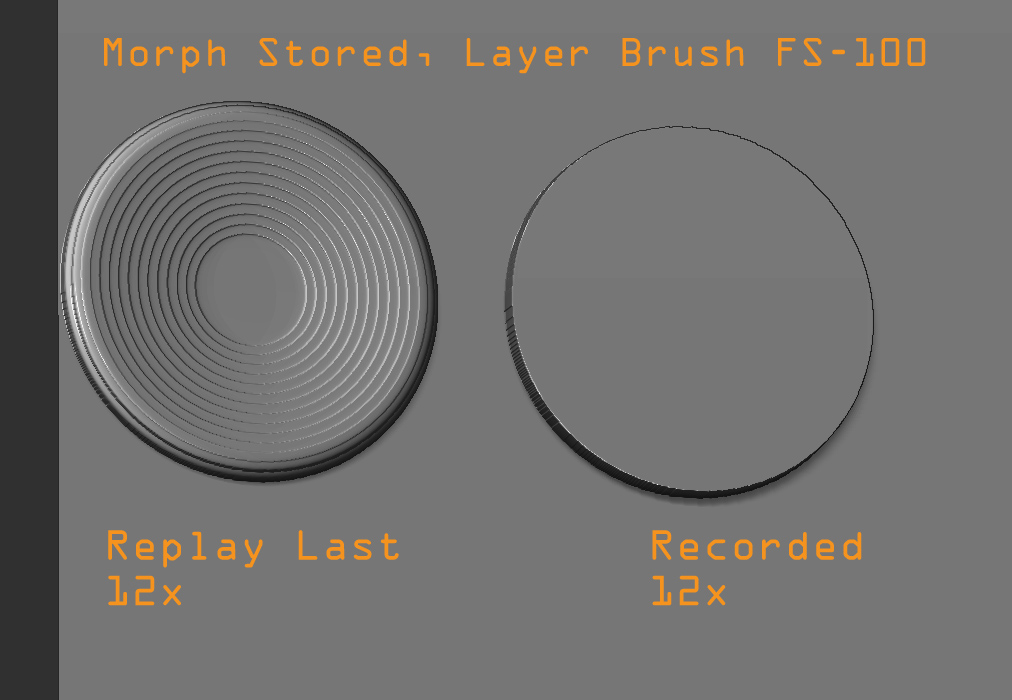
Recently i’ve been using the Replay Last in the Stroke palette. however i noticed a major issue with it, and a discrepency between it and a recorded stroke.
The Replay Last Stroke will get smaller the more you repeat it, where as the Recorded Stroke will not and function properly.
Heres my test example.

  1. Polyplane 1m.
  2. Store Morph Target
  3. Layer brush, focal shift -100(although this makes no difference but is more obvious)
  4. Drag a stroke.
  5. replay last, 10-15 times you will see it gets smaller with each click.
    now if you record the stroke before you drag it will remain the same, and even if you do a Recorded stroke then hit Replay it will still get smaller. so something is definitly wrong with Replay.

Attachments
ZBrush Document.jpg

This is something that started with 3.0, 3.1 - ZB2 had no problem with the Replay Last button.

Sven

agreed, i just didn’t know if it was a known issue and just wanted to put it out there in hopes it won’t pop up in z4.

just bumping this in hopes that aurick will let the dev team know if they don’t already.

i too have this problem and am needed a work around? any more thoughts?

I believe the problem comes from the Mouse Average Input Count in the Stroke palette. If you want to repeat a stroke be sure to set Stroke > Mouse Avg to 1. Works for me.

So ideally the Stroke replay button should disregard the Mouse Avg value.

As far as I remember the default Mouse Avg. value was 1 in ZBrush 2. In ZBrusg 3/3.1 the default value is 4.

brilliant TVeyes…i will try it out as soon as i get back to work tomorrow. If that works it will solve all my problems.

I am really trying to sculpt and paint textures at same time. But as you know the RGB value is tied to the alpha. That alpha is also tied to the zadd value…so if you have an alpha with alot of black in it…it won’t draw anything for your texture. My solution was to have the brush draw once with zadd on…then repeat last on for only drawing with RGB on…so you paint and sculpt at same time.

Hoping your solution works!

Nick

Just to be clear, it is perfectly fine to set Mouse Avg higher than 1 for the initial stroke. It is the repeated strokes that must have Mouse Avg at 1.

holy smoke, thanks tveyes i’m so glad there was a solution, would have been nice to have heard that officially when i originally posted.
works great, and i agree it would be nice for it to ignore the MA but i’m totally okay setting that back. thanks again:+1:small_orange_diamond:+1:

Just did some more testing. The ReplayAll function works fine when playing back multiple recorded strokes with Mouse Avg set higher than 1. Strange.

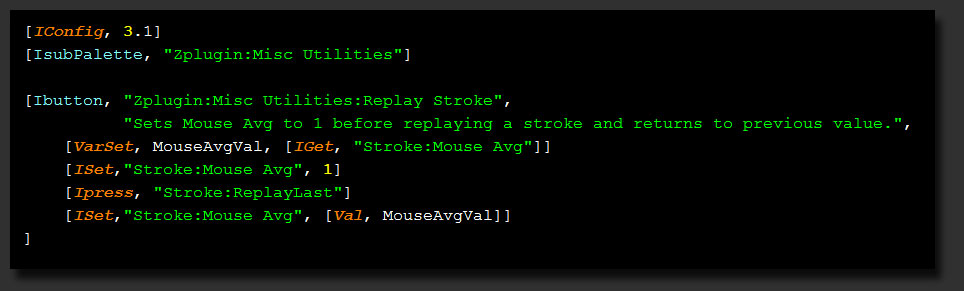
In any case I wrote a small script to handle the Mouse Average Input Count issue. You can find the script attached below here.

As always, extract the file into your ZBrush3/ZStartup/Zplugs folder. The button can be found in the ZPlugin > Misc Utilities subpalette, where it is named Replay Stroke.

Hope you find it useful.

As with all script buttons there is an annoying issue when assigning a hotkey involving the modifier keys (ALT, CTRL, SHIFT). You need to release the modifier key before you can use it again with that hotkey. Just something to be aware of if you use the same hotkey as the old ReplayLast button.

Assigning modifier hotkeys to the standard ZBrush interface items works just fine.

For anyone interested in the code for something like this, have a look here.

[[attach=155083]MOS_ReplayLast.jpg[/attach]](javascript:zb_insimg(‘155083’,‘MOS_ReplayLast.jpg’,1,0))

Attachments

MOS_ReplayLast.jpg

awesome thanks so much. is there a way to place the button in the stroke palette?

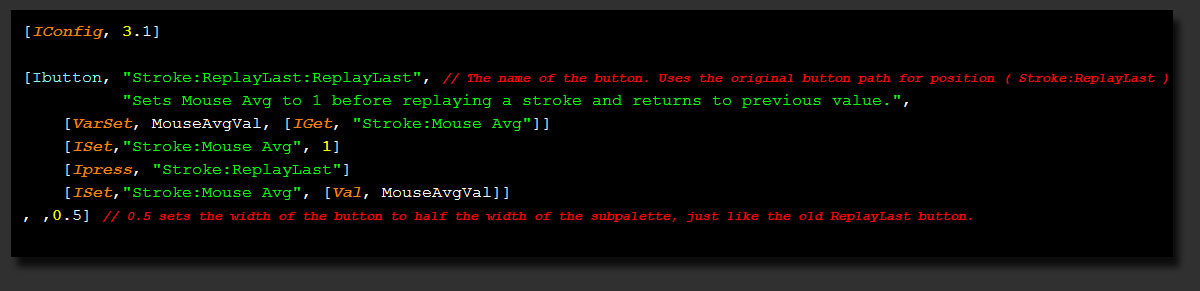
You can put it where you want. The script below puts the button on top of the previous ReplayLast button, as you can see from the code. If you put the button inside a subpalette then it is best to include a [ISubPalette,…] command like in the code above.

The button does not inherit the hotkey from the button below, so you need to assign it yourself.

[attach=155092]MOS_ReplayLast2.jpg[/attach]

Attachments

MOS_ReplayLast2.jpg

thank you, i didn’t know it was possible to put a button over another, so is the old button actually underneath or does this replace it? just curious.
i will try this scripting method to add the render button into the light palette

The original ReplayLast button still exists. It is just that the button generated by the script covers it. So the old hotkey (CTLR + 1) will still activate the original button and other scripts will still use the original button.

If you prefer to have the button at the bottom of the Stroke palette simply change the IButton path name to something like “Stroke:SpaceBoyReplay” :wink: You might also want to increase the width by changing the 0.5 to 1 (the full width of the palette)

Have fun.