Hi All,
Not sure if this is the right area to post…
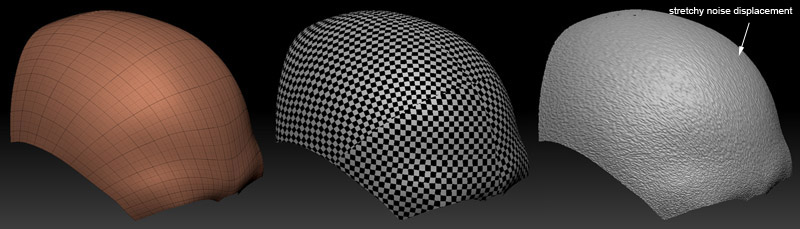
I am getting this problem when applying a deformation -> noise inside ZBrush.
The image on the left, as you can see from the wireframe, has certain area with more details. I have layout the UV such that when I place a checker box texture onto the mesh, there is no distortion or strechy images on the model, as shown in the middle image. However, when I applied a deformation -> noise inside ZBrush, it stretches on certain area. I have tried turned on SMooth UV, but it didn’t help as much. Just wondering why the checker box textures doesn’t seem to stretch but the noise does?
Hope someone could help me out here…
thanks,
zin
Attachments