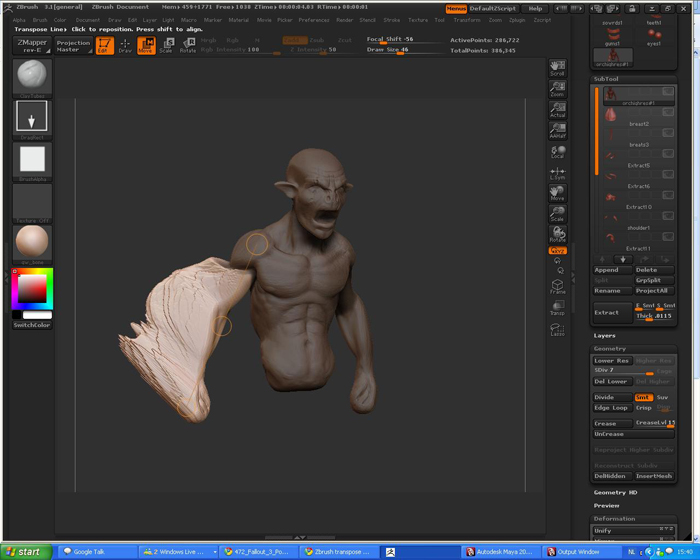
Hi all, I’ve come across the weirdest Zbrush mess-up since i’ve started sculpting
I made this buste from Zspheres (which for some reason made it REALLY big, but everything worked fine).
Now, I know when creating meshes from Zshperes and appending subtools, it can create positioning problems when going back and forth between maya (in maya everything imports fine, export, the models are in the wrong place), however I usually fix this by exporting a High Subidv Level to maya, export it back to zbrush and load it as a new file, then reconstruct subdiv.
In this case I decided to scale the model in maya before exporting it back to Z (reason being, the transpose tool, however working fine on the Zsphere model, can not allways reach far enough when the model is too big)
Now I did my subtools etc, I want to transpose the model a bit to give it a little a-symmetry. However when I do this, this happens:

I’ve been around this part of the forum searching for an answer, but couldn’t really find anything very helpfull (since most Transpose problems are because of Scale issues, which is not the case here imo, the size is to the preview window is also good)
I’ve also checked if there was any leftover masking, but didn’t help either
does somebody know whats happening here?
Attachments