ZBrushCentral

Strange texture issues (exporting to Max)

Can anyone help me out on why this would be happening.

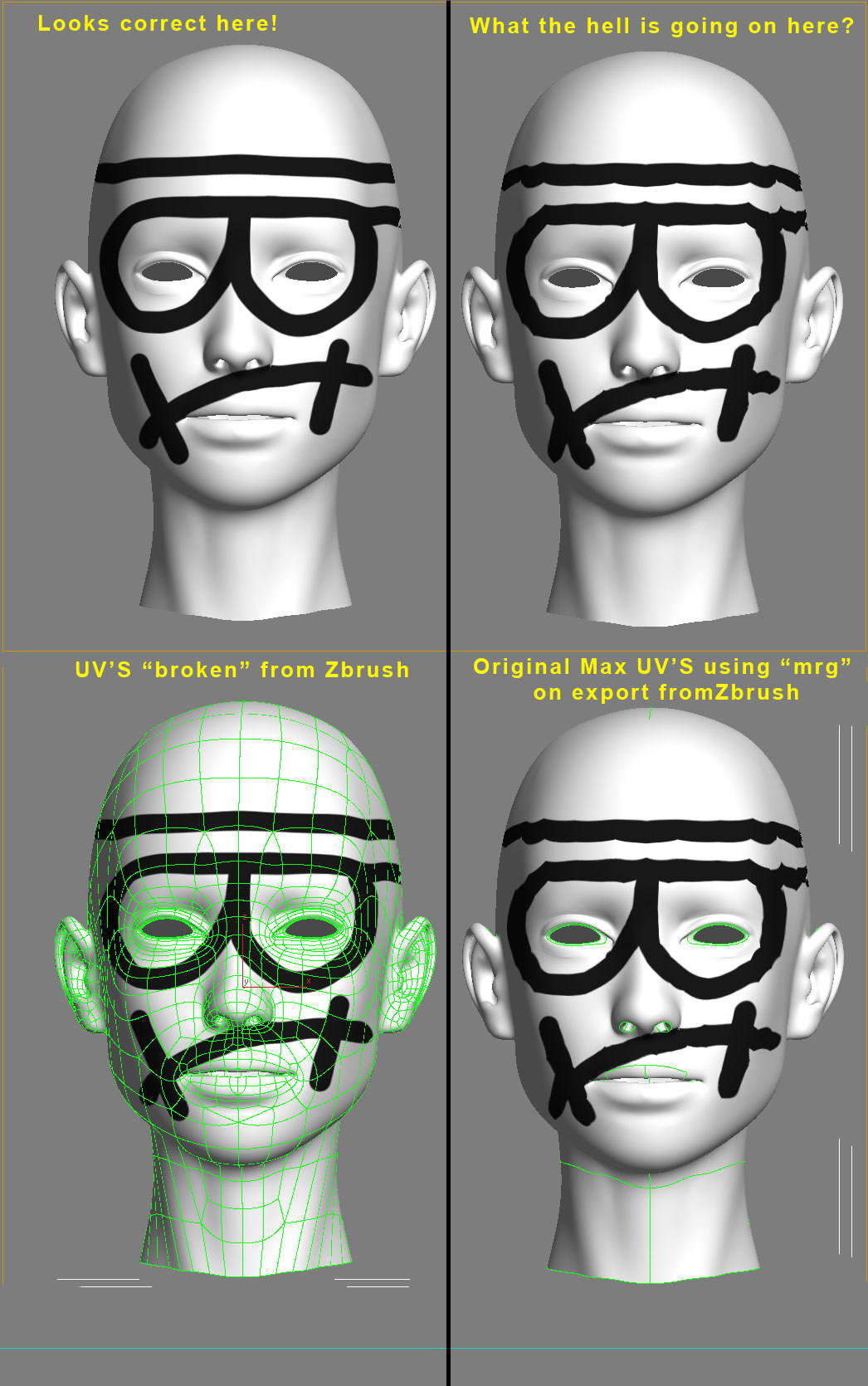
If I export an level 1 OBJ model out of Z brush with “mrg” unchecked (as seen on Left) the texture seems to work great when I bring it into 3dsmax and add a turbosmooth. However, all the UV’s are all unwelded, which causes issues when doing other things within max.

The original model is on the right, if I apply the texture to that or if I export a level 1 obj with “mrg” check on in the export options, and bring it into 3ds max and apply the same exact texture it gets all pinched. You can see that the UV’s are correct, but the texture is terrible. Any Ideas? Thanks!

Attachments

HELP_please.jpg

I use the weld all uvs script available here:

http://www.jhaywood.com/maxScripts.htm

This welds all the uvs that are laid over eachother and solves this problem.

That is a cool script but doesn’t solve my problem. I ran the script with the UVW Unwrap modifier selected on the unwelded uv’s (wich currently looks correct) it welded the UV’s perfect. The problem is that when I weld it, I get the same result as the image on the right using “mrg” on export out of Zbrush

Ok so I have been testing and retesting…so if I have “suv” checked in zbrush when I devide the mesh and the create the texture, The texture give the exact opposite results to the image posted above. The head with the welded uv’s displays and renders out with the texture perfectly, and the head with unwelded uv’s looks all pinched. The problem with this is that if you use “suv” checked when dividing, you loose the smooth uv’s in Zbrush as soon as you either go down in sub division levels or even if you save your zbrush tool and reopen the smooth UV’s get corrupted when you re-open the tool… So at this point I am not sure what to do. Is there any issues to using the unwelded uv’s in max?

Any body have the correct work flow on this?

What is the mesh flow on your low poly mesh? The reason I ask is that if you have a lot of “stars” or tris, turbosmooth will pull and stretch those areas when it adds density, this could affect you texture.

Also, can I ask why you are using turbosmooth anyway? It will only change the shape of your model away from what it is in ZBrush.

Thanks for the reply, You can see the mesh flow in the image I attached to the first post located above. It has a few tris, as you can see, The texture still however looks correct if I don’t turn on SUV and don’t merge the uv’s. But if I do “mrg” on export then they get messed up, I think this is because in Max using turbosmooth actually smooths the UV’s along with the geometry. So by not using “mrg” on export of the obj from Zbrush, ahen I turbosmooth in MAx each poly is treated separately, there for it doesn’t smooth them as a whole, and looks correct in the render. However, when you Turn on SUV’s in zbrush, which is the way Max likes it for texture pruposes…you have to use the “mrg” feature when exporting that way turbosmooth smooths the entire mesh as a whole. The problem is that SUV doesn’t work properly in Zbrush 3.1, as soon as I go down a subdivision level it wrecks all the painting that I just did on the mesh when you go back up to the top level it’s all messed up and pinched. So if you have to make revisions, it isn’t going to keep the SUV’s once you go down any level

The reason I am using turbosmooth is “in this instance” I am only trying to paint a map and don’t need to make normal maps or displacement maps, and I didn’t actually make any modifications/sculpt details in Zbrush, just texture painting…but I need to keep it on the low res mesh for animation purposes.

Are there any plans to fix SUV’s in Zbrush?
As a side note the same exact thing was happening in XSI, however, In XSI when you divide the mesh to smooth it, you can tell it to not smooth the UV’s There for in XSI the texture will look correct using the “mrg” function in zbrush to weld the UV’s…It would be great if max could use unsmoothed UV’s but there is no option for that as far as I can see…

ok, I understand your reasons for using Turbosmooth. From looking at your mesh, I notice that there are “stars” where you are having the texture pinching. I would maybe up the poly count a little bit to reduce this or change the mesh flow to hide them more. You will always get texture issues with stars.

To be honest I think you are asking a lot to expect ZBrush and Turbosmooth to see eye to eye on this, they both handle the mesh in different ways.

Have you tried the Meshsmooth modifier (the original one in Max), it has a lot more options that might help you.