ZBrushCentral

Straight Line mask or Mask Curve Modification on a Mesh?

Hi, I’m is there a way to mask out a straight line stroke onto a model? Even better would be if it worked like photoshop where you draw, let go hold shift at another point and it draws a straight line to your point from the original point, If not how do you mask a straight line in Zbrush though? I know theres a line brush but it doesn’t seem to work, or at least not for masking. If that line brush doesn’t work for masking which it doesn’t seem to so far as much as I’ve tried, is there a way to make the mask curve brush only draw a mask where the curve is and not above it?

Thanks.
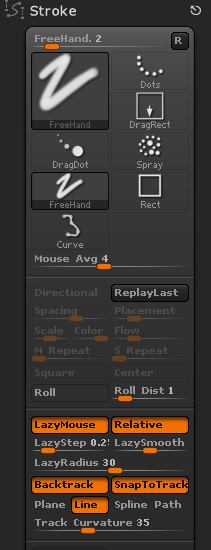
You can get a straight line mask by using the Backtrack feature in the Stroke palette:

Hold Ctrl and:

  1. Select MaskPen brush.
  2. In the Stroke palette turn on LazyMouse, Backtrack, SnapToTrack and Line.

Attachments

MaskStroke.jpg

I read this thread, because I also have difficulties in exact masking. So I often use photoshop to create a masking-texture to get a good masking.
Now in ZB4R4 we have good possibilities to make curves for forming meshes. It would be quite nice, to habe the same features for masking. So it isn’t possible to get straight lines while masking regions by pressing the shift-button when freehand-masking or when masking with the lasso-tool. The masking with curves can make straight lines, but makes problems when trying to mask a certain region, for example with the shadow-box to create technical details. it alwas masks everything on one side of the mask and the unmask-feature doesn’t work properly with the mask-curve-tool.
I think, we all would need a lasso-tool, which has functions like the new curve-tools for other brushes, like making parts of the lasso with straight lines, moving the lasso-segments before drawing the mask. So for me is the masking function one of the very few bad things in this really good program.

mawag01