ZBrushCentral

Still suffering irritating scaling issues...

Still looking for an answer to a scaling prob Im having.

Everytime I reimport particular objects they are rescaled in a elongated fashion.

[stretch2 copy.jpg](javascript:zb_insimg(‘34615’,‘stretch2 copy.jpg’,1,0))

I wouldnt mind if I could reset scaling or something, or if there is somewhere I can type a figure in to get the rescaling accurate as, atm, I am rescaling by eye.

Very frustrating. Any help would be appreciated.
Try looking under the import settings under your “Preferences” menu.

Thanks WingedOne, tried it out… no luck.

Its also happens when I reopen files, no matter how many times I rescale it and resave… it always rescales by about 10%.

Any other suggestions?

This is something you might want to check. It probably isn’t the problem, but it’s worth eliminating it from what it can’t be.

In the Draw menu, do you have Presective enabled, this might cause the distortion? As I said , I’m not sure if this would effect it or not, if this was enabled - which it porbably isn’t?

Thanks Scratchy, Just tried it out but, sadly, no luck.

It actually physically changes the shape of the object. I can upload a problematic ZTL, rescale it and then reload it and draw it over the original doc and its distorted…

The fact I can rescale it, save it, and reopen it and it jumps back to the original distortion puzzles me. Its like ZB is ignoring any Y scaling.

Its driving me nuts!!

How are you rescaling your object?

Scaling a Tool using the Gyro only adjusts the onscreen representation, not the actual geometry. To scale the geometry you should use Tool > Deformation > Size with the relevant axis enabled.

Thanks TVeyes, that worked!

I didnt know that. Still not sure why this was happening in the first place but at least I can fix it now.

Thanks guys for your help, I appreciate it.

Ok… the good times could only last so long:(

Having fixed the above scaling issue a new one has immerged.

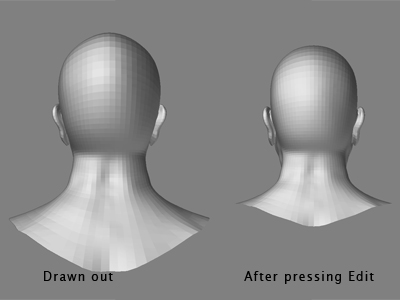
When I draw the tool out in the viewport some of the vertices are stretched out the bottom incorrectly… this is managable, but as soon as I hit the Edit button the vertices pop back and the scale drops.

[what2 copy.jpg]

this wouldnt be so bad if it was constant, but it seems to keep changing! Meaning that when I try to use blendShapes in Maya the model distorts incorrectly each time I change expressions.

Never had this prob before… I just need to lock down the tool somehow. Is there a way I can erase history on the model or something???

Im out of ideas!

It sounds like, as was mentioned earlier, that you have Draw > Perspective enabled for that tool. In Zbrush 2 on the PC perspective is only available out of Edit mode. That means you will get a different representation of your model as you draw it on the canvas and when you enter Edit mode. Again, it is not the geometry that is changing (should you export the model or calculate a normal/displacement map) it is merely the onscreen representation of your model.

The Draw > Perspective switch status is stored on a tool by tool basis, which might explain why you perceive a problem sometimes.

The Tool > Preview > Object Preview window shows the actual geometry at all times. What you see there is what will be exported.

Thanks again TVeyes,

Its been another day of learning. I must have turned on Perspective will fixing the last prob.

Once again, thanks all for your help. Makes this community one of the best support networks around.

Cheers