ZBrushCentral

Stepping topology prob

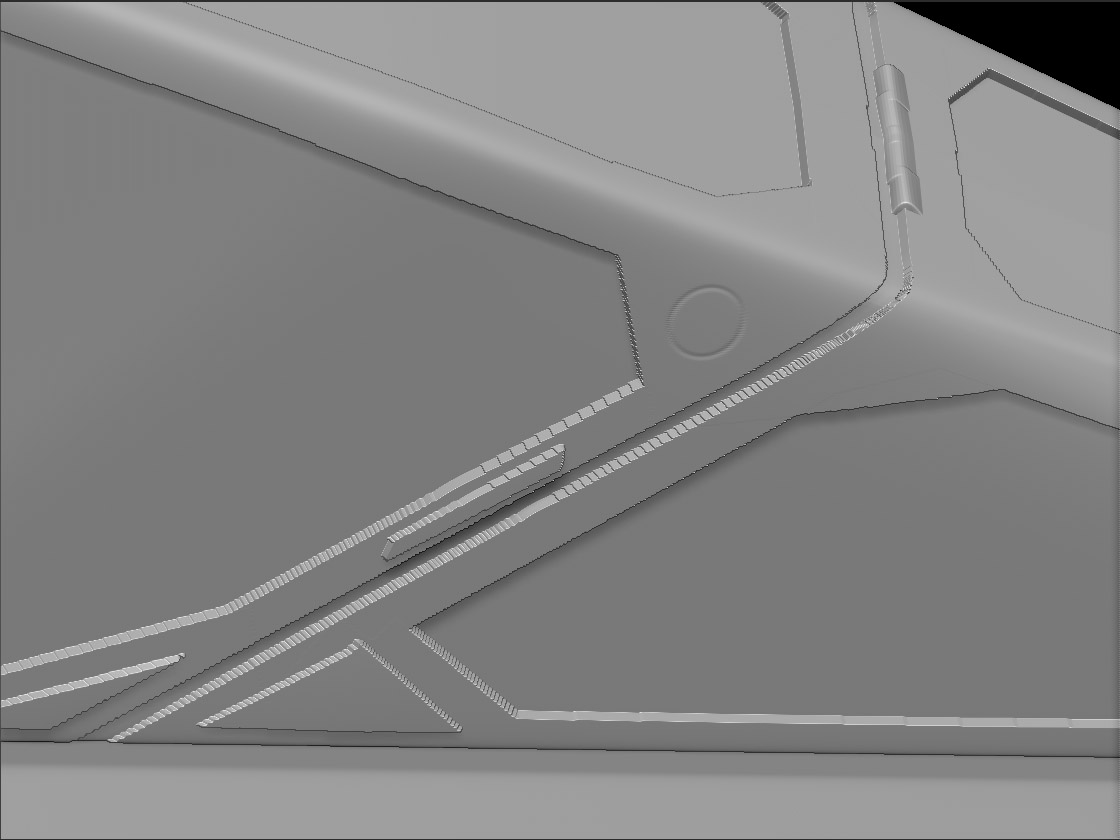
Does anyone have a work flow that cleans up these type of stepped edges? I created these shapes by masking areas and moving the unmasked area. I believe the stepping is a result of my mesh density. The density in the pic is as high as I can afford.

Thanksstepping.jpg

Attachments

stepping.jpg

The only way to clean that up is to add more detail to the mesh. you can also try to reproject higher subD levels and see if that works…but from the looks of it it won’t do much.

this is keeping me from being able to use ZBrush for modeling for rapid prototype hard body objects. ZBrush is SOOOOOOOOOOOOO close to being a useful industrial design tool.

You can divide differently that you are currently. You could attempt to use local subD levels or you could also use your masks to create edge loops that can be used to increase the model density in those areas that you mark off.

If that is being used for rapid prototyping why do they need to be perfectly crisp edges? What is the polycount of that object? Why can’t you divide any more?Have you tried using HD geometry?