ZBrushCentral

Spotlight zsub problem

Hi,

i used Spotlight with an alpha. It works just fine.
Then i used it again with the same alpha. The same Zintensity, the same brush and with zsub for sculpting. But now i only get the form of the alpha with an deeo valley, because zsub is activated. It seems logicaly, but the first time it just works like with an stencil. No valley, no real zsub besides the alpha.

Do i miss a button?

Greetz
No idea? Not understandable? Or not possible?

Any hints?

So, last push ^^

I cant understand what the problem is… can you show some screens ?

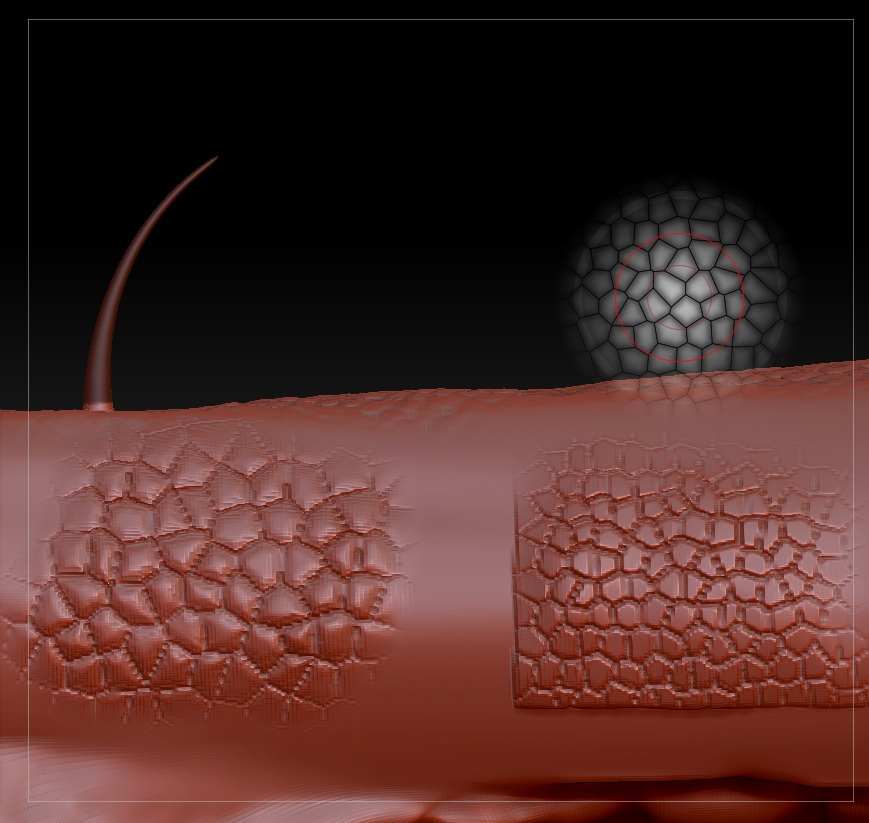
Well, here on the first picture you see on the left a used stencil. Here is only a little rising. But on the right, there is the used spotlight and you can see a much bigger rising.

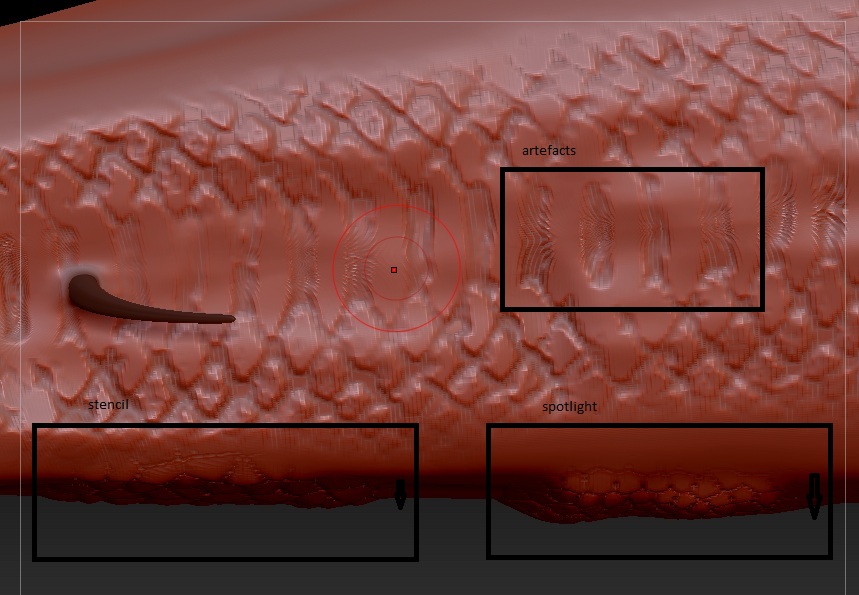
The second picture shows the used stencils in a front view.

Btw.: On the first picture you can see artefacts which appear everytime is use stencils or spotlight stencils.

Attachments

22.jpg

23.jpg

ok, ill give my cents here, try to help.

On the first picture, there are no artefacts. This is your mesh topology and the lack of polygon density - plus the symmetry. So, subdivide the mesh more, to get nice details.

On the second picture, again there is not enough polys. And the way i see it you set higher contrast to the alfa map/texture. So, chech your Spotlight settings and see what the contrast values are.

I hope i helped :slight_smile:

Thank you for your cents :slight_smile:

So, the point with the contrast is a good idea. I took a higher one and have to “add” fewer strokes over my model for the same endresult, without such a big raising. Thats a good point.

A higher polycount isn’t possible. The model has 8 million, what seems to be too much, because my system sometimes takes 10 minutes to end one stroke. Then my HDD works and doesn’t stop. Can’t do anything and have to leave it until it’s done.
Geometry HD isn’t really capable.

Dual Core, 4gb RAM, Win7 new installed.

But also with a higher polycount the artefacts still exist. For this you can see the first link in my signature.

But what is the problem with that detail ? When you soom so close, no mather how polys you have it will aways be like this.
Dont worry about that!

Btw: If i activate the polyframe, my mesh topology is still right. There are no strains.

So the problem this topic is about, seems to be solved with your contrast idea. I only tested it. Until now no deeper validation^^.

The problem with the details/artefacts is only, that it looks not professional. Not like all the pictures in the gallery. So for me it doesn’t seem to be normal operation. If i try to make high detailed face, this artefacts aren’t acceptable. I tried it with a test face of zbrush, again divided to the highest subdivisionlevel.