ZBrushCentral

Spotlight is Great but is this a Bug? (Answered)

Thanx Pixologic for these superb release of ZBrush. I realy like the new tools like Spotlight and Shadowbox. :smiley:

I have to admit that i already wrote a Message to Support, because i thought i was on track of a bug in spotlight and i was not able to post a message to the forum, because my Account was not activated.

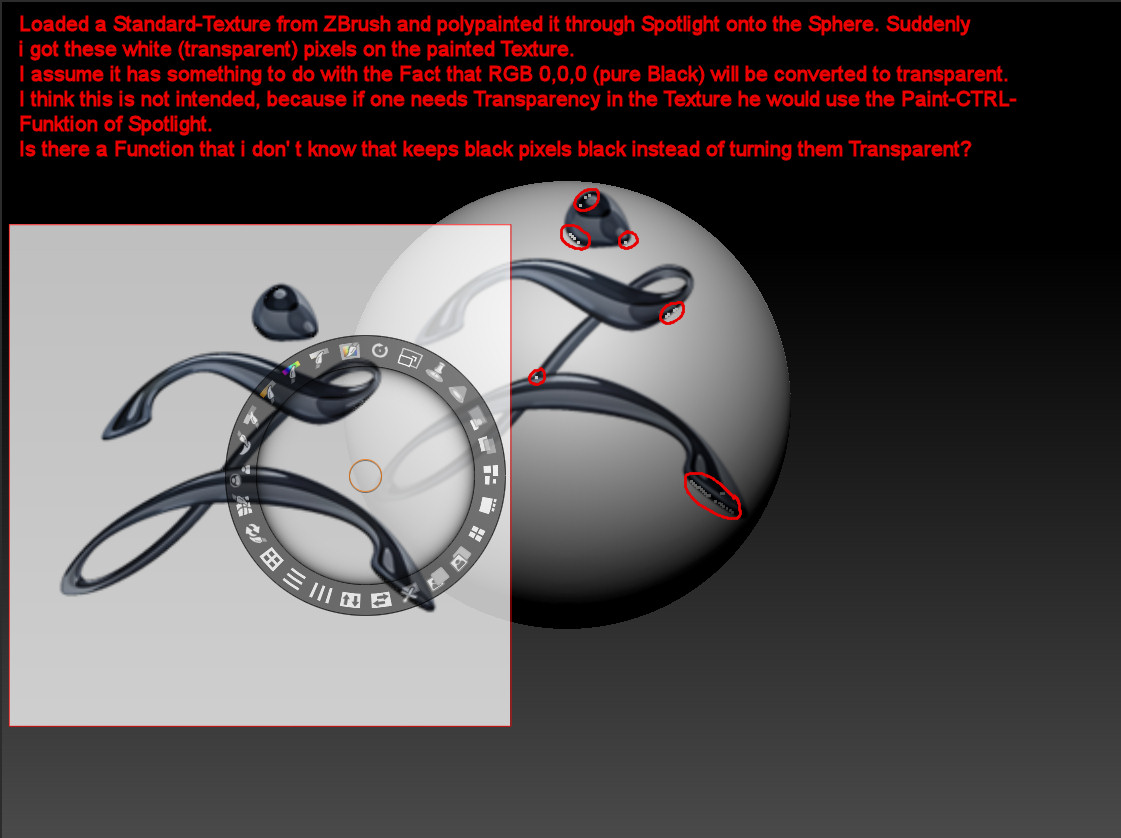
Anyway, i attached a Pic which explains what i was talking about (including a better description of what happened and what i suggest could be the Error).

Thanx for all Your Support and Help

Greets from Switzerland

jahkri51

Attachments
SpotlightArtefacts.jpg

Unfortunately I can’t remember the name of the person who offered this solution on the forum, but it was previously recommended that you adjust the contrast button on the spotlight ring just a little bit. It worked for me.

…

oops wrong spotlight button. Ignore this and read below :o

Pure black (0,0,0) color is considered transparent. Use the Spotlight Intensity control to slightly increase the intensity of the image, or use the Fill control to fill the black pixels with another color.

@ support @ nancyan

Thank you very much for the fast and helpfull Reply.

Everything clear now. Its good to know, because if i take textures from other sources (like Photoshop or Web or whatever) i can ensure that there is no pure Black in it where i need the black colour instead of Transparency. For example replace RGB 0,0,0 with RGB 0,0,1.

Thanks again and

Greets from Swiss

jahkri