The shift+Z keys toggle on and off spotlight but the Z key alone does not toggle on and off the spotlight dial. Any suggestions?
Thanks in advance.
Ezra
The shift+Z keys toggle on and off spotlight but the Z key alone does not toggle on and off the spotlight dial. Any suggestions?
Thanks in advance.
Ezra
Have you assigned ‘Z’ as a hotkey to anything else? That’s the only reason I can think as to why it would not be working - it’s fine for me.
Good call Marcos, I think that may be the problem.
How can I get that key or any key assigned to get that spotlight dial to toggle without being able to see the dial to click on it to set a “custom” hotkey?
Hi EZRA52,
If your on PC, what you can try is, go to C:\Users\Public\Public Documents\ZBrush Data\ZStartup\Hotkeys and open your custom hotkey TXT file. Look for the line that is using the Z key, and at the start of that line, put 2 forward slashes (//) which will just make it a comment (without deleting it) and won’t be used. Save the file, restart ZBrush and try Spotlight again.
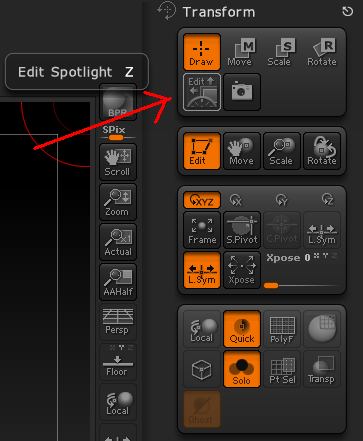
You can do as zber2 suggests (thanks zber2  ), or you can assign a new hotkey to the Spotlight dial. Assign the hotkey of your choice to the Transform>Edit Spotlight button (see attached image).
Thanks to both of you guys. Your both always so helpful and it’s amazing how quickly folks can get answers to their questions her.
take care
Your welcome EZRA52!
No problem EZRA52