ZBrushCentral

someone pls help (noob)

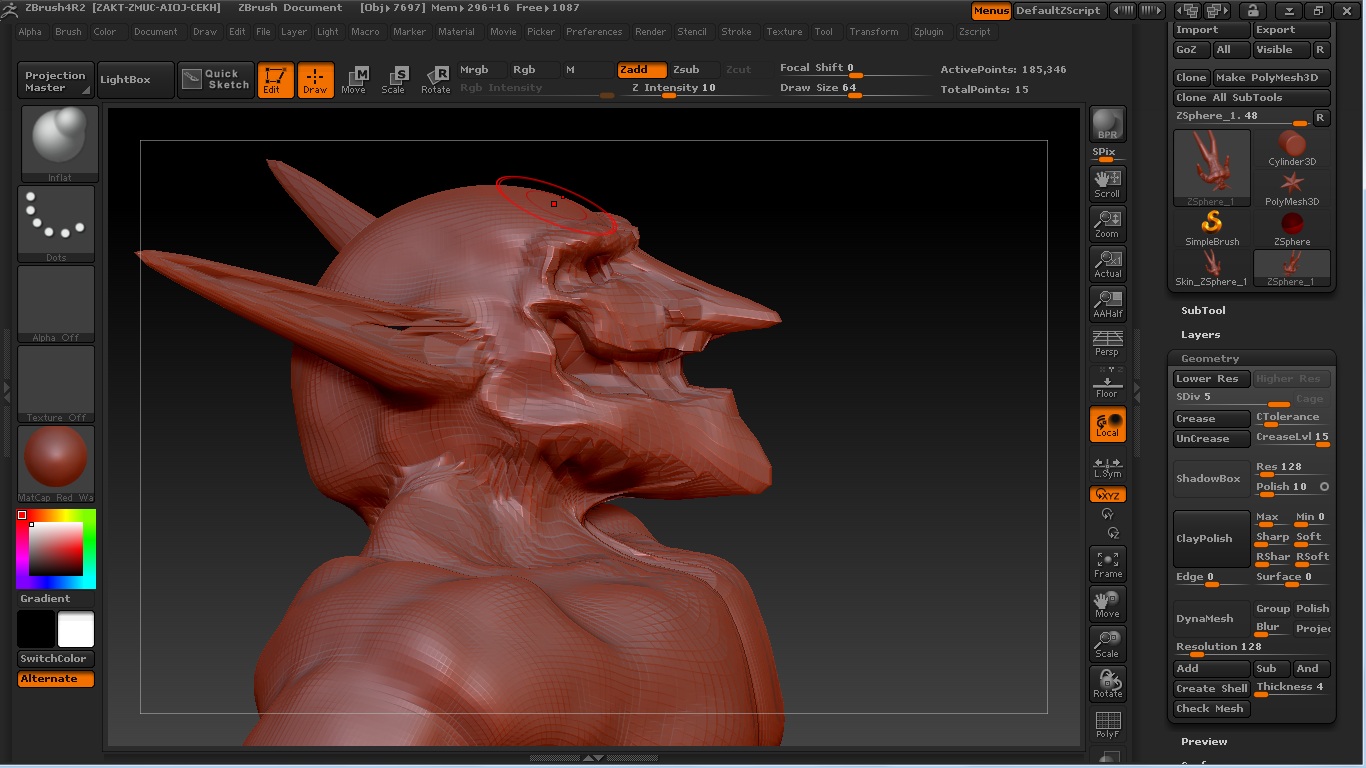
Hi guys this is my first post, im not sure if im posting in the correct section but i desperately need help, today i started zbrush for my first time and ive been playing around for about 10 hours :S finally ive gotten something which resembles what im trying to get at. But the eye sockets and the mouth still have mass inside, i cannot clear it for some reason, i know its probably something easy but there are just so many buttons im getting a headache. Ill post a photo of my creature so you guys can see what im talking about :slight_smile:

All help is much appreciated.:smiley:

Well seems that the program Paint isnt supported by this forum, im not sure how else to get the image to the post… any ideas?

Save your screen through ZBrush as a jpg. It’s under the Documents tab => Export.
Or just save it as a *.jpg with Paint. M$ Paint? :wink:

You want to make a hole? Insteed you can substract the geometry with any of brushes.

Thanks Nebular, i will give it a try in a few minutes and i will also upload the picture of my ugly creature :). it seems when i try take away the mass, pixels come outwards out of nowhere, probably from the zsphere

umm is it weird if i cannot save it as a jpg when clicking “export” in zbrush? ive only got .PSD , .BMP , and .TIF…

Saving directly as a JPG is a newer feature, believe it or not, and I think it was introduced in version 4R2b. So double check what version you’re using, and it’s a free update.

Ok here we go, i didnt really understand what you meant by the geometry part, today is my first day using zbrush, i had a look in the geometry part under the tools section but not sure what to do. Here is the model im trying to make holes in :stuck_out_tongue:

Oh and btw does anyone know how i would go about making 2 huge tusks coming out of the sides of his mouth? ^^