ZBrushCentral

Somehow my sculpt got messed up bad...

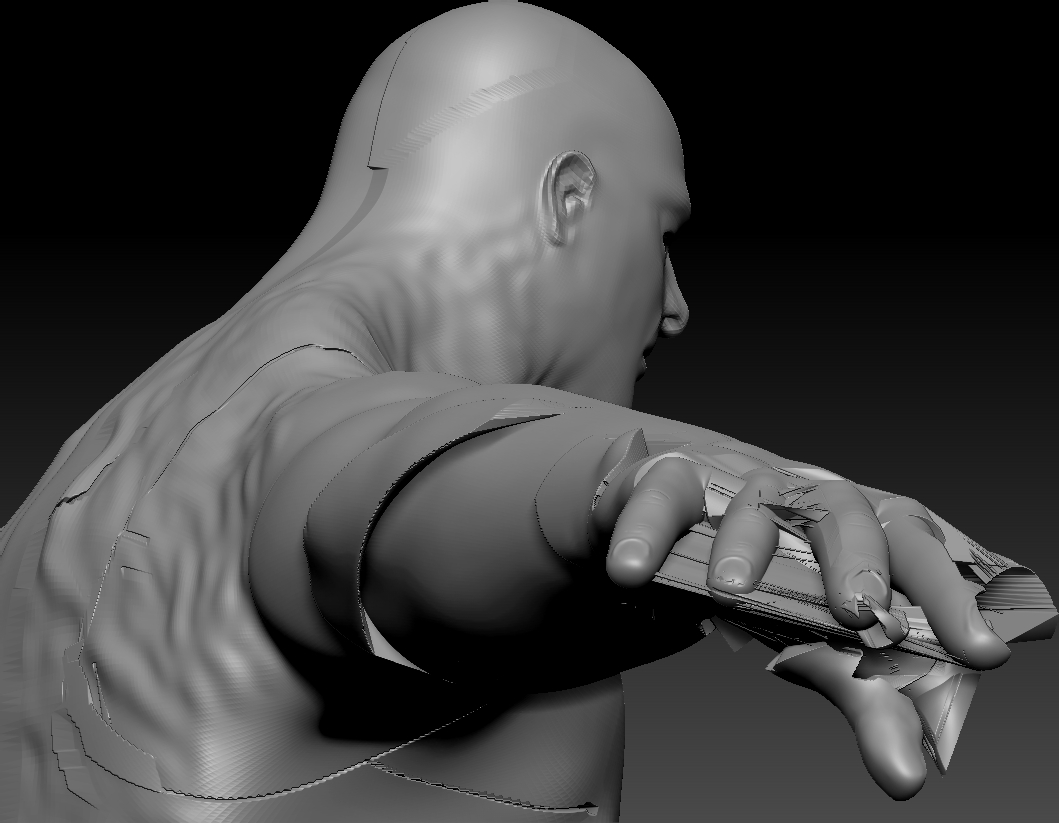
So I have been working on this sculpt for a while now and I’ve always got symmetry turn on except for minor details such as scars, anyway somehow along the way, the sculpt has become asymmetrical, his right side seems to be rotated back, so when I make a boot or glove on his left side, copy and mirror it over to the right, it’s all kinds of messed up, I’ve tryed smart resyming but when I do, I get this.

I think the polly count might have gotten screwed up somehow too, thus this outcome… Hoow can I fix this? If I don’t get his right side where it should be, it’s going to suck when I have to rig and weightmap him, I only have ZBrush, DAZ, and PhotoshopCS6, no maya. Thanks to all who throw me a bone!

Attachments
RGBGrab01.jpg

I’m still fairly new to Zbrush yet, so this may not be the most optimal method to fix it, but have you tried removing the right(the messed up side of the model) and mirroring the left side? You may be able to use smart symmetry again then. Hope this helps, its the first thing that came to mind when I read your post.

Thanks man, I had the same thought, but didn’t do it because I don’t know how to correctly remove half of the sculpt and when I merge the two sides, they wouldn’t sculpt smoothly across the X axis, good idea though, however I decided to just resculpt the whole thing and trash the old one, annoying? Yes, worth the effort, you better believe it, less tricky **** in the long haul, thanks for your reply pal. :slight_smile:

Do you have access to another 3D program? I had something similar happen once so I GoZ’d the model into Maya, deleted the incorrect half, mirrored it, ensured it was snapped to the center and GoZ’d it back into Zbrush and continued.

If you don’t have a secondary 3D application you can download trials of Maya, Modo, or 3Ds Max (and I think Cinema4D). All are GoZ enabled.