ZBrushCentral

Some layers, transpose and distortion

[01_head_twist_side.jpg]02_body_twist.jpg

So:

“face layer” PLUS “pose layer” EQUALS bumps-all-over-the-face. I’ve done some tests, and all distortions are related to a rotation.

If I take the neutral pose and twist the neck, torso, hip and so… the faces go crazy. So much fun! …Or not.

Do you know a solution or do you have an explanation for this? Thanks again.

I just did a test on one of my own models and it worked fine without distortion of the face. Do you perhaps have part of your tool masked? Try going Mask>Clear Mask. Also try storing a morph target of the t-pose before you start enabling your 3D Layers. ZBrush likes having morphs stored for some odd reason.

Hello! Thank you so much for your tests and your time, dustinbrown!
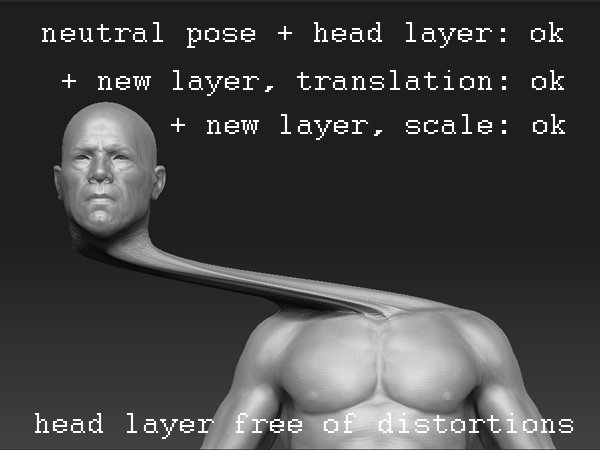
Bad news (for me) The distortion is still acting, and closely related to rotation. [![faceok_twist.jpg|600x450](upload://6YqEBu2w8U0PKXEdqJudVVLGQZq.jpeg)]![face_wrong_twist.jpg|600x450](upload://gqdQgcpDAhWQqqAvE4lwb9t8UQ5.jpeg) More tests: I took an old model, did a new layer and changed its face. Then, another layer was prepared for twisting its head. And yes, the distortion happened. My English may sound weird, sorry for that.

Attachments

translation_ok.jpg

My explanations may be confusing. Let’s try again, step by step. :slight_smile:

So:1) I load a ztl body 2) create a layer and change the head, then hide this "layer head" 4) add a new layer and twist the model: hips, torso, head, everything... until I get a nice pose. 5) The last move: switch on that "layer head". The new head is looking washed and bumpy. Why I'm trying this? The idea is having a pose and various types of head so you can choose the original head from the ztl body or the new ones. (The only similar thing I can remember is "crazyspace": that mad experience that you get when moving vertexs from a skinned rig or adding blendshapes to it.)

I haven’t tried this its just off the top of my head, but it’s possible you may be able to control which part of the mesh is effected by the layer using either masking or by hiding part of the mesh. That would be the next thing I’d try. Using a technique like that you should be able to isolate the good and bad parts of each blend shape combination.

dustinbrown (thanks forever) I tried several things like isolating distortion in one layer and then activating some “layer heads” with that distorition in negative value, also standing up before testing, enough time to hop onto left food and then walk backwards two steps in any random direction, point a corner with one finger and go on, crying “oh why” a few times.

That should work, but…

This is getting some sense, but still can’t understand the reasons.

I've done a jump to an external 3d program (Maya) and there I did a simple rig:a few bones for the torso, enough to rotate the model's neck. This very simple "pose" was imported into Zbrush, in a new layer. And here, in Zbrush, I activated some old layers which store variationes of the face (nose, chin, eyes...). These variations destroy its own details in some manners. More rotation equals more distortion. I expected that the detail of the layer should be "sticky" to the model, even if it was moved, rotated or squashed.

[bone_rotation_to_zbrush_bad.jpg]

Hello? :D Is it a bug? Do layers have this bug with rotations? [

]