Use to be, object in edit> press “T” 2x to get the gizmo, then LM drag and the object would move towards you in Z.
How to move objects in Z?
Attachments
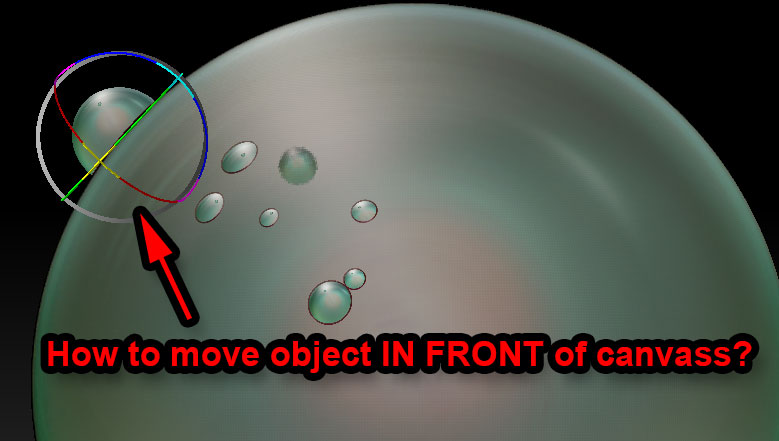
Use to be, object in edit> press “T” 2x to get the gizmo, then LM drag and the object would move towards you in Z.
How to move objects in Z?
I can get the gyro to come by going to edit turn off - leave draw on and click any one of the following move, scale or rotate and drag outside the gyro until the object is in front - however, another problem is that once you go back to edit on and draw the object falls back to it’s original position.
Good Question.
EDIT: to correct as zber2 says.
Leave ‘Edit’ off. With ‘Draw’ on, draw your object then turn ‘Move’ on for gizmo. LMB+drag up and down on blank part of canvas.
ok dumb question what is LMB?
BTW- when you go back to edit and draw does your ztool go back to the original state?
Left mouse button
@ Spaceman - Thanks for giving the description. THAT is what the problem is. In Gizmo Mode., After the object is moved in Z, it will not retain the position. It snaps back to where you started! :td:
LM = Left mouse
RM = Right
MM = middle
Doug Jones and sadicus thanks on the lmb question.
sadicus - And to think ZBrush started out as a 2.5d paint of sorts software (before zspheres) - this depth thing not good for painting on canvas (dropping ztool and and paint).
Maybe a ZbGuru will answer the question.
aruick:D;)
…it use to work!
I’m sure one of the gurus will be able to tell me what i’m doing wrong, and say it in a tactful way. 
The only time you are going to see the ball gizmos is when you are working in 2.5D. This is what the image in the first post is indicating. The gizmos allow you to move, scale or rotate your last drawn object on the 2.5D canvas. If you move the gizmo that is attached to your last drawn object, it will follow any surface that has already been dropped to the canvas, or move it in Z space as I indicated in my first post. “Edit” mode is only for creating 3D objects and the manipulation of those objects in 3D space. In the same respect, you can’t edit a 2.5D canvas while in “Edit” mode. The first thing I said in my first post was “Leave ‘Edit’ off”. SpaceMan and sadicus, go watch some Meats Meiers ZBrush for Illustaration tutorialsto understand what this is all about. Then maybe things will become a little clearer for you.
…or, wait for aurick to reply to this thread.
zber2 ZbGuru:)
Yep that works - I keep turning the Edit on after moving etc that why it didn’t work. Note to self do not use EDIT on any stage for drawing onto the canvas when using the gyro:)
If you need to have a model in Edit mode in front of something on the canvas (for example, an image plane) and you don’t want it being ‘clipped’ then do this:
YES! Thank you Marcus, That is the droid i was looking for.