ZBrushCentral

Smooth brush glitch

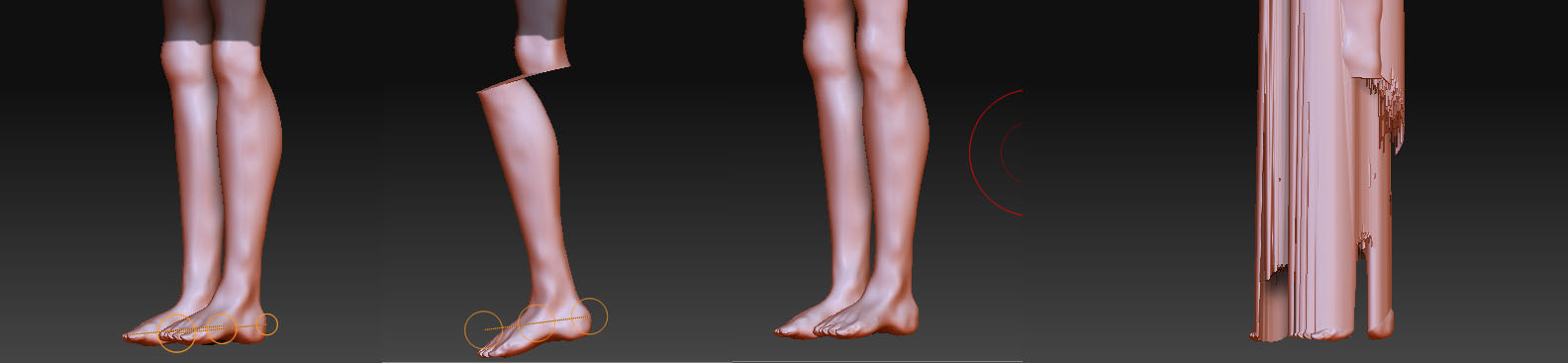
Hi, I’m new to the site, mainly because I need help with a final for my zbrush class. Everything seemed to work fine for a while, but after working on the head for an hour or two, I noticed the legs needed a little smoothing. So when I went to smooth them with the smooth brush and this little mess happened. On the right is the before and after effects of the smooth brush and on the left is what happens when I try to rotate the leg with transpose rotate. Is there a way to fix it, or do I have to just go back to a previous version of the file in which that wasn’t happening?

Attachments
Zbrush FINAL messups.jpg

This has nothing to do with the smooth brush. It’s entirely with TransPose. My guess is that your model is either extremely huge or extremely small. Open the Tool>Preview window. How well does your model fit within it. If it’s either way small or way big you’ll need to scale it to be a better fit. TransPose will then work correctly.

I now tried what you suggested, but encountered a new problem. When I scaled it down, (it was too big) there were some artifacts that remained from the creases in the hands that were caused by adaptive skin on my Zspheres. Those artifacts stayed in the same spot that the original hands, therefore increasing in size as I scale her down. No amount of smoothing or morphing or flattening helped reduce them in any way. Zbrush messups2.jpg

I also tried to use “Project all” in the subtool menu to project the head geometry onto a previous version that was fine but had no sculpted head. It didn’t work, but I think that’s because the previous version was the right size in the preview menu and the new one is about 20 times larger. I don’t know how the new one blew up in size so much, because I certainly didn’t resize it.

Ok, resolved. It turns out that there was an hidden mask inside the crevices on the hands that I didn’t notice until I went down to subdiv level 2 (highest is 8). I cleared it, scaled the model way down and now everything is handy-dandy. Thanks for the help!