ZBrushCentral

Smart ReSym problem

I have these two objects. I mirrored one of them in Maya and trying to transfer the detail from the left to the right. Usually i would just smart resym but it is saying that symmetry map not stored.

I center pivoted the obj before exporting. and the preview window has the cross in the center.

Help?

[1.JPG](javascript:zb_insimg(‘155170’,‘1.JPG’,1,0))
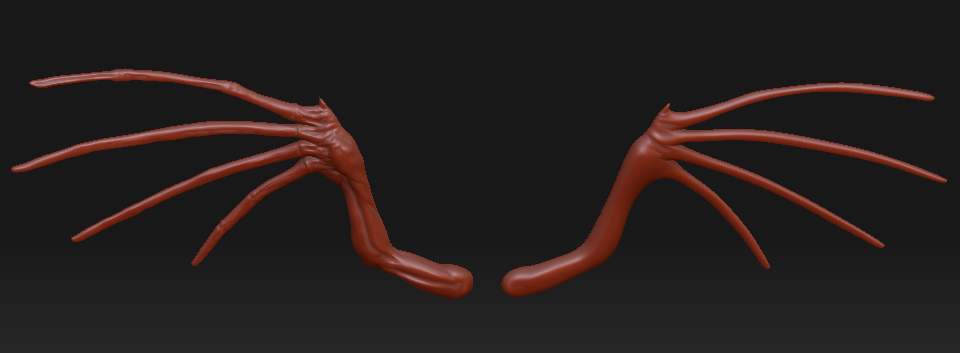
The fast way:
Use Subtool Master’s Mirror function to make a mirror of the hi-res one. You can merge them into a single tool if you wish.

The slower way:
Clone the detailed one. Mirror with the deformations tab. Merge in Maya.

The slowest way:
Flip the undetailed one without details to the same orientation as the hires one. Append the hires one as a subtool. Use ProjectAll to transfer the details. Flip the updated one back.

Dup.

Gotcha. Just wanted to keep the low res detail as well. I will just finish one wing all the way and then mirror it at the end. Import double wings and project details. Thanks for the idea. Didnt think of that.

Within zbrush no fuss method

  1. Clone your subtool at the highest subd lvl. (the wings)
  2. Append the clone to the orig
  3. Delete all lower subd lvls
  4. deformation>mirror X
  5. Hide the undetailed side of the new subtool
    6.select your orig
    7.project all (make sure orig is at the same lvl as the new)
  6. delete the new
  7. full symetry and detail has been restored

This method will retain the vert id of your orignal mesh as it is the same.

note: easy if you re name the new subtool as “source” and the orig as “target”

:+1: :+1: :+1: